Hacking the Kodak Reels 8mm Film Digitizer (New Thread)

fishgee

Tinkerer
Jan 6, 2025
32
28
18
If you can only get the top or bottom of the image in focus, it would seem to me that your camera wasn't re-mounted precisely parallel to the film. You may want to try shimming or otherwise adjusting the camera mounting to bring it parallel.

As for scratches, others have wrapped the film guide posts with soft cloth, and even replaced the plastic guides with metal or plastic guides that actually roll as opposed to the stock non-moving ones.
 

Balto1986

New Tinkerer
Aug 10, 2026
4
2
3
If you can only get the top or bottom of the image in focus, it would seem to me that your camera wasn't re-mounted precisely parallel to the film. You may want to try shimming or otherwise adjusting the camera mounting to bring it parallel.

As for scratches, others have wrapped the film guide posts with soft cloth, and even replaced the plastic guides with metal or plastic guides that actually roll as opposed to the stock non-moving ones.
i've been trying the adjusting/shimmering the camera, but with no luck so far. but Im gonna try a little more.

I dont use the plastic guides at all. I let it fall into a box. the scratch seems to come from one of the two guides inside the lid. I was thinking about removing one or try to widen the path a little bit. but havent done it yet.
 

ArgieBargie

New Tinkerer
Jul 1, 2026
11
4
3
Linking the dissassembly video by Mac84, because it's always a pest to try and find it in the thread, or in my watch history. Also keywords: Livestream, live video, dissassemly guide kodak reels reelz.


Ok. So I got it all apart with no issues.
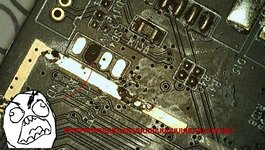
However I've F'd it up. I managed to lift the RX pad and now I can't attach the lead. Let this be a lesson to me not to use my nice solid core wire, even if it's wonderful to handle.


So now I'm SOL with regards to dumping this firmware. If I can't manage to microsolder a couple of wires without ballsing it up, then I have no chance desoldering the firmware chip for reading.


Mac84. I can disassemble this and send you the board for firmware extraction - that's about my only hope of getting a read from this, now.


Edit: I have reassembled it, and so far it does appear to be working normally.
 

Attachments

  • IMG_001.JPG
    IMG_001.JPG
    399.2 KB · Views: 23
  • FUUU.jpg
    FUUU.jpg
    426.7 KB · Views: 27

ArgieBargie

New Tinkerer
Jul 1, 2026
11
4
3
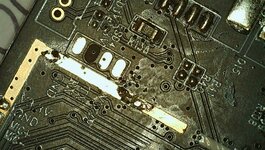
On a different note, I also have some problems with the kodak making scratches in the film
I've scanned the same movie 3 times now. And noticed that on the last scan, the film has a new line going down vertically on the left side of the frame. See attached picture.

Has anyone had similar issues?
Any help/suggestions on either topic would be appreciated.
A few people here said not to use teflon tape, but I did that anyway (before reading about not doing that).

I still think it's better than using the plastic pegs that the unit comes with. I have instead cut some 10mL syringe barrels to make rollers with, and that at least feels like it takes a lot of the main friction from the roller. I put it over the top peg, and just used the teflon tape on the others.

I am using blue teflon tape, which is firmer than the usual white. As far as I can tell, no scratches yet.
 

UKAussi

New Tinkerer
Jul 26, 2026
2
2
3
New purchase of this to scan my mother-in-laws huge stash of 8mm/Super 8mm films nobody has seen so volunteered as a tech guru to do this in house as she has almost 100 films!!
Being a tech geek for 30+ years I figured I would "tweak" this as stock was not great and hate devices that dont use all their capabilities.

M2025148BK*****

Suffice to say the B and C did not work for my device as either froze screen or inverted+color warped + froze screen

I used the D from above in #645 and it is back to working and scanning again so can start on this "stack" of up to 50 year old reels! (wife is just a toddler)
Using a 64GB PNY card (100MB/s - V30) reformatted to FAT32 for these approx 3 min films with no issue

TLDR - M2025 needs D?

So I am not happy with this unit I have so returning it to Amazon.
What firmware file can I load as currently has the custom D firmware so need to change it before return?
 

melw

Tinkerer
Jun 23, 2026
18
45
13
I've been using the latest version a lot recently and the freezing issue is completely solved. The only problem I'm running into is that it sometimes falsely detects the end of the reel and auto stops even on scenes that have some movement. It's not a huge deal but I figured it'd be worth mentioning
Thanks for reporting this @danhendleydigital

Few questions:
  • When the incorrect reel auto stop happens, what's the "Exp" value on the bottom right of the screen?
  • When the reel ends for reel, what's the "Exp" value? (i.e. just white screen without any film)
The auto-stop currently reacts if exposure stays below 150µs for more than 20 frames in a row. I wonder, if on your device (or with the reels you're capturing) the content is so bright that even this is too high of a value. For reference, on my device the no film / white screen exposure is 118µs - way below 150µs.
 

Boojakascha

New Tinkerer
Jun 20, 2026
8
2
3
I finally went and hardware modded my Type D!

I used Deano's 3D printer parts and his instructions.

I printed in Resin and had to re-drill the holes at the 7 mm spacer.

Also I would not recommend heat, when removing the stock lens from the glue dot. My cam assembly was super thermoplastic and the inner thread bent, causing issues inserting the thread prolongation afterwards (the threads did not marry well and the thread was shredded). I would recommend removing the glue cold. Otherwise I would always second guess myself what the head may or may not have changed about angle and thread.

Personally I removed the front panel to work, and I would recommend that to everybody who is fine with removing ribbon cables.

Please find before and after images. Before has sharpening 0 and after has sharpening -2 as I intend to sharpen in DaVinci Resolve or some place different and not bake it in.

Edit: I changed the image for a zoom, as there the change in quality is especially notable
- after mod: no sharpening (-2)
- stock, using sharpening dialed to 0 (a bit of sharpening)
- after mod: with tasteful DaVinci Resolve Sharpening

@melw , the automatic stop after the scan worked like a charm, thank you very much!
 

Attachments

  • 00_mod_zoom.png
    00_mod_zoom.png
    611.5 KB · Views: 9
  • 00_stock_zoom.png
    00_stock_zoom.png
    718.5 KB · Views: 9
  • 00_mod_zoomResolveSharpening.png
    00_mod_zoomResolveSharpening.png
    664.6 KB · Views: 9
Last edited:

Boojakascha

New Tinkerer
Jun 20, 2026
8
2
3
After another scan (successful) I turned the scanner off.

Now it won't "start" anymore:
- White Power LED goes on, but no screen, and motor won't initialize
- If I attempt to re-flash, it doesn't fetch the firmware and doesn't delete it not the spare folder.
- I can turn off the device by long pressing.

Did anyone of you stumble over this issue too?

I think I might try to forcefully flash the firmware. Does anybody know how I would address the internal programming headers? I have programmers laying around the flat.
 
Last edited: