Mac IIsi Repairathon

RetroViator

Tinkerer
Oct 30, 2021
101
120
43
retroviator.com
An embarrassing long time ago, I set off on an effort to restore a collection of Mac IIci. I had much to learn. I knew enough to replace capacitors and clear corroded traces, but I lacked the knowledge to tackle serious problems. I may still lack that knowledge, but I'm going to try again. This time, with a collection of Mac IIsi. (I will get back to the IIci, but I want to start with these IIsi to clear out mental cobwebs and space in my workshop.)

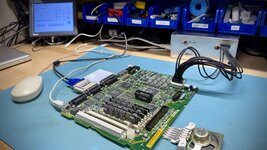
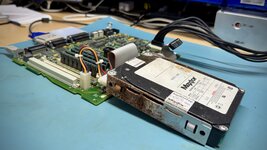
Even longer ago, I successfully restored my first Mac IIsi, and I documented my efforts here. This provides me with one known good Mac IIsi, which is a decent place to start. I've now accumulated six non-working IIsi in my workshop. Two are battery bombed, so I don't expect much of them, but the other four have hope.

IMG_1819.jpeg

To keep things straight, I'm labeling them A through G, using the phonetic alphabet. That makes Alpha the first Mac IIsi I restored back in 2021 (not in the picture above). It will be pressed into service when necessary for testing. Bravo will be another system I partially restored back in 2021. Looking at my old work caused a bit of cringe, but the cap replacement looks passable. However, I attempted some fancy bodge work which I now suspect is unnecessary. So that's where I'm starting.
 
Last edited:

RetroViator

Tinkerer
Oct 30, 2021
101
120
43
retroviator.com
Beginning with Bravo:

This is the sister to Alpha, which was successfully restored in early 2021. I acquired both from a Texas seller who said he picked them up at Computer Reset. I started off repairing both, but when this unit didn't work after the cap replacement, I set it aside.

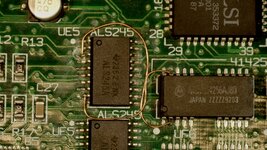
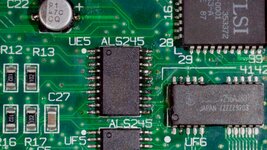
It seems I lifted a pad on C10 back in 2021, but that was an easy fix as the via is adjacent. I vaguely recall the system booting to a gray screen, and at some point, I somehow zeroed in on the RAM bus transceivers. Both UE5 and UH5 were quite corroded. This is where I got cute, and ran some fancy bodges when I couldn't restore connectivity to the nearby DRAM. But when things didn't go well, I again set the computer aside.

So, this time I started with removing my bodges and removing UE5. (I lacked the courage to remove surface mount ICs in my earlier repair attempts.) The chip and its pads were disgusting. After lots of flux and heat, I was finally able to get new solder on the pads. I then discovered the bad trace from pin 3 to a via located under the chip. Once I fixed the trace, that bodge became unnecessary. I'm glad, because I also realized I ran my earlier bodge to the wrong DRAM! Pin 3 of UE5 should be connected to pin 2 of UF7, not UF6. Cleaning the pads restored connectivity from pin 9 to UF6 pin 19, making that bodge unnecessary.

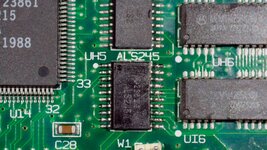
I then worked on UH5. I found three pins were no longer connected to their pads due to corrosion. After removing the IC and applying lots of flux, heat, and working it over with fresh solder, I finally got the pads and chip legs clean. I then reattached the UH5 and carefully checked all connections. It looked good, so I prepped the system for testing.

I was happy to see it spring to life! After running a full suite of MacTest Pro diagnostics, it looked to be good to go. However, I noticed the absence of sound. I plugged in some headphones and could hear. Though it wasn't great sound, and the volume slider didn't seem to change anything.

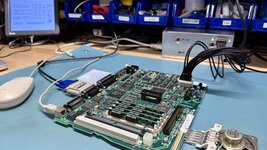
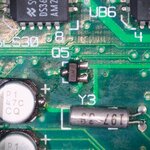
I went through and tested all connections from the Sony sound chips (UB7 and UB8) to the speaker. It was tricky to trace all the way across the board, but I eventually confirmed connectivity. When I probed the speaker with an oscilloscope, I saw noise, but no identifiable signal. I probed the output pin (11) on UB7 and UB8 and saw a lot of noise, but I could also make out a faint square wave poking through when I generated a beep sound. Something was causing noise and a weak signal. While the signal was apparently decent enough to make the headphones work, once the signal traveled across the board, passing through a number of resistors and capacitors, there was not enough for the op amp to pick up for the speaker.

I eventually traced every line in the sound circuitry. Once I was sure everything was connected, I probed each line with the oscilloscope and measured the results. I then pulled out unit Alpha (my working IIsi), and did the same. Everything matched, until I got to UB7 and UB8. It was soon obvious that I was missing about half the voltage on shared pins 12, 13 (getting about 4V instead of 8V) and shared pin 17 only had about 3V instead of 5V. It was then that I realized that pin 16 was connected to something. I say this as if it's a revelation because the BOMARC schematics don't show what either pin 16 is connected to. I was ignoring pin 16, and then realized the drawings did show a line that went off the page and onto a page I don't have! Probing Alpha's pin 16, I could see it is a clock signal humming at 22.5KHz and 5.5V. However, on Bravo, pin 16 is providing 22.5KHz, but at only 2.5V, and the resulting amplitude is much lower.

BOMARC Snippet.jpg


I could see that the trace for pin 16 hits a via to the other side of the board where it contacts R85. That resistor is reading a correct 33.3k Ohms. Then it hits another via and disappers.
  • Does anyone know what pin 16 on UB7 and UB8 goes to?
  • Does anyone have the missing page from the BOMARC schematics?
  • Can anyone point me in the right direction for the datasheet to the Sony sound chips?
 

Attachments

  • 20250122_185841.JPG
    20250122_185841.JPG
    1.5 MB · Views: 14
  • 20250124_000135.JPG
    20250124_000135.JPG
    1.4 MB · Views: 16
  • 20250123_214120.JPG
    20250123_214120.JPG
    1.4 MB · Views: 16
  • 20250124_024256.JPG
    20250124_024256.JPG
    1.4 MB · Views: 16
Last edited:

RetroViator

Tinkerer
Oct 30, 2021
101
120
43
retroviator.com
Good to see you restoring Macs again! Where on earth did you get six IIsi's from?
Well, they sort of grew over time.

I got my first from a retired couple who sold me all their old Macs when they downsized. Unfortunately, this is one of the battery bombed units. I then went on the hunt for a replacement, and I ended up getting two because the seller was slow to ship the one I ordered so he graciously sent along another. Finally, I got four more (for a total of seven) from someone who had picked them up, years ago along with some IIci, from an auction. I was interested in their collection of IIci, but the IIsi were part of the package.

I'm not looking for any more!
 
Last edited:
  • Like
Reactions: Byte Knight

RetroViator

Tinkerer
Oct 30, 2021
101
120
43
retroviator.com

Charlie:


The Charlie system needed a recap, a good clean, and it worked perfectly. It's nice to have one easy one!

IMG_1870.jpeg

Though, some of my problems with Alpha and Bravo were due by my poor recapping skills when I tackled them in 2021. Now, I'll sometimes use the snip and remove the legs method, but for serious recapping, I use my Hakko hot tweezers. I had trouble getting the hang of it at first, but this time, everything went smoothly. I've noticed the tweezers struggle when dealing with serious pad corrosion.

This was not leaking badly. However, I decided it try to fire it up before the recap, and I was greeted with a hissing power supply and a bad video signal. So it really needed that recap.
 
Last edited:
  • Like
Reactions: Byte Knight

PL212

Tinkerer
Dec 25, 2022
47
32
18
I will say, as the owner of a IIsi in 1990, the speakers on these are quite prone to losing their connection -- it's just pressure pad fingers, which can easily oxidize. If you're getting headphone audio but no speaker audio, try cleaning both the speaker assembly and the place on the motherboard where it mounts...
 
  • Like
Reactions: RetroViator

RetroViator

Tinkerer
Oct 30, 2021
101
120
43
retroviator.com
I will say, as the owner of a IIsi in 1990, the speakers on these are quite prone to losing their connection -- it's just pressure pad fingers, which can easily oxidize. If you're getting headphone audio but no speaker audio, try cleaning both the speaker assembly and the place on the motherboard where it mounts...
Yes, I did clean them, and even added fresh solder to see of thickening them up a bit would help. Unfortunately, something more troublesome is going on. Also, unfortunately, I damaged the speaker amplification circuit on my working Alpha unit while trying to diagnose what was going on with Bravo. I suspect I shorted something with my sloppy oscilloscope probe handling. I've ordered replacement op amps and transistors, and I'll get back to the audio problems on Bravo (and now Alpha), after the parts arrive.
 

RetroViator

Tinkerer
Oct 30, 2021
101
120
43
retroviator.com

Delta:

Another straightforward recap and clean for this one. I will say I make less dumb mistakes as I go when I recap several machines in a row. This logic board is working well.

Delta had corrosion from leakage, but it was not terrible. No traces were eaten away and the IC pins were okay. There was blue nasty corrosion in spots across the board. I believe that was coming from the power supply. (I’ll deal with terrible Sony PSUs soon enough.) This corrosion seemed to travel through the air and attach to larger metal pieces, such as the testing connector.

IMG_1873.jpeg
 
Last edited:
  • Like
Reactions: Byte Knight

RetroViator

Tinkerer
Oct 30, 2021
101
120
43
retroviator.com

Echo:​

This IIsi was sending me mixed messages. It was the dirtiest of the non-battery bombed systems, so I tackled it last, assuming it would likely have issues.

However, when I started recapping, the old caps came off pretty easily, and even more surprising, I was able to get the pads to take fresh solder with little drama. After the recap, I cleaned the board with IPA and a good scrub of dirty looking pins and decided to give it a test. While I got a solid bong and a happy Mac, the boot process stopped with a bus error. I was using the system's original RAM, so I swapped them out for some known good SIMMs, and everything was fine. It passed all the diagnostic tests. However I suspicious...

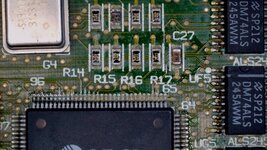
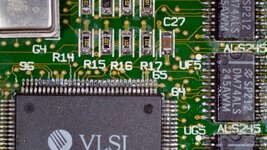
Some of the pins, especially around the Memory Decode Unit (pins 50-80) and UJ5 ROM IC looked bad. Actually, all the resistors and ICs nearby were not great. Once I hit the pins with flux and heat, I was greeted with a strong smell--not the fishy smell, but urine. This makes me think the board was suffering not from leaking electrolyte but rodent pee. This IIsi came from the same lot as a IIci that was destroyed by serving as a mouse house. While this system was dirty, it was not that dirty. So the mouse must have just passed through, and settled in the more spacious IIci.

20250204_001233.jpg 20250204_011801.jpg

I checked the SIMMs in my Retro Chip Test Pro, and they came back good. And after I thoroughly cleaned the MDU, ROM, and nearby components, I tested again with the original SIMMs, and everything is fine.
 
Last edited:

RetroViator

Tinkerer
Oct 30, 2021
101
120
43
retroviator.com

Logic Board Summary:​

I started with one working IIsi, and I now have five functional IIsi logic boards!

Here is a run down:
  • Alpha - Recapped and working in 2021, now has an audio issue *
  • Bravo - Recapped and failed repair in 2021, now working except for an audio issue
  • Charlie - Recapped and working
  • Delta - Recapped and working
  • Echo - Recapped and working
  • Foxtrot - Battery bombed
  • Golf - Battery bombed
* I was using Alpha to help repair the audio issue with Bravo, and I foolishly touched my oscilloscope probe to the wrong thing and now the speaker has distorted audio. I have ordered spare parts and will revisit the audio issues with both Alpha and Bravo.

Next: In addition to fixing the remaining audio issues, I will clean up the floppy drives and see if the original hard drives are salvageable (though I expect to use BlueSCSIs). Then I'll tackle the infamous IIsi power supplies.

Thankfully, I've had one working Magnetek PSU for testing, because it looks like all the Sony PSUs have issues. Of course, the daughtboard on the PSU is a known problem, and there may be others. So, I've decided to try building replacement PSUs. I took advantage of the replacement PCBs developed by CayMac Vintage. I am using the older design that is posted to GitHub. After I reached out with a question, Will offered to send me some new PCBs with his latest design, but my order was already in with JLCPCB. Truth be told, this is the first time I've ordered custom PCBs. I'm looking forward to the parts arriving so I can get to work making five functional IIsi PSUs.
 
Last edited:
  • Like
Reactions: Byte Knight

RetroViator

Tinkerer
Oct 30, 2021
101
120
43
retroviator.com

Tonight was floppy night​


I worked on all seven floppy drives, following @Branchus excellent restoration tutorial. It was like spending an evening with the Bob Ross of vintage Mac repairs. 🙂

IMG_1892.jpeg


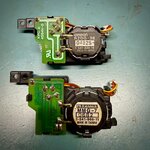
I nearly stumbled on the eject gears. While disassembling the eject mechanisms, I noticed that two of the seven had a different kind of metal covering the gear box and the problematic gear inside was white, not cheesy yellow. That prompted me to flip them over to see that two were made by Sanwa and the rest Omron.

IMG_1893.jpeg

In the back of my brain, something was telling me that mattered. I vaguely remembered buying two sets of gears at some point in the past. Sure enough, my past self was smart and ordered replacement gears for both the common Omron and the less common Sanwa eject mechanisms. Even though the existing Sanwa gears looked okay, I replaced them anyway since I had the parts, but I kept the original gears just in case.

In the end, four of the seven drives passed testing.

Two of the drives came from the battery bombed systems, so I knew all seven was a long shot, but I hope to get at least one more working from the parts of the three non-working drives so I have five floppies to go with my five functioning logic boards.
 

RetroViator

Tinkerer
Oct 30, 2021
101
120
43
retroviator.com

Hard Drive Archeology​

Tonight, I plugged in seven hard drives from the Mac IIsi to see if anything was salvageable.

IMG_1907.jpeg

There were three Quantum LPS drives (two of which were 80MB and one was 230MB), a Quantum ELS of unknown size, a 40MB Conner drive, a 120MB Maxtor, and finally a 200MB Maxtor drive.

In the end, one of the 80MB Quantum drives, the Maxtor 120MB, and Maxtor 200MB drives were accessible.

I attempted to access the drives by plugging them into one of the Mac IIsi, and booting from my external BlueSCSI. For the operable drives, I copied their files over to the BlueSCSI. I then created an appropriately sized HDA images using Disc Jockey and opened my BlueSCSI image in Basilisk to copy the files over to the new HDA images for archiving.
  • The Maxtor 80MB was the most interesting. This was apparently used by the news department at WUSF in the 1990s. WUSF is a public radio station broadcasting from the campus of the University of South Florida in the Tampa Bay area. Most of the files were written in WordPerfect, though oddly, WordPerfect was no longer installed on the drive. There were hundreds, maybe thousands, of news scripts from the mid to late 1990s and a few other journalism files. The shocking thing is this drive came from a battery bombed IIsi. The drive cage is rusted and the drive looks pretty bad; I never expected it to work!
  • The Quantum 80MB was moderately interesting. It looked to be from a well loved system with great applications, such as Adobe Illustrator 5.5, Photoshop 2.5, Claris CAD, and other drawing programs. There were a few games and a copy of Netscape Navigator 3.0. The bookmarks revealed that the user was likely Japanese and enjoyed mid '90s chat rooms. All the personal files had been removed.
  • The Maxtor 200MB was boring. It was a wiped drive with an install of System 7.5.
I may come back to one or two of the dead drives and try pulling data from them using the BlueSCSI initator mode, but most of them clearly had mechanical problems.
 
Last edited:

Trash80toG4

Active Tinkerer
Apr 1, 2022
1,155
338
83
Bermuda Triangle, NC USA
Great stuff, you've inspired me to have a crack at my pile of IIsi boards. Gotta get my right arm back online so it'll be a while. Given your mention of experience making things go more easily, I'll probably give the expendable pile of BeigeG3 machines a whirl as my first experience.

Nice to see someone using radio code, military, aviation, HAM or . . .
 
  • Like
Reactions: RetroViator

RetroViator

Tinkerer
Oct 30, 2021
101
120
43
retroviator.com

The Dreaded Power Supplies​

Knowing how bad the IIsi power supplies are (due to leaky SMD caps on the soft power daughter board and leaky axial caps on the low voltage side of the main board), I decided to try the Power-Up-iiusi (Lucy) board that Caymac Vintage posted on Github. I realize he is now selling what I image is an improved design using Meanwell power supplies, but Will's store did not have any available, and I was eager to get this project moving.

There is not a lot of information on this build, except for two great videos from two smart fellows. The first is from @This Does Not Compute available here. And the second is a live stream with @Branchus available here.

So, I downloaded the gerbers and accommanying files for JLCPCB to make the boards and place the tiny R1, R2, and D1 on the board before they shipped it to me. I then ordered the AC/DC converter, PicoATX, 2N4401 transistor, 24-pin ATX connector, along with the standoffs, nuts, and screws. There is really not much to it.

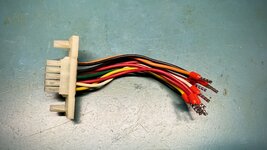
You need to harvest the power connector from an existing IIsi PSU. This proved to be challenging due to the corrosion on the pins, combined with the beefy caps placed on the ends of the wires. After some a good amount of flux and heat, they loosed up enough to push out of the old PCB.
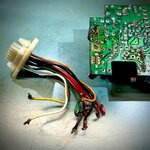
Connector.jpg

I then considered how to connect the new old wires to the new PCB. I realized that some of wire caps I painstaking removed from the old board were disgusting from corrostion and unless I got every last bit of solder off of them, they would not fit in the new PCB. So I ended up cutting them off and crimping new 18AWG ferrule connectors to each end. (Therefore, I could have just cut the wires off at the top of the old end caps and avoided the desoldering hassle.)

Now, this is where I made a dumb mistake. For no other reason than I can be dull-witted, I crimped the plastic sheath end of the ferrule connector, not the metal end. While that held the connector onto the cable, it did not form a good bond. Thought it took me awhile to figure out my mistake.

Not aware of this problem yet, I continued with the build and easily soldered on the connector and transistor, and I mounted the AC/DC converter on its standoffs. One wrinkle was the PicoATX I purchased had its input power wires on the wrong side. So, I desolder the black and red wires power input wires and switched them onto the other side. I then cut the barrel connector and crimped on 20WG ferrule ends (also incorrectly). I then set about soldering the old connector onto the new PCB. It was more fiddly than I would have liked, but it worked.

I then rewired the AC input so the output plug was tied directly to the input plug since the new PCB lacks the ability to switch power on for the output jack when the computer powers up. I then de-pinned the leads going to the AC input so I could cut it and insert the ends directly into the AC/DC converter.
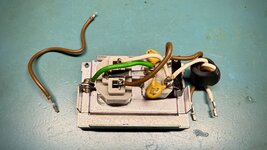
IMG_1918.jpeg

I eagerly put it back in the IIsi's orignal metal PSU enclosure and hit the power switch... and nothing happened.

Curiously, the same thing happend to both Colin and Bruce in their videos. And for both, the problem was the transistor (foreshadowing).

I started poking around and the white wire just fell out of its ferruled end! This is important, because the white wire carries the signal that tells to PSU to turn on. Then I realized my dumb mistake, and had to desolder the connector from the PCB and cut off the incorrectly attached ends from each of the wires. I then reinstalled the ferrule ends correctly, I also did the same with the wires going from the PicoATX to the AC/DC converter.
IMG_1924.jpeg

I tested again, and still nothing.

So, since the transistor was a problem for both Colin and Bruce, I turned to give it attention. Colin may have originally had a different transistor on his, but Bruce had a 2N4401 installed, which tested good, but swapped it for another he had in his stash, and everything worked.

I ordered plenty from Mouser for this project. So I pulled out another and got the same result. Nothing.

I then broke out the ossiloscope. What I saw was a steady 5V coming through for standby power, and the power on signal on the PicoATX was around 4.6V. When I press the power switch on the IIsi, the signal dips down to 4.3V for second or two, then moves back to 4.6V. It should be dropping down to ground for that second or two, not dipping slightly.

As I understand it, the Macintosh keeps the power on signal low until startup, and then it pulls it high. ATX power supplies expect the opposite. They expect the signal to go low on start up. The transistor at Q1 serves as an invertor, converting the Mac's signaling to something the PicoATX can handle. In my case, it doesn't seem to be pulling it low enough.

I checked the signal coming in from the Mac IIsi connector and running to R2. As expected, the signal is low until I press the switch, them it moves to 3.7V for a second. On the other side of R2, it knocks that momentary signal down to 0.5V. That signal makes it to base of Q1, but on the leg connected to the PicoATX, which runs at 4.6V, it only dips down 4.3V, as previously mentioned.

I checked R2, and realized another possible mistake. Caymac's parts list says that R2 should be a 10K resistor, but when I look up the assigned part number listed in the BOM on JLCPCB's parts library, I'm told that is a 15K resistor. So, it was possible R2 was knocking down the signal beyond what would trigger 2N4401 transistor.

However, before I went too far down that rabbit trail, I fired up ChatGPT for assistance. It had me checking the base, emitter, and collector legs of Q1. It was saying the emitter should be grounded, but my 2N4401 had the collector at ground. I uploaded the datasheet from for the transistors I bought from Mouser, and ChatGPT was very insistent that I had the transistor installed backwards.
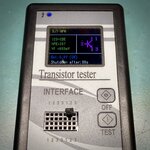
IMG_1935.jpeg

I decided to give it a try, and it worked! The transitors I bought must be wired opposite of the one Caymac used when preparing the silkscreen.

I was so happy to have it working, I buttoned it back up in its case before probing the pins to see the start up behavior, but the proof is in the pudding.
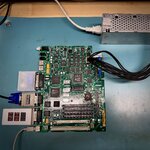
IMG_1942.jpeg

Now, I need to make four more!
 
Last edited: