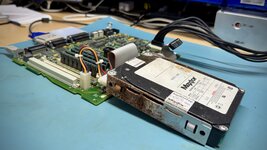
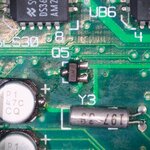
The Dreaded Power Supplies
Knowing how bad the IIsi power supplies are (due to leaky SMD caps on the soft power daughter board and leaky axial caps on the low voltage side of the main board), I decided to try the Power-Up-iiusi (Lucy) board that Caymac Vintage posted on
Github. I realize he is now selling what I imagine is an improved design using Meanwell power supplies, but Will's store did not have any available, and I was eager to get this project moving.
There is not a lot of information on this build, except for two great videos from two smart fellows. The first is from
@This Does Not Compute available
here. And the second is a live stream with
@Branchus available
here.
So, I downloaded the gerbers and accompanying files for JLCPCB to make the boards and place the tiny R1, R2, and D1 on the board before they shipped it to me. I then ordered the AC/DC converter, PicoATX, 2N4401 transistor, 24-pin ATX connector, along with the standoffs, nuts, and screws. There is really not much to it.
You need to harvest the power connector from an existing IIsi PSU. This proved to be challenging due to the corrosion on the pins, combined with the beefy metal caps placed on the ends of the wires. After some a good amount of flux and heat, they loosed up enough to push out of the old PCB.
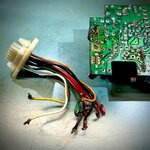
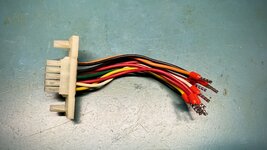
I then considered how to connect the new old wires to the new PCB. I realized that some of wire caps I painstaking removed from the old board were disgusting from corrosion and unless I got every last bit of solder off of them, they would not fit in the new PCB. So I ended up cutting them off and crimping new 18AWG ferrule connectors to each end. (Therefore, I could have just cut the wires off at the top of the old end caps and avoided the desoldering hassle.)
Now, this is where I made a dumb mistake. For no other reason than I can be dull-witted, I crimped the plastic sheath end of the ferrule connector, not the metal end. While that held the connector onto the cable, it did not form a good bond. Thought it took me awhile to figure out my mistake.
Not aware of this problem yet, I continued with the build and easily soldered on the connector and transistor, and I mounted the AC/DC converter on its standoffs. One wrinkle was the PicoATX I purchased had its input power wires on the wrong side. So, I desolder the black and red wires power input wires and switched them onto the other side. I then cut the barrel connector and crimped on 20WG ferrule ends (also incorrectly). I then set about soldering the old connector onto the new PCB. It was more fiddly than I would have liked, but it worked.
I then rewired the AC input so the output plug was tied directly to the input plug since the new PCB lacks the ability to switch power on for the output jack when the computer powers up. I then de-pinned the leads going to the AC input so I could cut it and insert the ends directly into the AC/DC converter.
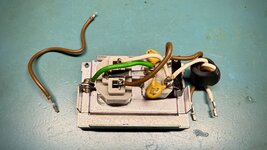
I eagerly put it back in the IIsi's original metal PSU enclosure and hit the power switch... and nothing happened.
Curiously, the same thing happened to both Colin and Bruce in their videos. And for both, the problem was the transistor (foreshadowing).
I started poking around and the white wire just fell out of its ferruled end! This is important, because the white wire carries the signal that tells to PSU to turn on. Then I realized my dumb mistake, and had to desolder the connector from the PCB and cut off the incorrectly attached ends from each of the wires. I then reinstalled the ferrule ends correctly, I also did the same with the wires going from the PicoATX to the AC/DC converter.
I tested again, and still nothing.
So, since the transistor was a problem for both Colin and Bruce, I turned to give it attention. Colin may have originally had a different transistor on his, but Bruce had a 2N4401 installed, which tested good, but swapped it for another he had in his stash, and everything worked.
I ordered plenty from Mouser for this project. So I pulled out another and got the same result. Nothing.
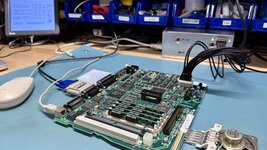
I then broke out the oscilloscope. What I saw was a steady 5V coming through for standby power, and the power on signal on the PicoATX was around 4.6V. When I press the power switch on the IIsi, the signal dips down to 4.3V for second or two, then moves back to 4.6V. It should be dropping down to ground for that second or two, not dipping slightly.
As I understand it, the Macintosh keeps the power on signal low until startup, and then it pulls it high. ATX power supplies expect the opposite. They expect the signal to go low on start up. The transistor at Q1 serves as an inverter, converting the Mac's signaling to something the PicoATX can handle. In my case, it doesn't seem to be pulling it low enough.
I checked the signal coming in from the Mac IIsi connector and running to R2. As expected, the signal is low until I press the switch, then it moves to 3.7V for a second. On the other side of R2, it knocks that momentary signal down to 0.5V. That signal makes it to base of Q1, but on the leg connected to the PicoATX, which runs at 4.6V, it only dips down 4.3V, as previously mentioned.
I checked R2, and realized another possible mistake. Caymac's parts list says that R2 should be a 10K resistor, but when I look up the assigned part number listed in the BOM on JLCPCB's parts library, I'm told that is a 15K resistor. So, it was possible R2 was knocking down the signal beyond what would trigger 2N4401 transistor.
However, before I went too far down that rabbit trail, I fired up ChatGPT for assistance. It had me checking the base, emitter, and collector legs of Q1. It was saying the emitter should be grounded, but my 2N4401 had the collector grounded. I uploaded the datasheet from for the transistors I bought from Mouser, and ChatGPT was very insistent that I had the transistor installed backwards.
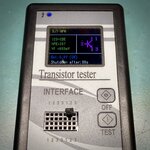
I decided to give it a try, and it worked! The transistors I bought must be wired opposite of the one Caymac used when preparing the silkscreen.
I was so happy to have it working, I buttoned it back up in its case before probing the pins to see the start up behavior, but the proof is in the pudding.
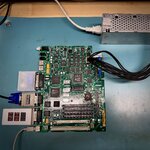
Now, I need to make four more!
Update: Check out a follow-up post
here for the addition of a resistor to help with consistent shutdowns.