MARCHintosh 2026 Projects

  • Nominations will close March 25th. If you'd like to join the board and influence how TinkerDifferent runs in the next year, put your name in now!
  • Hey Guest, MARCHintosh 2026 is upon us. Check out community projects, join GlobalTalk, and have fun!

Trash80toG4

Active Tinkerer
Apr 1, 2022
1,198
366
83
Bermuda Triangle, NC USA
View attachment 27206View attachment 27207

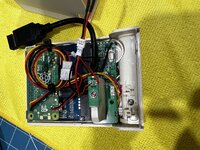
only had to slice the PSU side off for this build, but then random bits of metal and a ton of JB weld to fill in all the gaps. printed a cover for the IO shield area as thats where i put the sff power supply. The case is actually a 15x15x7 junction box that had to be cut with a grinder :)
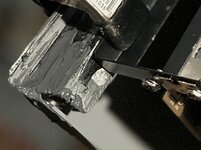
In this shot it looks like you had the same kind of offset slot problem I have, in the other not so much?

Slot_Offset.jpeg

Difficult to show the 3.8mm offset required to fit the 9500/PEx boards. But easy enough to see that the rightmost slot edge will be a perfect overlay for the resultant gap.


PEx-Netra-01.JPG


After the grlf flies home Sunday I can get down to the grinder/cutoff nitty gritty.

PEx-Netra-02.JPG


Crosshatched sections show the absolute minimum I could do in case mod, but will be doing a bit more to fair the new black slot section in across the back. DB-25 Port A will work for the SCSI connector if I file the ear out a little, even less as shown for the speaker/microphone ports above ALARMS. The indented slots for the backplane cover plate extensions had to be done, so opening things up a bit more than the crosshatched indications will be done.

PEx-Netra-03.JPG

PEx-Netra-04.JPG

These two shots detail the further cutback I need to do for to the tan plastic Netra board supports for fitting the PEx mobo. Will work nicely supporting the Board's Memory/ROM slots.
 
Last edited:
  • Like
Reactions: europlus

geerlingguy

New Tinkerer
Mar 21, 2024
7
21
3
St. Louis, MO
www.jeffgeerling.com
My MARCHintosh has been busy, some year I'll join in GlobalTalk, but for now I'm using it as an excuse to work through the backlog of old Macs I have sitting on shelves un-inventoried...

So far:

  1. I finally put together my Pico Micro Mac — the V2 version that required some extra soldering work. Fun, definitely enjoyable, especially as a Raspberry Pi Pico connoisseur!
  2. My Dad and I were lucky to get a Docklite from Juicy Crumb, and so we installed it in his old iMac 2010 21". Excited to hear they're also working on a way to get the Combo drive working—he will actually find a lotta use for it, as unlike me, he's okay with 1080p displays still :D
  3. I just finished recapping an Xserve G5 PSU (huge thanks to House of Moth for assistance!), and now I'm trying to figure out the best way to do lights out management of the G5 — I know the Xeons had ipmitool support, but it doesn't look like the G5 has a BMC? Shucks.
In the coming weeks, I hope to finish up a video I've been working on a while, on my favorite Mac laptop of all time (and some runners-up), with a few special guest appearances. Then if I can finish it, a video on how I made my first YouTube video — using a similar FireWire + G4 setup I used back then... and then showing a neat new tool that might get some of us to pull our old DV cameras out of the closet! (Hint: it's called the Firehat!)

I've been enjoying all the other projects I see on here, the live streams, etc. — and with this leading up to Apple's 50th, it's been a great month of nostalgia for the computers that I grew up using!
 

theirongiant

New Tinkerer
Dec 27, 2023
8
5
3
Someone on the Wireshark Discord pointed me to this GitHub repo with a very complete Lua plugin for decoding AURP traffic — legacy AppleTalk.


It's been rather interesting to sniff "vmenet0" of my virtual Quadra 800 acting as an Apple Internet Router. Especially with 100+ nodes in the GlobalTalk network. I can only see the traffic going in and out of my node, and since most of us are directly connected to other AIR nodes, it's pretty much limited to traffic I'm generating like browsing file shares, sending or receiving routing updates, pinging other networks and devices, etc. Nevertheless, AppleTalk is a very descriptive protocol.
 

Null

New Tinkerer
Mar 14, 2026
1
3
3
42
GA
This is my first ever Marchintosh. I only started using apple products last year. Before that I was a windows user since 3.11.

So to keep it simple for my first I got a PowerBook G4 1.67. I upgraded the ram to max, placed a mSata drive in it. I’m really struggling to get macOS installed on it by the only way I have which is usb. I don’t own any other older Mac or any FireWire things. So I’m currently waiting for a retail copy of leopard in the mail.

My end goal is to see how far I can push it to run modernish browser, do basic email/word processor stuff. Once I get all that I’m turning my attention to turn it into a retro gaming machine for anything 90s RPG related.
 

mac27

Tinkerer
Apr 30, 2024
137
153
43
Virginia, USA
www.mac27.net
My project for Marchintosh this year was a video project! I am still fairly new to video production, so this particular episode was a challenge but I learned a lot while putting it together.

This is a ~45min long video showing a CIB 20th Anniversary Mac system. I believe it is the longest / most comprehensive video of this system presently on YouTube, though I could be wrong. So if you're into that sort of thing feel free to give me some feedback on the vid.


sunvalleylaw

Tinkerer
Jan 7, 2026
32
38
18
My Marchintosh Project as a vintage newbie is to figure out how to connect up all the various Serial/MIDI pieces (Roland PC-200, Opcode Studio 2 interface, cables, microphone) I have collected to my Mac SE/30 with 64 MB RAM, BlueSCSI and FloppyEMU, get something like Opcode Studio Vision or early Cubase or Logic and get it all running for some simple music/sequencer/DAW play. The Treasure Valley Vintage Computing Club (https://tvvcc.org/) has an expo on April 18 and I hope to have it up and running to present, along with a couple other machines I plan to bring with games. (Apple IIe, likely running Oregon Trail, Beige G3 266 running Myst and Launch CD mags). You can see the Mac SE/30 and in the background, bits of the Beige G3, in this video. First time I fired that SE/30 up!


IMG_8537.jpeg
 

MacOfAllTrades

Tinkerer
Oct 5, 2022
198
222
43
Last edited:
falecore

New Tinkerer
Oct 7, 2022
12
9
3
Project “Tseep”: Power Mac 9600 as a Nocturnal Migration Listening Station

Happy #Marchintosh2026!

I wanted to take a moment and share my #Marchintosh2026 project that bridges 90s Mac workstation muscle with modern avian research: transforming my Power Mac 9600/500 G3 into a dedicated Nocmig (nocturnal migration) recording and analysis station.

The Mission:

I am an avid “birder” (birdwatcher) and live in southern coastal New York, directly on the Atlantic Flyway. Every spring, millions of birds migrate overhead under the cover of darkness, emitting "flight calls" to stay in contact. These faint, high-frequency “tseeps" “seeps” and "zeeps" (6-9kHz) are often the only way to track species movement at night. To catch them, I’m installing a custom-built "Bucket Mic" on a ledge outside my attic window, positioned with a clear view facing South/Southwest to intercept the migrants as they push north.

The Rig:

Computer:
Power Mac 9600/350 (500MHz G3 card 320MB RAM) and BlueSCSI v2 with high-endurance SD card for 8-hour continuous 16-bit/44.1kHz writes.

The "Ear": A DIY "Bucket Mic" setup—a 5-gallon plastic pail lined with acoustic foam to reject ground noise, sealed with a "drum-tight" plastic wrap and pantyhose acoustic window.

The Pill: I’m building a high-gain pre-amp around a PUI Audio AOM-5024L-HD-R capsule and a TI TLV271 op-amp (SOT-23 on a PA0084 DIP adapter). It’s powered by a dedicated 9V rail to keep the noise floor low enough to catch birds at 2,000 feet.

The Workflow:

I’m using AppleScript to automate the recording schedule (dusk-to-dawn). The 9600 should be able to successfully record and analyze high-resolution FFT spectrogram in software like SoundEdit 16 and Audacity 1.2.6.

I’ve been in touch with Harold Mills (who wrote the original Tseep/Zeep detectors at Cornell in the 90s) and the Macaulay Library to hunt down the original Mac-ported detection algorithms. If those are lost to time (anybody know someone who did acoustics research at Cornell in the early 90’s???), the 9600 will still serve as my manual "Spectrogram Hunter" to ID species by their visual signatures.

However, for the most difficult IDs—like distinguishing between the confusing warblers — I’ll likely export clips to a modern machine for analysis. Tools like BirdNET or Cornell’s Raven Pro will serve to verify species when the classic spectrogram shapes are too similar to call by eye.

Waiting on my Mouser order to finalize the "pill" pre-amp. Will update once the first "seeps" are captured!
I am open to any and all input from the community!

-fal3core

#Marchintosh #Marchintosh2026 #VintageMac #CitizenScience #PowerMac9600 #Nocmig #TinkerDifferent
IMG_4815.jpeg
 

MacOfAllTrades

Tinkerer
Oct 5, 2022
198
222
43
I loved every byte of this post. What a genuine idea. And man that setup shot takes me back. I grew up with my first computer a 7500/100 power Mac which had that outrigger case lik the two in the middle. And then my dad upgraded us to the PowerPC G3 minitower just like that one on the left. I loved those two computers and have so many wonderful memory feelings of just endless fascination with those two computers. That picture takes me back. That little glowing green power button on the minitower just amazed me so much. I remember the thrill I had “modding” the hardware by replacing that green light with a red one. Haha I know it’s tame but I remember sweating bullets worrying I was going to somehow fry the computer for my tiny mod. Mom yelling at me in the background telling me to stop.
Hard to believe I remember a handful of years ago helping clean out my mom’s house by taking that minitower to the street corner for the trash truck to pick it up. It would only be a year or so later when I’d get into retro computing and think boy that was stupid….. It happens.
 

Sideburn

Tinkerer
Jun 16, 2023
272
109
43
California
youtube.com
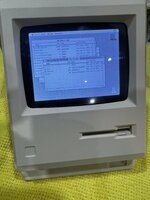
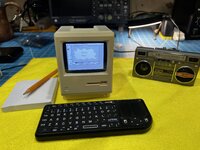
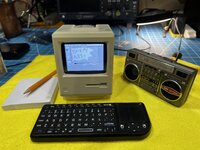
I just finished doing a MacClock to Mac Plus mod. Several have already done this but I wanted to take mine a bit of a step further.

I scaled and positioned the screen to fit properly and got the pi to boot directly into Mini Vmac without putting up andy "Raspberry Pi" splash screens.
Then I setup bluetooth audio so it auto connects to my bluetooth speaker.
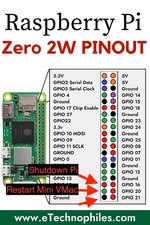
I hooked up the two buttons on the bottom right to a couple GPIO pins so the bottom left button Restarts the mac and the right button shuts down the pi.
The little floppy powers the pi down when you eject it and powers it up when you insert it.
And finally I added a USB dongle that connects to one of those tiny wireless keyboards with a mini trackpad.
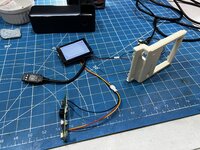
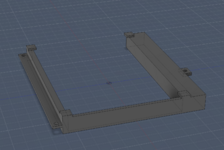
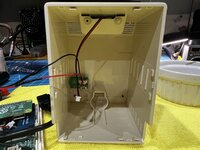
I made a little 3d printed mounting bracket that snaps the LCD and Pi in perfectly and screws into the existing screw holes. No need to cut the case up or do any mods to it other than adding the connectors to the buttons and floppy switch.
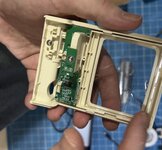
The only thing I had to do other than that was take a dermal tool to the original PCB to cut out the display and leave the portion with the buttons and knob.


It took a lot of mucking around with the OS to get all the services etc working right but it's pretty solid now. I just SSH in to copy disk images to it and remotely reboot it etc..

If anyone wants my STL, Disk Images, or Setup docs, just let me know and ill zip them up and put on my server.

Heres so photos!

IMG_4857.jpeg


IMG_4859.jpeg
IMG_4861.jpeg
tempImageBnVKv6.png
tempImageANFTqH.png
 

Attachments

  • GPIO.jpg
    GPIO.jpg
    134.1 KB · Views: 16
  • IMG_4847.jpeg
    IMG_4847.jpeg
    1.6 MB · Views: 16
  • IMG_4862.jpeg
    IMG_4862.jpeg
    1.4 MB · Views: 14
  • IMG_4866.jpeg
    IMG_4866.jpeg
    142 KB · Views: 15
  • Bracket.png
    Bracket.png
    114.9 KB · Views: 17
Last edited:
🌈NiziMac

New Tinkerer
Mar 17, 2026
5
5
3
JAPAN
View attachment 27045


I made a program with Retro68 cross compiler with a strange likeness to the like clock Maclock. Watch out for the clock bug, where DAY does not match date. I find 1998 works for this year. @This Does Not Compute gave me the idea when he converted the clock into a vintage Mac, I wanted to see if I could do the opposite. I'm sure this will run on his tiny 'Mac' and restore Maclock function :)

Features:
  • Large digitized time display with blinking colon.
  • Date and Day of the week in a custom small font.
  • Double-buffered rendering for a flicker-free experience.
  • Inversion and Gray Background modes for different lighting conditions.
  • Alarm system with customizable time and multiple alert sounds.
  • Face mode (Happy Mac) toggle.
  • Dynamic Resolution Scaling: Automatically detects screen size (Compact Mac 512x342 vs. Hi-Res 640x480) and scales the digits and layout to fit.

Keyboard Shortcuts:
  • 'H': Toggle Happy Mac mode.
  • 'I': Toggle Inverted display (Black background).
  • 'G': Toggle Gray background.
  • 'Q': Quit the program.
Hello, nice to meet you.

I really like your idea — taking the MacClock concept and flipping it around to run on an actual classic Mac is a brilliant twist.

I’m currently working on a project to run real classic Mac systems (System 6 / KanjiTalk 7.5) inside a MacClock.

Not just running the OS, but also recreating classic Mac experiences like freezes, bomb errors, and virus/Norton-style recovery events.

Your idea actually inspired me — I started thinking it would be really fun if my mini Mac could display MacClock-style visuals (like the Happy Mac or clock) as a kind of screen saver.

I really felt a connection with your approach.

I’ve also posted my project here on the forum, so if you’re interested, I’d really appreciate it if you took a look.
 

Sideburn

Tinkerer
Jun 16, 2023
272
109
43
California
youtube.com
Hello, nice to meet you.

I really like your idea — taking the MacClock concept and flipping it around to run on an actual classic Mac is a brilliant twist.

I’m currently working on a project to run real classic Mac systems (System 6 / KanjiTalk 7.5) inside a MacClock.

Not just running the OS, but also recreating classic Mac experiences like freezes, bomb errors, and virus/Norton-style recovery events.

Your idea actually inspired me — I started thinking it would be really fun if my mini Mac could display MacClock-style visuals (like the Happy Mac or clock) as a kind of screen saver.

I really felt a connection with your approach.

I’ve also posted my project here on the forum, so if you’re interested, I’d really appreciate it if you took a look.
Ah yeah I saw your post that’s awesome. The opposite. I’m hacking and tossing the clock and making it a Mac and you’re making a Mac into the clock. Hilarious.

ya I’m still mucking with it. Going to embed a little Bluetooth module and speaker in it next. It runs system 6.0.8 good seems about the same speed as an authentic Mac plus. Prince of Persia is very playable.

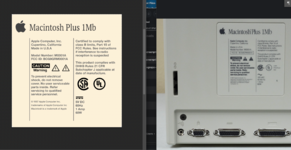
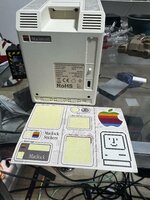
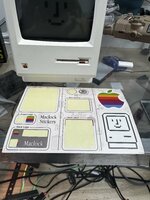
Also mine didn’t have any Mac branded stickers so I made my own set and made the label on the back just like a real Mac plus.

I wonder if they got slapped by Apple and had to change their sticker.
 

🌈NiziMac

New Tinkerer
Mar 17, 2026
5
5
3
JAPAN
Ah yeah I saw your post that’s awesome. The opposite. I’m hacking and tossing the clock and making it a Mac and you’re making a Mac into the clock. Hilarious.

ya I’m still mucking with it. Going to embed a little Bluetooth module and speaker in it next. It runs system 6.0.8 good seems about the same speed as an authentic Mac plus. Prince of Persia is very playable.

Also mine didn’t have any Mac branded stickers so I made my own set and made the label on the back just like a real Mac plus.

I wonder if they got slapped by Apple and had to change their sticker.
What? — there was no sticker included?

Ahh, I see… that explains it!


When I saw the Mac Plus sticker, I was like:

“Wait… is this a real Mac Plus? Or a MacClock?”

My brain got confused for a moment haha.


The quality is really high though — I was honestly surprised.


And Apple getting mad at you 😂

That makes sense now.


Also it’s really cool to hear that System 6.0.8 runs about the same speed as a real Mac Plus.

That’s actually very important for what I’m trying to build.


I’m also curious about the Pi side of things —

how did you manage to boot straight into Mini vMac without showing the Raspberry Pi splash?


That illusion of “it’s just a Mac” from the moment it powers on is something I’m really trying to achieve too.
 

Sideburn

Tinkerer
Jun 16, 2023
272
109
43
California
youtube.com
What? — there was no sticker included?

Ahh, I see… that explains it!


When I saw the Mac Plus sticker, I was like:

“Wait… is this a real Mac Plus? Or a MacClock?”

My brain got confused for a moment haha.


The quality is really high though — I was honestly surprised.


And Apple getting mad at you 😂

That makes sense now.


Also it’s really cool to hear that System 6.0.8 runs about the same speed as a real Mac Plus.

That’s actually very important for what I’m trying to build.


I’m also curious about the Pi side of things —

how did you manage to boot straight into Mini vMac without showing the Raspberry Pi splash?


That illusion of “it’s just a Mac” from the moment it powers on is something I’m really trying to achieve too.

Haha yeah I spent too much one time on those stickers.

I looked at the Mac plus and made one that’s a close match.

PNG image.png

it came with stickers but no Apple logo just a rainbow colored square and nothing “Macintosh” and everything “Maclock”

The boot up isn’t perfect but pretty good.

theres 3 weird dots in the middle of my solid gray boot screen I haven’t figured out and for a second or so when the screen goes black you can see some text appear on the right rotated 90 degrees but not a show stopper.

On power up the screen turns solid gray first. And then turns black and the mouse cursor appears and then miniVmac starts up and you hear the system beep and the happy Mac appears.

One other minor issue is the “Welcome to Macintosh” message box is now not centered. It’s up and to the left a bit so you see both that message box and the happy Mac. This is because of the scaling I am doing to get it to fit right with the black margins on that tiny lcd panel.

To get the non Debian / Raspberry pi startup screen I created a custom Plymouth theme at /usr/share/plymouth/themes/macintosh/ Macintosh.scri

In this file is:

Window.SetBackgroundTopColor(0.75, 0.75, 0.75);
Window.SetBackgroundBottomColor(0.75, 0.75, 0.75);

And then a Macintosh.plymouth file with:

[Plymouth Theme]
Name=Macintosh
Description=Classic Mac boot screen
ModuleName=script

[script]
ImageDir=/usr/share/plymouth/themes/macintosh
ScriptFile=/usr/share/plymouth/themes/macintosh/macintosh.script

To autoboot I made a script in ~/.config/labwc/autostart

wlr-randr --output DPI-1 --transform 90 &
sleep 5
cd /home/sideburn/micromac && WAYLAND_DISPLAY=wayland-1 ./minivmac &

I also set the horizontal positioning there:

wlr-randr --output DPI-1 --pos 30,0

This shifts the screen to the left. To get it to center.

The scale is set and then vmac is compiled at that scale setting :

./setup_t -t larm -m Plus -hres 576 -vres 430 -fullscreen 1 -speed z -emm 0 > setup.sh


I had to put some sleep delays in and stuff to get vmac to force itself to the front. It was tricky and took a long time to get sorted.

I did everything from commandline through SSH. I never used the Linux desktop environment or VNC
 

Attachments

  • IMG_4852.jpeg
    IMG_4852.jpeg
    1,014.8 KB · Views: 13
  • IMG_4857.jpeg
    IMG_4857.jpeg
    1.2 MB · Views: 9
  • IMG_4854.jpeg
    IMG_4854.jpeg
    1.2 MB · Views: 7
  • IMG_4853.jpeg
    IMG_4853.jpeg
    1.4 MB · Views: 12
Last edited:
  • Like
Reactions: molten_software

🌈NiziMac

New Tinkerer
Mar 17, 2026
5
5
3
JAPAN
Haha yeah I spent too much one time on those stickers.

I looked at the Mac plus and made one that’s a close match.

View attachment 27360

it came with stickers but no Apple logo just a rainbow colored square and nothing “Macintosh” and everything “Maclock”

The boot up isn’t perfect but pretty good.

theres 3 weird dots in the middle of my solid gray boot screen I haven’t figured out and for a second or so when the screen goes black you can see some text appear on the right rotated 90 degrees but not a show stopper.

On power up the screen turns solid gray first. And then turns black and the mouse cursor appears and then miniVmac starts up and you hear the system beep and the happy Mac appears.

One other minor issue is the “Welcome to Macintosh” message box is now not centered. It’s up and to the left a bit so you see both that message box and the happy Mac. This is because of the scaling I am doing to get it to fit right with the black margins on that tiny lcd panel.

To get the non Debian / Raspberry pi startup screen I created a custom Plymouth theme at /usr/share/plymouth/themes/macintosh/ Macintosh.scri

In this file is:

Window.SetBackgroundTopColor(0.75, 0.75, 0.75);
Window.SetBackgroundBottomColor(0.75, 0.75, 0.75);

And then a Macintosh.plymouth file with:

[Plymouth Theme]
Name=Macintosh
Description=Classic Mac boot screen
ModuleName=script

[script]
ImageDir=/usr/share/plymouth/themes/macintosh
ScriptFile=/usr/share/plymouth/themes/macintosh/macintosh.script

To autoboot I made a script in ~/.config/labwc/autostart

wlr-randr --output DPI-1 --transform 90 &
sleep 5
cd /home/sideburn/micromac && WAYLAND_DISPLAY=wayland-1 ./minivmac &

I also set the horizontal positioning there:

wlr-randr --output DPI-1 --pos 30,0

This shifts the screen to the left. To get it to center.

The scale is set and then vmac is compiled at that scale setting :

./setup_t -t larm -m Plus -hres 576 -vres 430 -fullscreen 1 -speed z -emm 0 > setup.sh


I had to put some sleep delays in and stuff to get vmac to force itself to the front. It was tricky and took a long time to get sorted.

I did everything from commandline through SSH. I never used the Linux desktop environment or VNC
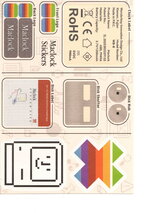
Wait, mine came with this sticker sheet though — was yours different?

IMG_9518.jpeg

That “Macintosh Plus 1Mb” label made me grin lol.
Nice touch.

It’s kinda wild thinking those machines only had 1MB of RAM back then.
Feels like my iPhone calculator alone would probably choke it 😂

By the way, did you use Apple Garamond for the label?

I used it too in the diagram I posted earlier, referencing some old Apple ads from that era.
I used to work as a graphic designer, so I can’t help getting a bit obsessive about those details lol.

Also — your boot setup is really clever.
I’m trying to build something similar around a MacClock too, so this is super helpful.

Using a custom Plymouth theme to hide the Pi startup and mimic that classic gray screen is such a smart approach.
I didn’t realize you could intercept that stage like that.

Booting straight into Mini vMac is awesome too — from the outside it basically feels like a real Mac powering on.

Quick question though — that gray background.

Is it just a flat color generated by the script, or did you actually make some kind of pattern for it?

For a second I was like… did you just draw it in MacPaint? lol
 

Sideburn

Tinkerer
Jun 16, 2023
272
109
43
California
youtube.com
Wait, mine came with this sticker sheet though — was yours different?

View attachment 27362
That “Macintosh Plus 1Mb” label made me grin lol.
Nice touch.

It’s kinda wild thinking those machines only had 1MB of RAM back then.
Feels like my iPhone calculator alone would probably choke it 😂

By the way, did you use Apple Garamond for the label?

I used it too in the diagram I posted earlier, referencing some old Apple ads from that era.
I used to work as a graphic designer, so I can’t help getting a bit obsessive about those details lol.

Also — your boot setup is really clever.
I’m trying to build something similar around a MacClock too, so this is super helpful.

Using a custom Plymouth theme to hide the Pi startup and mimic that classic gray screen is such a smart approach.
I didn’t realize you could intercept that stage like that.

Booting straight into Mini vMac is awesome too — from the outside it basically feels like a real Mac powering on.

Quick question though — that gray background.

Is it just a flat color generated by the script, or did you actually make some kind of pattern for it?

For a second I was like… did you just draw it in MacPaint? lol

what’s the front of your maclock look like, is it blank or is there a branding name printed on it? My first maclock has the company’s name on the front of it and THAT one came with the version of stickers that have alternate “Macintosh” and rainbow Apple logo.

The second one that I hacked does NOT have any company name printed on the front and its sticker sheet is same as yours but without any Apple logo or “Macintosh” versions. Only the square rainbow and “Maclock”.

Scan.jpeg

fonts - no I used something else I found that was a close match. I forgot about Apple Garamond. Ya I used to do a lot of Flash banners and websites etc in the early 2000s and UI designed all my software so I’m a bit anal about that stuff too and actually what’s driving me nuts right now about my stickers is if you look closely the horizontal alignment is off and it’s not me my graphics are spot on but it is the Cricut cutter is cutting them with slight offset. I didn’t notice until after I finished but I may go back and try to calibrate it and do them over.

On the splash screen - at first I tried loading an SVG image but it didn’t work so I ended up just making it a solid gray fill with code and no images.
 
Last edited: