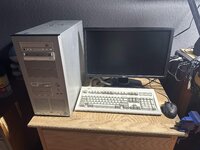
What did you do to your computer today?

Froggy814

New Tinkerer
May 6, 2026
36
6
8
Squaw Valley, CA
512mb which at the time iirc had 128mb. I asked for 1gb but got the 512
LOL, Mine came with 512mb of ram preinstalled I think. I am to lazy to get it open right now to look. I am am liking it a lot too!
Oh, you've got the fancy base for it! I just passed on a Dimension 3200, kinda wish I'd have kept it, but I already have a better Pentium 4 build, just needs a good GPU.
Fancy Base? What is your pentium 4 build?
I do think the 8250 is a really cool machine. With the way I collect things soon dad's gonna kick me out of the house!


Doe's anyone know of good mods that are easy to do to the 8250 that makes it better without having to replace the cpu?
I was surprised when I saw that the only video out on it is on a video out card. It did come with a modem card and an ethernet card.
 

PentaxEnthusiast

Tinkerer
Jan 27, 2026
48
40
18
SATX
LOL, Mine came with 512mb of ram preinstalled I think. I am to lazy to get it open right now to look. I am am liking it a lot too!

Fancy Base? What is your pentium 4 build?
I do think the 8250 is a really cool machine. With the way I collect things soon dad's gonna kick me out of the house!


Doe's anyone know of good mods that are easy to do to the 8250 that makes it better without having to replace the cpu?
I was surprised when I saw that the only video out on it is on a video out card. It did come with a modem card and an ethernet card.
The tower sits in a little base around it that's supposed to reduce the chance of tipping, saw them every now and then when these were still current tech.

I've got a Pentium 4 HT 630, so a later Prescott chip with hyperthreading on an Asus P5GDC-V motherboard.

As far as mods go for the Dell, your biggest limit really is going to be the factory BIOS that doesn't really allow you to do all that much under the hood.
 

Froggy814

New Tinkerer
May 6, 2026
36
6
8
Squaw Valley, CA
As far as mods go for the Dell, your biggest limit really is going to be the factory BIOS that doesn't really allow you to do all that much under the hood.
Bummer!
I've got a Pentium 4 HT 630, so a later Prescott chip with hyperthreading on an Asus P5GDC-V motherboard.
Cool! That sound's awesome! Do you think you can send a photo or 2 of it?
The tower sits in a little base around it that's supposed to reduce the chance of tipping, saw them every now and then when these were still current tech.
Ahhh, the base! I see it now! Thanks!
 

PentaxEnthusiast

Tinkerer
Jan 27, 2026
48
40
18
SATX
Bummer!

Cool! That sound's awesome! Do you think you can send a photo or 2 of it?

Ahhh, the base! I see it now! Thanks!
It's nothing too special, but it's in an awesome Lian Li case from back in the day that I've always wanted, so there's that. It's on a table that's entirely too small, I'm missing a proper CRT, and the Quadro 1800 that's in there is obviously awful for gaming.

My Model M is nice, though the V-key is sticking.
 

Attachments

  • IMG_2433.jpg
    IMG_2433.jpg
    393.8 KB · Views: 6

Certificate of Excellence

Active Tinkerer
Nov 1, 2021
920
652
93
48
United Sates
Well, I broke one of my MX linux boxes last week and it has been a slow and painful spiral down to the bottom of the toilet trying to fix it. Essentially, after some updates and getting retroarch to work, when I rebooted the machine, I got a black desktop that would flash between that and the splash screen. Ok so x was failing but why? Interestingly wifi connectivity died too. Anyways, I then got into grub+e, removed no splash and was watching the os load when I noticed user accounsservices daemon was failing so I decided to try and reinstall some core services like lightdm etc. THEN it was telling me that somehow ownership was through my admin account and not root and it wouldnt let me dl updates ... omg so then I jump down the rabbit hole of trying to fix that mess which ultimately I was able to reestablish downloading and reinstalling files via cli but reinstalling those core system files did not fix my whacko screen issue. I then broke down and decided to not use nouveau driver which works perfectly on every other machine I use MX on and decided to build legacy 340xx driver. That took about 15 minutes and I pointed the install to use this driver ... and then the screen went totally black with no cursor so yeah, that made everything worse LOL. With my tail between my legs, I grabbed my MX USB stick, wiped this giant pita (gave myself a bit more room for my home folder this time) and reinstalled fresh MX and guess what?

Everything is working fine. Ive been using MX for quite a while at this point with 100% stability and no issues until now. It still has to be something I did to it because one of my other boxes would be exibiting similar issues and they're all absolutely fine. The cuddy part is I cant figure out what I did haha. Oh well, dems da breaks LOL.

:D