WON'T POWER ON: PowerBook Wallstreet PDQ

JDW

Administrator
Staff member
Founder
Sep 2, 2021
2,820
2,198
113
55
Japan
youtube.com
I have two PowerBook Wallstreet PDQ notebooks that once worked fine several years ago), but now neither will power-on when I press the POWER button (long or short press).

When I first plug-in the Apple AC Adapter, the fan spins at full blast and the green power LED lights for a couple seconds, and then the fan and LED power off. After that, pressing the power button does nothing.

I have no working battery anymore, so I only have AC power from the stock adapter. I've tested both PDQ machines with nothing in either drive bay and with even the hard drive removed, but to no avail. Both PDQ machines respond in the exact same way — power button doesn't power them on, despite my hearing the fan spin and LED light initially after connecting the AC Adapter. I've swapped their CPU cards, but again, it doesn't resolve the problem.

Here's a video overview of what I explained and mentions a couple voltage measurements I made too...


Wallstreet repair experts...
How can I fix these machines?
 

JDW

Administrator
Staff member
Founder
Sep 2, 2021
2,820
2,198
113
55
Japan
youtube.com
Something good but strange happened today. I accidentally left the Apple AC power adapter connected to the PDQ and to the wall socket all last night, and just for the heck of it, I pressed the power button. To my surprise, I heard a boot chime and then 15 seconds later, I saw the display light up, and I saw the disk icon with flashing “?” in it. The hard drive did not spin up for some reason, but technically it powered on.

It’s really strange. Good, but strange.

I then went to get my camera so I can take a photo, but by the time I got back the screen was dark and pressing keys did not wake it up and pressing the power key did not make it wake up or chime again.

Thoughts?
 

Froggy814

Tinkerer
May 6, 2026
153
42
28
Squaw Valley, CA
Capacitors most likely. I have heard that if you leave a PowerBook 1xx series plugged in for a couple of hours that the capacitors that have leaked will have enough power to work a little. Not certain, but most likely.
 

JDW

Administrator
Staff member
Founder
Sep 2, 2021
2,820
2,198
113
55
Japan
youtube.com
Well, remember there are five electrolytic capacitors on the main DC board that sits between the two drive bays. Those are the only electrolytic capacitors in the entire machine. And they sit quite a long distance from the smaller DC board that is where the barrel plug attaches from your AC adapter. Distance is significant. We need to be mindful of it. Because if those five electrolytic capacitors were indeed critical to the operation of the machine, and not simply to support power going to/from the drive bays alone, I must logically conclude that they should be found closer to the CPU and logic board. That point alone makes me doubtful that swapping out those capacitors would be the magic fix.

On top of that, there is no sign of leakage whatsoever. And I fully realize that capacitors can dry out and slowly turned into resistor, even when there is no sign of leakage, but these capacitors are either sitting on their side or upside down, which further helps to ensure the electrolyte stays in them. And they are also not located in a hot part of the machine either.

Normally, when we look at other vintage Macs, like the motherboard of an SE/30, SMD capacitor leakage is obvious, and everyone in the community knows from years of experience those absolutely must be replaced. But the community is utterly silent about the capacitors inside the WallStreet (PDQ in my case). That cannot be because those machines were not popular. They did sell fairly well. More likely it’s because those five capacitors did not prove to be a major problem in those machines like electrolytic capacitors have been a problem in older vintage Macs.

Nevertheless, there will always be people who continue to point the finger at those five electrolyte capacitors, so I’m just going to have to spend my money to replace them to put it into this speculation. But my gut feeling says that even if I pay the money to buy the best capacitors and replace them, I still am probably going to have a problem. And then what?

With that said, the AC adapter may have electrolytics inside, but it’s tightly sealed and would need to be cut open, which means the plastics would unlikely be able to be used anymore. That pose is a That poses a problem for safety. And considering how compact it is, the plastic case is probably very close to the electronics inside, so cutting could accidentally damage something. It’s a real risk.

So I guess the question at this point is, have any of my fellow Wall Street owners found a suitable modern replacement for the stock Apple AC adapter? The output is 24 V at 1.875A.

Unlike the Macintosh, Portable, I’m assuming that a modern replacement power supply with a higher amperage rating (e.g. 3.0A, 4.0A, etc.), would NOT damage in the machine, but I have no experience to say what will happen.

I would love to hear any additional thoughts you folks might have. Thank you.
 

Froggy814

Tinkerer
May 6, 2026
153
42
28
Squaw Valley, CA
I didn't mean to say that the capacitors were the problem, I was just telling you what I heard from other people about the older PowerBooks. If you don't think they would do anything I wouldn't want you to do it.

If you are going to buy capacitors just because, I would suggest taking the capacitors off of one board first and then measure it to see if it is the right value before buying. I don't want to push or be one of those people who says do this do this do this. Pull the parts cannon!

I also assumed there were a lot more electrolyitic.....


I would love to hear any additional thoughts you folks might have. Thank you.
I would like to hear more before jumping to conclusions as well.
 

JDW

Administrator
Staff member
Founder
Sep 2, 2021
2,820
2,198
113
55
Japan
youtube.com
… I would suggest taking the capacitors off of one board first and then measure it to see if it is the right value before buying.
I sincerely appreciate you’re having made time to give me advice. Unfortunately, I know from firsthand experience that desoldering electrolytic capacitors and then measuring them, even using one of the best handheld LCR meters like the DE-5000, will sometimes give you readings that make you think the capacitor is perfectly fine. I have measured capacitors like that, but the circuit didn’t work until I swapped them out. So I guess I’ll just need to bite the bullet and pay the $16 in international shipping to get those capacitors over here so I can swap them out and if the machine doesn’t work then that will be the definitive word on the matter, putting that particular topic to rest.


As an addendum to my earlier post here, I would just like to add that even after leaving it connected for more than half hour, it still doesn’t power on. So I guess I have to leave it connected to number of hours? Not sure.

Anyway, while the AC adapter is connected to the wall socket and to the computer, touching it with my hand gives me a very slight sensation of warmth, which is probably normal.

When I pressed the power button earlier (which miraculously caused it to make the boot chime and power on that one time), I heard a very tiny little pop sound, most likely coming from the speaker, at the exact moment I pressed the power button. I think that’s normal, but I just want to report it because after the screen went dark, every single time I’ve pressed the power button again, there is no little pop sound at all, and of course the computer doesn’t power on either. Just something to take note of.

Also, it is extremely significant that I got a boot chime today (even though it only happened once). The screen came on and displayed the disk icon with the flashing “?” inside. If the CPU card was bad or if any of the RAM was bad, I don’t think that would’ve happened. That also shows the logic board is fine. The hard drive did not spin up, but maybe that’s a power related issue.
 
Last edited:

Froggy814

Tinkerer
May 6, 2026
153
42
28
Squaw Valley, CA
Do you get any sound or video out externally. (I am not acquainted with these machines so I don't know if they have ext. video or headphones.


I also didn't realize you could get a wrong reading from a capacitor like a battery.
 

JDW

Administrator
Staff member
Founder
Sep 2, 2021
2,820
2,198
113
55
Japan
youtube.com
Do you get any sound or video out externally. (I am not acquainted with these machines so I don't know if they have ext. video or headphones.
I've not tested the headphone jack or the VGA output connector because I've not had need too. Today's reveal shows why. Today, for that one time only, I got a boot chime (which means the internal speaker works, and there's no need to check for sound via the headphone jack) and I also got the display backlight and LCD to activate and function normally (for a short period of time lasting a couple minutes).

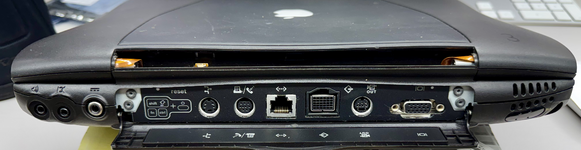
Here is a photo showing all the ports, just FYI:

tempImagehOVxMT.png

I also didn't realize you could get a wrong reading from a capacitor like a battery.
I would not say it is a "wrong reading" necessarily. My DE-5000 is working fine. My preferred term is "misleading" reading. Because if you measure good values for ESR, etc., and then you swap out that capacitor with a new one and find your circuit then starts working, you then know the capacitor was bad despite the good readings. That is because the meter doesn't impose a major load on the capacitor, whereas when it is installed on the circuit, the capacitor has to work harder to do its job.

Also once you keep it plugged in for a while feel everything before turning it on to see if it is hot, (if it is torn apart) that might be able to tell you if something is different because of heat.
It's not heat. I say that because I have a thermal meter and checked the computer, and there is nothing that get's worrisome hot at all.

I hope you don't take me for a capacitor replacement fanatic. I was just putting 2 and 2 together and getting 3. I hope you don't think I am like that!
I do not. Nor was I in any way chastising you. I was simply telling you my gut feeling, along with my analysis. Nevertheless, I can swap out the capacitors. It just takes time because I am located in Japan and Mouser ships from the USA.

My guess is that the external AC Adapter must be failing to supply the required voltage/current while under load (attached to the PDQ). But again, cutting open that sealed adapter isn't something that is the idea. Having a new adapter with the same barrel plug, supplying 24V at about 2A is best. But that is only speculation at this point.

I have two Apple adapters. I swapped out both in my testing over the past couple weeks but such made no difference. Even so, both were made at the same time back in 1998, so both could have bad electrolytic capacitors inside for all I know.
 
  • Love
Reactions: Froggy814

Froggy814

Tinkerer
May 6, 2026
153
42
28
Squaw Valley, CA
I am glad you already checked everything I would check. I was just wondering about the ext. video and audio, because what if it is a chip. But the processing is probably handled by the same chip for ext. video as well as audio...