It's been almost a month since my last post, so I want to provide an update so as to hear your kind thoughts.
ONE PDQ NOW POWERS ON RELIABLY
First, I've been testing one of my Wallstreet PDQ machines almost daily (the one with a 266MHz CPU card). For much of September, I left the stock Apple AC Power adapter connected to the wall socket and to my PDQ. What I found after several days was that it would regularly power-on when I pressed the Power Button. No need for any PMU reset. It just worked. That only applies to one of my two PDQ machines, but at least one of them powers on well now (so long as the AC Adapter is left connected to the wall and PDQ).
However, the main problem has been that the machine suddenly powers off (loses power) after a while. And that span of time varies, almost like it is random. Sometimes, I can use it for 1 hour before it suddenly powers off. Other times, it's a half hour. There have been times when it was more than 1 hour. And yes, it still happens even if I keep a floor fan on the machine to ensure heat is not the issue.
MY OTHER PDQ REFUSES TO POWER ON
My PDQ with 300MHz CPU card refuses to power on even if I put the 266MHz card in it and swap RAM and even remove the main Hard Drive and keep both drive bays empty. I left the Apple AC Adapter connected to it and the wall socket for days last month, but to no avail. Even with the new 24V Adapter, it still won't power on. The hard drive works, despite having shown signs that something liquid had spilled on it in the past. I can put that drive in my other PDQ and it boots. So perhaps something spilled on the drive while the 300MHz PDQ was powered on in the past and that shorted something, but clearly not the hard drive, even though I see the liquid flowed under the drive and onto its PCB. I'm not seeing any burn marks on the machine's main PCB, however. Not sure what's wrong with this machine.
MODERN AC ADAPTER TESTING
I purchased this modern
24V 2.5A Adapter from Amazon, and I recently received my ZigZagJoe order which contained the
adapter plug from Bix Power. (I had the plug shipped to him, and he kindly shipped it to me with my NuCF order.) No need to keep this connected to the wall or the PDQ, I'm pleased to report! The adapter will reliably power-ON one of my PDQ machines without fail! So I guess the improvement must come from bad caps inside the stock Apple AC Adapter, which is only overcome if you leave it connected all the time. The same is true of the G4 Cube power brick -- it often fails to boot the Cube unless you recap.
Sadly, this modern AC Adapter does NOT resolve my sudden power loss issue. As was true of the stock adapter, this new adapter too fails to keep the machine alive all the time. Sometimes it powers off after 1 hour, and sometimes less. (When I say "power off" I mean "loses power suddenly.")
When the machine loses power, if I press the power button soon afterward, it often fails to boot chime or show any signs of life. But if I wait 15 minutes or more, it sometimes powers on. That was true of the Apple adapter and this new one too. I've tested that over and over.
WHAT I'VE TRIED
CPU CARD SWAP
I am able to put the 300MHz CPU card into my PDQ which has a 266MHz card, and the 300MHz card works just fine. But the sudden power loss problem remains.
RAM SWAP
I have used 8-chip and 16-chip RAM Cards, but the power loss problem remains.
CONTACT CLEANER
I have used DeOxit D5 on the CPU Card connectors and the RAM socket connectors, but the suddenly power loss problem remains.
EMPTY DRIVE BAYS
I've tested extensively with nothing in either drive bay, and with the Apple CD-ROM in the right drive bay. Made zero impact on the machine. Sudden power off issue remains.
PMU Reset
Does not fix the sudden power off issue.
BATTERY (in the distant past)
In the past, when I had a good main battery, I don't recall ever experiencing this sudden power loss problem (when the main battery was inserted and charged). It's only now that I have no main battery at all that I have the power loss issue.
SLEEP MODE
If I put the machine to sleep (while booted into OS 9.2.1), I can come back the next day and it wakes just fine. But I cannot leave it powered and awake for more than an hour or so before that power loss problem occurs.
SOLDER JOINTS
I re-soldered the joints on the main DC input plug in the past, but that was never a solution for me.
PRAM BATTERY
I confirmed that PDQ machines will indeed boot WITHOUT any PRAM battery installed at all. Mine was dead, so I removed it. Presence or absence most likely has nothing at all to do with the sudden power loss problem.
RECAPPING
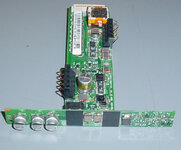
I still think the electrolytic capacitors that are on the PCB which sits between the two drive bays are too far away from the primary DC board that has the DC input jack on it (at the back of the machine). I therefore am highly skeptical if that would be "the magic fix" for this sudden power loss problem. Nevertheless, to avoid a situation where folks continue to point to finger at those caps, I will need to now buy the caps and see what happens.
YOUR THOUGHTS
Now that you've read my report, I'd certainly appreciate your thoughts and suggestions.
If I recap and still have the same power loss issue, then it's clear something else is the cause.
THANK YOU!