
Hacking the Kodak Reels 8mm Film Digitizer (New Thread)
- Thread starter Mac84
- Start date
You are using an out of date browser. It may not display this or other websites correctly.
You should upgrade or use an alternative browser.
You should upgrade or use an alternative browser.
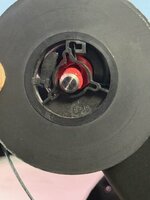

That is not the adaptor. The red and grey posts are just classic 8mm style reel hubs. You need to attached this over the red post:My Kodak Reels arrived today with the red adapter attached to the left arm and the grey one attached to the right arm. However, my super 8 reels "center hole" are still too large. Do I need another adapter? please see image.
Framing is likely working after the reboot.so, I just got my Kodak Reels and was able to get OdanO's firmware up and running. However, when I try to use the "framing" buttons, nothing happens. I try to zoom in and it does not respond, it also does not respond to left or right.
so, I shut it off and turned it back on, and when I did, the framing was zoomed in and to the left - as if it applied my adjustments .
I tried zooming out at this point and it did not respond.
has anyone else had this issue with framing?

Print your own if you can https://www.stlfinder.com/model/super8-to-normal-reel-adapter-ovQWakM0/2572373Darn. My unit did not come with the adapters. what are they called? maybe I can find them on AMAZON. If I cant find on AMAZON, where can I buy in USA? thanks

Thanks for posting that!Why did twenty people (so far) download NewNtkTools2025.zip, this is for developers to "customize firmware". I was just sharing a change to one the tools I'm using, I only expected maybe Mac84, and one other to try it. If there are more out there want to try extending the firmware, let me know and I can show the steps I'm using. Now that serval hacks are in C, it might be little easier for others to try.
Perhaps my call to action in my video persuaded some lurkers to inspect the code...
 You should totally record a screen recording of you explaining your work or something similar and post it. Even though I'm not a programmer I'd watch that!
It also reminds me, I wonder what would happen if a higher capacity memory chip was soldered to the Kodak board... I know you previously mentioned some of the mods had to remove other things to make room. Although I suppose the firmware would have to be aware of such extra space to take advantage of it.
yes, thank you. that issue resolved after boot up.Framing is likely working after the reboot.
I like the transparency of idea #1... It will likely lead to many folks buying a 12mm macro lens (I have mine, but I still need to install it).Now most of the time I do not see the artifact, although we did a short film a couple of weekends ago (7 rolls for Ektachrome,) and there was only one moment when I saw this error. But it reminded me to look into it.
I'm thinking of two firmware changes with this new insight.
1) displaying the current readout resolution. This will be sad for stock lens users, as you will see you resolution at around 672x504.
2) optionally encoding at the native readout window resolution (super depressing for a stock lens.) For 12mm users, at 1440x1080 native encode will eliminate any minor scaling artifacts.
Feedback on these ideas?
I have mixed feelings about idea #2... I like that any scaling artifacts would be eliminated for 12mm lens users at 1440x1080. I also like that it supports the digitization of a 16mm frame (even if the stock film gate does not). However, I'm sure that folks with the stock lens love that the 672x504 images are currently upscaled to 1600x1200. So, I'd like to see the following implemented as a compromise if possible:
a) encode at the native readout window resolution for 1440x1080 and higher
b) retain the 1600x1200 upscaling for native readout window resolutions below 1440 x 1080.
A variation of my "compromise" that I prefer (if feasible) is to make the encoding resolution user-configurable, providing those 2 encoding resolution setting options ('Native' and '1600x1200') regardless of the current readout resolution.
Thanks again for all that you continue to do to improve the quality of this device!
Release V7.6
This adds info reporting the sensor read-out resolution, but leaves the encoding resolution at 1600x1200 for now. This is info is during preview only.
There is also the window offset, the number of x, y pixels from top left of the active sensor region. This could be useful for debugging.
Final change, during capture I have restored support for 50 ISO, so a slightly cleaner image (maybe).
Attachments
Correct. The range of film means the ISO needs to vary. The algorithm will aim for the lowest practical for the film's density.We currently DO NOT have control over ISO, correct? (the algo manages the iso.)
Hello everyone,
I’m new to the forum, based in Germany, and I digitize old small-gauge films from my family archive purely as a private project.
I bought the Kodak Reels mainly because, after quite a bit of online research, it seemed like the most practical way to handle film digitization at home with a reasonable and manageable budget. As expected, though, I wasn’t completely happy with the initial image quality.
A very noticeable improvement came from the recently published video by Mac84 — especially the suggestion to significantly reduce the sharpening in the settings. That alone made a clear difference for me. The video was extremely motivating and really changed how I approached the device.
After that, I started testing the updates provided by 0dan0, and I now install them regularly. It’s impressive how much these updates expand the capabilities of the scanner. The documentation written by ThePhage has also been a huge help — many thanks for that!
I’ve now ordered the recommended new lens and plan to have the corresponding mount 3D-printed. Since I don’t have much experience with 3D printing, I have a quick question:
The service Craftcloud, which I plan to use for printing, asks whether the 3D model is specified in millimeters or inches. I assume millimeters, correct?
And which material would you recommend for the print?
I’m new to the forum, based in Germany, and I digitize old small-gauge films from my family archive purely as a private project.
I bought the Kodak Reels mainly because, after quite a bit of online research, it seemed like the most practical way to handle film digitization at home with a reasonable and manageable budget. As expected, though, I wasn’t completely happy with the initial image quality.
A very noticeable improvement came from the recently published video by Mac84 — especially the suggestion to significantly reduce the sharpening in the settings. That alone made a clear difference for me. The video was extremely motivating and really changed how I approached the device.
After that, I started testing the updates provided by 0dan0, and I now install them regularly. It’s impressive how much these updates expand the capabilities of the scanner. The documentation written by ThePhage has also been a huge help — many thanks for that!
I’ve now ordered the recommended new lens and plan to have the corresponding mount 3D-printed. Since I don’t have much experience with 3D printing, I have a quick question:
The service Craftcloud, which I plan to use for printing, asks whether the 3D model is specified in millimeters or inches. I assume millimeters, correct?
And which material would you recommend for the print?

The STL file is in millimeters, and material choice is not critical. PETG should work nicely and should be inexpensive.Hello everyone,
I’m new to the forum, based in Germany, and I digitize old small-gauge films from my family archive purely as a private project.
I bought the Kodak Reels mainly because, after quite a bit of online research, it seemed like the most practical way to handle film digitization at home with a reasonable and manageable budget. As expected, though, I wasn’t completely happy with the initial image quality.
A very noticeable improvement came from the recently published video by Mac84 — especially the suggestion to significantly reduce the sharpening in the settings. That alone made a clear difference for me. The video was extremely motivating and really changed how I approached the device.
After that, I started testing the updates provided by 0dan0, and I now install them regularly. It’s impressive how much these updates expand the capabilities of the scanner. The documentation written by ThePhage has also been a huge help — many thanks for that!
I’ve now ordered the recommended new lens and plan to have the corresponding mount 3D-printed. Since I don’t have much experience with 3D printing, I have a quick question:
The service Craftcloud, which I plan to use for printing, asks whether the 3D model is specified in millimeters or inches. I assume millimeters, correct?
And which material would you recommend for the print?
Last edited:
Hi @0dan0 -- I have a couple observations / questions about the ISO / exposure algorithm.Correct. The range of film means the ISO needs to vary. The algorithm will aim for the lowest practical for the film's density.
v7.1 - v7.5: During capture with my 'C' unit, the highest ISO / exposure that I observed was ISO 200 / ~5970µs. I never observed an ISO of 400 during capture, even with a black image. Is that behavior consistent with your expectation / experience?
v7.6: During capture with my 'C' unit, the highest ISO / exposure that I observed was ISO 100 / ~5984µs. I never observed an ISO of 200 or 400 during capture, even with a black image. Is that behavior consistent with your expectation / experience?
I understand that you're aiming for the lowest practical ISO for the film's density, but I'm surprised that none of the thousands of feet of film that I've scanned with v7.1+ has triggered neither your highest coded ISO nor an exposure time exceeding 6000µs. If that is by design, then no worries... I just want to confirm that my unit isn't underexposing images due to a hardware malfunction or firmware bug.
Attachments
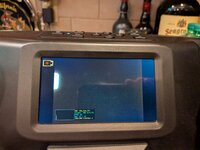
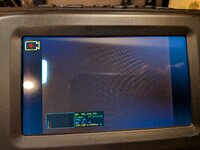
see https://tinkerdifferent.com/threads...m-digitizer-new-thread.4885/page-2#post-42788what should the default values be in the capture screen for the WB? (cause I screwed them up big time.)