2026 PowerPC Challenge, is it happening?

Trash80toG4

Active Tinkerer
Apr 1, 2022
1,174
347
83
Bermuda Triangle, NC USA
Day 21

I received my DSO-152 from Temu and have yet to learn it. I set out to try to find the fan speed signaling on the G5Q. I was ramping up the temps by running benchmarks.
View attachment 26284

Great project, following closely. :)

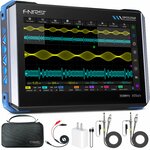
Very much interested in your learning curve as you gain experience with this scope. I'm looking into a bit more capable, medium range scopes for my electronics exploration, to keep this thread clean:


71JqOCHJEXL._SL1500_.jpg
 
Last edited:

phunguss

Active Tinkerer
Dec 24, 2023
554
465
63
57
Stillwater, MN
Day 22

I received my DSO-152 mini digital oscilloscope and had to watch a few online videos on how to properly use it. I connected to my G5 Quad with some needle probe adapters for my multimeter and the alligator clips on the DSO. Reading the Tach line pin 3 on the LCS.
PPC2026d22-DSO152-05.jpg

Running through various benchmarks to get the CPUs hot and the pumps ramped up to decode the signals.
PPC2026d22-SpeedTest402.png

Nothing like running 10.4 with classic support and OS9 benchmarks!
PPC2026d22-MB4.png

Even the old CineBench 2003 for early osX
PPC2026d22-CB2003.png


My best guess on the 12pin G5 Quad LCS is this:
1. V+ (1) 12v (no waveform detected, definitely not a PWM signal)
2. V+ (2) 12v
3. Tach (1) 3.3vpp
4. Tach (2) 3.3vpp
5. Vspeed (1) analog 0-12v, 3v at idle, 12v at max loads
6. Vspeed (2) analog 0-12v, 3v at idle, 12v at max loads
7. GND
8. GND
9. NC
10. NC
11. GND
12. NC

So it looks like using a standard 12V 4pin PWM computer fan will require converting 0-12v analog pin 5/6 to a 5v PWM driver.
 

Arbystpossum

Tinkerer
Jan 8, 2024
72
44
18
USA
My cat-pee G4 kept Kernal Panicking, and I couldn't figure out why. I kept looking at the KP log, and it kept saying something like "I wrote something to RAM and looked and it's not there and crashed.". Something like that. It took me WAY too long to figure out that the DIMM and SODIMM sticks that it was using both ran at different speeds, and the machine would hiccup at some point. Now it's running fine, playing UT99 smoothly.

I also managed to replace the Fan with a Noctua with a resistor in line. It doesn't sound like a leaf blower, moves air effectively, and the machine stays cool under intense load. I also replaced the Optical Drive, using the 90's Super Mario movie as a test (I watched the whole thing). I'm really proud of this thing. G4 iMacs are beautiful machines. Strange design philosophy, but extremely charming.
 

PowerRCP-G3

Tinkerer
Jan 31, 2022
54
34
18
Here is a recap of what happened on Day 22

Day 22: After I got the IDE to SD card adapter to work, I then tested some emulators to see which one will work best on the G4. I also got MacMAME to work for the first time. Though, some ROMs that I downloaded had missing files and could not be tested.
 

PowerRCP-G3

Tinkerer
Jan 31, 2022
54
34
18
Here is a recap of what happened yesterday.

Day 23: I decided to test out sixtyforce on different PowerPC Macs to see which one would run best on it. The iMac G5 is the clear winner here as it ran the best out of all three computers I've tested it out on.


iBookSpeedster88

Tinkerer
Jan 1, 2024
43
43
18
The following happened in November, so you all are now caught up with some of the more interesting things I did with my PowerPC Macs in-between last year's challenge and this year's challenge!

powerpc-challenge-21.jpeg


Looking to put myself through more nonsense with Fienix Linux, I decided to give it a shot on my iMac G5. Fienix failed to boot on both my Mac Mini G4 and my PowerBook G4, both refusing to accept any of Casey Cullen's recommendations for booting with ATI Radeon graphics. Both just boot to a blank black screen no matter the command given.

powerpc-challenge-22.png


Casey Cullen's reaction to someone installing Fienix on an iBook G4 is very telling that Fienix hasn't seen any testing on G4 machines, if at all. "You're the first I've heard from who installed Fienix on a G4! Great news!", Casey writes on January 13th, 2020 (https://fienixppc.blogspot.com/p/software-request.html). That's not to say that since then he hasn't encountered any other testimonies of Fienix installing on G4 machines, but considering my failed experiences on TWO G4 machines over 5 years after that comment was posted, it's safe to say that little to no testing on G4 machines has occurred since then by either Casey or anyone else for that matter. It's still rare for me to find someone online even mentioning Fienix Linux. We know that Fienix has been thoroughly tested on an iMac G5, because Casey is confirmed to have one, as the iMac G5 ALS model can be seen in one of his videos on his official YouTube channel, viewable here:

So, this explains why Fienix worked out of the box with my iMac G5 iSight model, unlike with two of my three G4 machines.

According to the system requirements, Apple's AirPort wireless cards are unsupported, so I had to connect my iMac G5 to Ethernet through my powerline adapter (https://fienixppc.blogspot.com/p/system-requirements.html). Fienix Linux used to have a software repository of its own, but Casey Cullen has announced that the repository got broken during a botched upgrade and would take "several months" to repair it (https://fienixppc-news.blogspot.com/2025/02/repository-down.html). Well, it's been just shy of a whole year since that proclamation.

powerpc-challenge-23.png


I was tired of waiting before trying Fienix, so I went ahead and attempted to sync up with Debian Sid's unofficial PowerPC software repository. Since Fienix Linux is based on Debian, everything should go without a hitch, right? Well, just simply trying to find HOW to get an unofficial hacked together repository in to Fienix Linux wasn't easy, and it seemed like websites all had their own different answers. I spent most of my journey chronicling my findings and frustrations as it was happening, so I will let these following photographs speak for themselves. I hope the text is big enough to be legible.

powerpc-challenge-24.jpeg

powerpc-challenge-25.jpeg

powerpc-challenge-26.jpeg

powerpc-challenge-27.jpeg

Well, after about an hour of doing the upgrade, I was met with a borked Fienix Linux, left miserably in an unusable state. The next photograph shows the continuous error line the user is met with once turning on the computer:

powerpc-challenge-28.jpeg


Apparently, the dreaded systemd was not happy with the upgrade...

 

PowerRCP-G3

Tinkerer
Jan 31, 2022
54
34
18
Here is a recap of what happened yesterday.

Day 24: I sadly didn't do anything on the Power Mac G4. So, the PowerBook G4 took center stage and I wrote a script for one of my upcoming videos on it.
 

phunguss

Active Tinkerer
Dec 24, 2023
554
465
63
57
Stillwater, MN
Day 23-25 Misc Stuff

I ordered some drive belts, and they arrived, so I was able to piece back together the broken SCSI cdrom drive. I will install and test it this week in the 7100/66 which was upgraded to G3/250.
PPC2026d23-drivebelt.jpg


I have reorganized my office too many times and stuff ends up in places I can't find it. I decided to use an Arduino to convert the 0-12V pump driver on the G5 Quad to 5V PWM. But I could not find any of my many Arduinos except this Pro Mini 5V version.
PPC2026d23-ProMini5V.jpg

I made a run to Micro Center to get the other half of it so I could program it.
PPC2026d23-FTDI.jpg

Then I bread-boarded it to see if my code worked, and I could control the PWM fans with a potentiometer. I will use a voltage divider to get the input from the 12V driver down to 5V for the analog input.
PPC2026d23-G5Q-PWM.jpg

And, now I can't find my pile of perf board so I can't transfer this and solder it up. Ooof.

Other parts of my days were spent trying to get Windows 7 installed on an old Athon 1100 AGP motherboard so I can try flashing some AGP video cards for G4/G5s. It was royally kicking my butt, I could not even get linux to boot on this motherboard. So I grabbed a $10 retro motherboard from Free Geek and it happened to be a P4 3GHz, so Win7 32bit got installed. Then NVFlash kicked by butt for many more hours trying to find the correct version that would run under Win7 32bit. Finally got one to go, but after the flash, the card did not boot on a Mac, so that will be revisited in the days to come.
 
Last edited:

Arbystpossum

Tinkerer
Jan 8, 2024
72
44
18
USA
I think I put the G4 back together wrong, those heat pipes are misalligned with the metal chassis that it sinks its heat to. The system overheats and freezes, I can feel the internal heat pipe and it's extremely hot, and the rear of the chassis was not even remotely warm. A curious thing.
 

phunguss

Active Tinkerer
Dec 24, 2023
554
465
63
57
Stillwater, MN
those heat pipes are misalligned with the metal chassis that it sinks its heat to
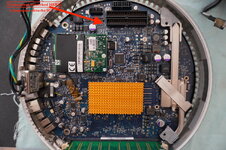
An iMac G4 lamp? It can only go on one way with how short the monitor and drive cables are.... you should apply thermal paste between the dome and lower logic board where the two metal pieces align (small area near the center bottom in this photo).
Screen Shot 2026-01-26 at 1.17.04 PM.png
 

Arbystpossum

Tinkerer
Jan 8, 2024
72
44
18
USA
Mine looks like the attached image. It has 2 points of contact. I re-creamed the contact points, but it doesn't feel like the heat is radiating through the inner chassis properly. The bottom front is hot as expected, but the whole front isn't as warm as I think it should be. I had felt a different result when I first found it, heat spread throughout the inner chassis pretty smoothly the first time. It seem like it's kinda hard to screw this up so I'm curious about what I did wrong.
An iMac G4 lamp? It can only go on one way with how short the monitor and drive cables are.... you should apply thermal paste between the dome and lower logic board where the two metal pieces align (small area near the center bottom in this photo).
 

Attachments

  • iMacG4MBa copie.jpeg
    iMacG4MBa copie.jpeg
    238.3 KB · Views: 7

Certificate of Excellence

Active Tinkerer
Nov 1, 2021
787
545
93
48
United Sates
Havent had much time but I was able to get Discord lite to work on my Tiger install on my A1047. Initially it would not work as CAPTCHA gate kept log in and as it was grayed out, I wasn't able to log in. There is also a token option which I had no idea what my token was so I logged into browser Discord and fired up dev browser terminal window and dug around until I found what I thought was the token. I entered that and it did not work initially either however it DID get me past the CAPTCHA window and into a blank discord instance. I then logged out and logged back into my credentials

and voila, I was in like Flynn :)

discord lite.jpg


I also found a macintosh port of ShogoMAD too. Will have to give this a try this week.
 
Last edited:

Trash80toG4

Active Tinkerer
Apr 1, 2022
1,174
347
83
Bermuda Triangle, NC USA
MDD'03 has been booting up fine every day, stiction seems at bay for now.🤞 2.5" IDE/160 made it to Memphis Friday at 3:41PM and supposedly arrives tomorrow as scheduled. Not holding my breath, given the weather between here and there since then.
A fresh install of OS9Lives and transfer of data from as early as 2002 from the miraculously revived drive I had in the Digital Audio to be done ASAP.
 

PowerRCP-G3

Tinkerer
Jan 31, 2022
54
34
18
Here is a recap of what happened yesterday.

Day 26: I decided to do some art on the PowerBook G4 for an art challenge. Day 27 is going to be more of the same. So, don't expect much.
 

PentaxEnthusiast

New Tinkerer
Jan 27, 2026
5
6
3
SATX
New here, but jumping in on this! I recently picked up a late-model G3 iMac from a friend with the 500 MHz chip. I remember using these back in high school, so first order of business was an overclock. Got it to 700 MHz but couldn’t keep it stable. Dropped it back down to 600 MHz to be safe. I tried several things to repair the notoriously bad optical drive but to no avail.

A few days ago I swapped in an SSD and reinstalled OS 9 and OSX Tiger. I’ve got some additional plans for it, but I’ll start an actual thread for that. I regret getting rid of all of my CRTs and old machines, so now I’m going back down the rabbit hole to reacquire it all.

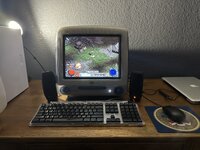
Today I reinstalled Diablo II: LoD patched up to 1.13d, which means no more CD required! The current setup below; I do have the Pro mouse as well, but playing with a cheap two-button Dell mouse for the sake of gaming.
 

Attachments

  • IMG_2127.jpeg
    IMG_2127.jpeg
    1.5 MB · Views: 7

PentaxEnthusiast

New Tinkerer
Jan 27, 2026
5
6
3
SATX
@PentaxEnthusiast welcome :) Looks like fun! Makes me want to fire up one of my imacG3s for some good ol StarCraft Terran campaign.

I also just found ShogoMAD for macos9, so might fire that up as well but I think its 3d environment might be a bit much for the imacg3s GPU. Probably will fire up my QS w/ 32mb gpu for that one.
I actually just finished both the original and Brood War campaigns! I patched the game as far as I could to 1.15.1, but unfortunately Blizzard did not make 1.15.2 for OS9 which would have allowed me to play without the discs as well. I suppose I could try running it on 10.4.11, but when I first installed it before putting in the SSD due to the Maxtor my friend put in for me giving the click of death, it wasn't a good experience.

I've just been missing doing anything on a CRT, so getting my hands on a G3 iMac of my very own after 20-ish years is a nice interim solution. Would still love a G4 or G5, but that's down the road.
 

Trash80toG4

Active Tinkerer
Apr 1, 2022
1,174
347
83
Bermuda Triangle, NC USA
Screenshot 2026-01-27 at 21-46-42 Your Orders.png

We’re sorry for the delay. If you have not received your package by February 2, you can come back here the next day for a refund.​

February 1 deadline officially missed. Don't think it ever got out of Memphis. At 5:00 PM it was listed as delayed in transit . . .

. . . so if it gets here on the third it's free? :confused:
 
Last edited:
  • Sad
Reactions: PentaxEnthusiast