
Apple Network Server MacOS based ROMs found

  • Board Nominations
    Nominations have now closed and the results are available here.
  • Hey Guest, MARCHintosh 2026 is upon us. Check out community projects, join GlobalTalk, and have fun!

mizerable

New Tinkerer
Apr 11, 2026
13
7
3
When you are able to boot into Open Firmware, you can use the script at
https://tinkerdifferent.com/threads/apple-network-server-macos-based-roms-found.4756/post-41390
to see all the checksums.
any help on how to do this would be super sick, I didn't even know OF was capable of connecting via serial like this haha!

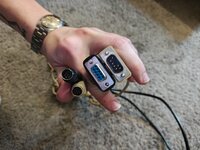
I have these two cables, one I bought specifically for using bbs and ATDpro on my iigs, the other I'm not really sure where I got it, old apple one with just an apple logo on one side, have two different usb to serial cables, tried for hours last night to get it to work with no success....any help is super appreciated!
 

Attachments

  • IMG_20260412_154934294_HDR.jpg
    IMG_20260412_154934294_HDR.jpg
    1,000.1 KB · Views: 13

joevt

Tinkerer
Mar 5, 2023
280
112
43
any help on how to do this would be super sick, I didn't even know OF was capable of connecting via serial like this haha!

I have these two cables, one I bought specifically for using bbs and ATDpro on my iigs, the other I'm not really sure where I got it, old apple one with just an apple logo on one side, have two different usb to serial cables, tried for hours last night to get it to work with no success....any help is super appreciated!
Try the "Connecting to Open Firmware" section here:
https://forums.macrumors.com/thread...tosh-g3.2303689/#-connecting-to-open-firmware
Connect to modem port.
In Open Firmware use this command to redirect input/output to modem port at 57600 bps:
Code:
" ttya:57600" io
To make the change permanent, you can use these commands to set NVRAM. The settings will take effect after restart:
Code:
setenv input-device ttya:57600
setenv output-device ttya:57600
Use a terminal app with XModem or VT100 emulation.
Increase the scroll back buffer to maximum so you can capture results of commands that output many lines of text.
Set the text pacing delay so that you can paste lines of text without Open Firmware missing any characters.
Text pasted into the dl command doesn't require a text pacing delay. Text pasted to the normal Open Firmware prompt does require a text pacing delay for strings longer than 14 characters or so.
 
  • Like
Reactions: Mr. Macintosh

mizerable

New Tinkerer
Apr 11, 2026
13
7
3
The ADTpro cable should work. What did you set your Open Firmware variables to? Remember that port 2 is ttya, not port 1.
success.

im 99.999% sure port 2 being being ttya is what was messing with me, why the hell apple???

here is the data!


Code:
0 > dl
calced: 962F6C13  045A4042.04A81401.033345A1.03FFE57D  02D405AD.032486C3.0219E592.0289480C.02ADA3B2.038B0E0F.023E6C34.02AAD56B:50348B3D0126096B
stored: 962F6C13  045A4042.04A81401.033345A1.03FFE57D  02D405AD.032486C3.0219E592.0289480C.02ADA3B2.038B0E0F.023E6C34.02AAD56B:50348B3D0126096B
 ok
 

Attachments

  • Screenshot 2026-04-12 at 5.55.06 PM.png
    Screenshot 2026-04-12 at 5.55.06 PM.png
    20.2 KB · Views: 11
  • Like
Reactions: Mr. Macintosh

joevt

Tinkerer
Mar 5, 2023
280
112
43
here is the data!

Thanks for checking. That exactly matches the info for the 2.26NT ROM which we already have.
Code:
077d.28f2.1  962f6c13  045a4042.04a81401.033345a1.03ffe57d  02cdecec.031ec3af.0213d883.02837b28.02a7be75.03853500.023892c2.02a52e8a:c60da96de537f08a  23a7bbda5681be978972517d4758bbdd  "1.1.20.1"
077d.28f2.1  962f6c13  045a4042.04a81401.033345a1.03ffe57d  02cdf1e7.031ed7ca.0213f083.0283859e.02a7b7cc.0385549f.02388b9d.02a4ffaa:d540b3dd5bcf9caa  676809c236138574282fa8416c6c5a6d  "1.1.22"
077d.28f2.1  962f6c13  045a4042.04a81401.033345a1.03ffe57d  02d405ad.032486c3.0219e592.0289480c.02ada3b2.038b0e0f.023e6c34.02aad56b:50348b3d0126096b  ad405e01c663340c479668c70f741f1b  "2.26NT"
077d.28f2.1  9630c68b  045a3ff2.04a8169b.03334745.03ffe575  02d3e2e8.0324a294.0219ffa8.02895fd8.02ada29f.038afd23.023e4a4a.02aac18a:a71fb907dd180b8a  d1d3720c38143eb2bac86b8393318529  "2.26B6"
077d.7dd0.1  49b2be8f  044701df.046e7c5d.02fa6527.03dc24a2  02c4eb7f.0302e5d4.01f7e0a8.0273a3f7.029f509f.0368984a.021b27e4.0295cecb:5f2aeeb25507b2cb  83be626679b5c74a606cd31443063a53  "2.0"
 
  • Like
Reactions: Mr. Macintosh

mizerable

New Tinkerer
Apr 11, 2026
13
7
3
Thanks for checking. That exactly matches the info for the 2.26NT ROM which we already have.
Code:
077d.28f2.1  962f6c13  045a4042.04a81401.033345a1.03ffe57d  02cdecec.031ec3af.0213d883.02837b28.02a7be75.03853500.023892c2.02a52e8a:c60da96de537f08a  23a7bbda5681be978972517d4758bbdd  "1.1.20.1"
077d.28f2.1  962f6c13  045a4042.04a81401.033345a1.03ffe57d  02cdf1e7.031ed7ca.0213f083.0283859e.02a7b7cc.0385549f.02388b9d.02a4ffaa:d540b3dd5bcf9caa  676809c236138574282fa8416c6c5a6d  "1.1.22"
077d.28f2.1  962f6c13  045a4042.04a81401.033345a1.03ffe57d  02d405ad.032486c3.0219e592.0289480c.02ada3b2.038b0e0f.023e6c34.02aad56b:50348b3d0126096b  ad405e01c663340c479668c70f741f1b  "2.26NT"
077d.28f2.1  9630c68b  045a3ff2.04a8169b.03334745.03ffe575  02d3e2e8.0324a294.0219ffa8.02895fd8.02ada29f.038afd23.023e4a4a.02aac18a:a71fb907dd180b8a  d1d3720c38143eb2bac86b8393318529  "2.26B6"
077d.7dd0.1  49b2be8f  044701df.046e7c5d.02fa6527.03dc24a2  02c4eb7f.0302e5d4.01f7e0a8.0273a3f7.029f509f.0368984a.021b27e4.0295cecb:5f2aeeb25507b2cb  83be626679b5c74a606cd31443063a53  "2.0"
ah gotcha. welp, glad I could be of some information.

is there anything else y'all would need?
 
Last edited:
  • Like
Reactions: Mr. Macintosh

mizerable

New Tinkerer
Apr 11, 2026
13
7
3
Fascinating. A second 2.26NT ROM in the wild, though the one I have from @dbinreno has production labeling.
It is pretty cool, although ide be lying if I said I'm not incredibly bummed it isn't Mac OS capable, or at least something different than what y'all have seen already.

Looking forward to seeing what comes from this, I'll be around if anyone needs any help or info from me. o7

(Im fighting demons tryna not desolder the ROM chips haha...)
 
Last edited:

mizerable

New Tinkerer
Apr 11, 2026
13
7
3
As long as it's running fully from RAM at the point that you switch ROMs it would work fine.
By this logic, do you think it would be possible to boot a Mac and physically swap the roms?

Let's say something like a 9500, boot, rip the ROM out, put a different one in and flash?

Or even, in the case of the TAM that has a built in rom, can you not just put a rom in after? I wanna test this when I get home if it hasn't been already. (Although I doubt it's the same pinouts on the tam)
 
Last edited:

Mr. Macintosh

New Tinkerer
Dec 22, 2021
10
2
3
By this logic, do you think it would be possible to boot a Mac and physically swap the roms?

Let's say something like a 9500, boot, rip the ROM out, put a different one in and flash?

Or even, in the case of the TAM that has a built in rom, can you not just put a rom in after? I wanna test this when I get home if it hasn't been already. (Although I doubt it's the same pinouts on the tam)
We DID find a macOS rom from John. We are all trying to work together to find a way to get it to work for others who don't have the rom. I could be a programable flashed rom chip or @joevt is working on a boot loader type of idea. The experts working on this will see a breakthrough. Right now the flash is not looking the greatest but @trag is looking at it. I have my fingers crossed.
 
  • Like
Reactions: mizerable

Rairii

New Tinkerer
Apr 15, 2026
2
1
3
It will mount, but it doesn't look like there's anything in it other than the Desktop Folder, so it would not have been bootable. It may not have been in use - possibly a pull from something else that they were planning to repurpose and never did.
There's definitely stuff present on this drive that isn't overwritten. Various HTML pages that look Apple-internal, plus what looks like some warez and porn (not even joking here).
 

mizerable

New Tinkerer
Apr 11, 2026
13
7
3
There's definitely stuff present on this drive that isn't overwritten. Various HTML pages that look Apple-internal, plus what looks like some warez and porn (not even joking here).
You're kidding me. Anything fun?

I'm going to recheck the other drive now that I have aix fully installed finally (I really need to write up a guide for people like me, cuz holy shit it's hard.)

I also need to come clean.
Tried for hours and hours to just dd the 4gb drive the same as I did the 1gb one I could not.

Different computers, different OSs, different SCSI cards, tried everything and nothing worked, would crash any system that tried to read it.

I put it into the ans and it at least seeked, which is didn't before.

But it wouldn't boot into anything (both drives in or not)

So, I Booted into the install, saw preservation mode, and clicked it.

Depressingly, after, I looked through and didn't see anything that looked like anything apple.

TLDR: erased a drive with potential apple secrets.

Imma load it up after work to confirm, since I have aix fully up now, but I'm p sure I ****ed up.
 
Last edited:

mizerable

New Tinkerer
Apr 11, 2026
13
7
3
You're kidding me. Anything fun?

I'm going to recheck the other drive now that I have aix fully installed finally (I really need to write up a guide for people like me, cuz holy shit it's hard.)

I also need to come clean.
Tried for hours and hours to just dd the 4gb drive the same as I did the 1gb one I could not.

Different computers, different OSs, different SCSI cards, tried everything and nothing worked, would crash any system that tried to read it.

I put it into the ans and it at least seeked, which is didn't before.

But it wouldn't boot into anything (both drives in or not)

So, I Booted into the install, saw preservation mode, and clicked it.

Depressingly, after, I looked through and didn't see anything that looked like anything apple.

TLDR: erased a drive with potential apple secrets.

Imma load it up after work to confirm, since I have aix fully up now, but I'm p sure I ****ed up.
Rechecked the other drive...nothin...if there was something on it, it unfortunately wasn't aix so doing the restore defo wiped it.

Depressing.
 

Mr. Macintosh

New Tinkerer
Dec 22, 2021
10
2
3
I would still dump it, it wouldn't have overwritten everything.
agreed. even wiping it the only stuff that "should" have been written over was the os area. The blocks should have been marked as erased but the info should be still there until it is actually written over.

Things happen, who knows if anything was even on the drive. It is still fun to see this unit!!!
