Hello everyone! New here, although I followed this thread and the previous one thoroughly, and I've been kindly surprised by all the advances and achievements from this community on this subject. Great collective work!!!
A couple of days ago, I bought a second-hand Kodak Reels 'type C' film scanner, an AZURE-1228MAC lens and some other parts, as I will try to do some tinkering... I've got a lot of rolls of regular 8mm and Super 8 from my family, and I also got another lot for a documentary project I am working on as a music producer. I live in Argentina, and here there are no offers for commercial 8mm/Super 8 film scanning services, only Telecine (I did transfer some of these rolls 20 years ago and got NTSC DVDs; now they give you 720p/30 fps uncompressed files at best). The alternative of sending all these rolls abroad and having them professionally scanned isn't logistically/economically viable, so... I figured that this might be my best shot. I'm not a stranger to tinkering with stuff myself; I have a lot of tools, and I'm quite proficient at soldering. I do my own maintenance work for speakers, mixing desks, effect modules, musical instruments, etc. I can also program in Python.
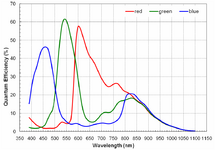
Now, while I wait for the parts to arrive, I do have some questions... For my main occupation (outside of music), I work at a satellite manufacturing company as a Data Science Specialist in the data division, which primarily focuses on Earth observation imagery. I have more than 25 years of experience in remote sensing. So, with that speciality bias, I took great interest in the AR0330 CMOS sensor from ON Semiconductor used in the Kodak Reels scanners. Its spectral response has a typical 'bump' around 750-850 nm for the three bands. This means that a significant (*) amount of near-infrared (NIR) light would be detected by the sensor as red/green/blue light. To avoid this, an infrared-cut filter is usually added to the light path before it reaches the sensor. Generally, this filter would be a coating over the lenses. Now, I've checked the specifications on the different M12 lenses that have been recommended in the threads, and I've found that none of these offers IR-cut.
So, my first question would be whether the stock M12 lenses have some kind of IR-cut or not (which I would find strange). Do we know the emitting spectrum of the light source on the Kodak Reels? Also, did anyone here try an IR-cut filter in their modified setup?
If the light source emits NIR, the effects of the lack of an IR-cut filter on the optical path would be noticeable:
- lack of contrast (blacks will receive NIR light)/loss of effective dynamic range/inconsistent black level
- colour shifting (as the three bands have different NIR sensitivities)/incorrect white balance
- higher brightness than expected/sensor saturation (which might create inter-frame ghosting, especially in the red band and when a light area in a frame is dark in the next frame)
- focus shift (NIR light would not be in focus at the same plane as visible light)/haze or glow around contrasting areas
- Bayer crosstalk (NIR light has more penetration on the sensor, which results in electrons being excited on neighbouring pixels)
- compression artefacts due to the above effects
I think some of these effects might have something to do with some of the unsolved issues that have been commented on so far, but we need to check the light source first.
(*) I have asked ON Semiconductor for the Quantum Efficiency tables so I can calculate this, but from the look of the spectra, about one-third to half of the total light received in each band would be outside of the respective range, and that would be a minimum. That is, if the light source emits NIR.