Hacking the Kodak Reels 8mm Film Digitizer (New Thread)

Hook Line and Tinker

New Tinkerer
Mar 17, 2026
17
8
3
Thanks so much for the detailed testing @Hook Line and Tinker.

It's almost certainly the card, not the menu/playback timing.

Both truncations were on the 128GB card. A 128GB card is formatted exFAT by default, and this firmware seems to write to exFAT / large cards a lot slower. During capture the motor and preview keep running normally, so it looks fine — but if the card can't keep up with the higher bitrate, the write buffer fills and the clip gets cut short. That would also explains the difference you saw: ×4 fills it faster (~8s), ×2 slower (~1min).

Meanwhile your 16GB card completed the full reel at ×4 — and I get the same result with a 32GB V10 card. Both are FAT32.

Recommendation:
  • Use a FAT32-formatted card, 32GB or smaller
  • Class 10 / V10 or better — there's plenty of headroom (×4 only needs ~4 MB/s - a V10 card support 10+ MB/s)

With a card like that, ×4 is the one to use — better quality, and it should run a full reel no problem.

Thanks again for helping testing this!
I think you nailed it with the formatting theory. I had forgotten that I had a 128GB SD that I formatted with FAT32 and was using an exFAT formatted 128GB card for the failed captures. I switched to the FAT32 128GB with the post #594 4X firmware and it worked. Both 128GB SD cards and the 16GB are V10.

So - same conditions as my first try of the post #594 drop also using the post #594 drop with only the formatting (FAT32) changed:

1. Pushed OK immediately when the playback/close screen popped up
2. I pressed playback
3. I used the 128GB card (formatted to FAT32)

Full 3:20 minute clip resulted.
 

ArgieBargie

New Tinkerer
Jul 1, 2026
4
1
3
Hello everybody (Nick Rivera voice)

Thanks for all your hard work in disenshittifying these units. That can't be stated enough; your sharing of this is phenomenal.

I have a serial number that looks like it's different to everybody else's. I've bought it recently, so I'm not sure where it sits in the firmware hierarchy. My serial is A3026148BK01272. It probably uses the B firmware, since it's not on The List but it also has a pattern reminiscent of the D firmware.

H2825148BKxxxx - the D
A3026148BK01272

I bought it via Amazon, in Australia. The plugs it shipped with are european style, UK style and US (I just bend those out to the angled AU shape, after verifying it can handle 240).

It scans ok, but with all the usual crappiness of the standard firmware. I'm not planning to go whole hog with 12mm lens upgrades and case mods, but having a better resolution and bitrate would be great. I also expect that the takeup reel motor has a finite lifespan given the issues others have reported with the motor.
 

melw

New Tinkerer
Jun 23, 2026
11
20
3
A couple of findings worth sharing.

1. "Recordings get cut short" — use FAT32 only

Same 128GB card: as exFAT it truncated the clip at higher bitrate; reformatted the same card to FAT32 and it recorded a full reel. The firmware's exFAT write path is too slow to keep up, so the buffer fills and the clip cuts off.
  • Record on a FAT32 card (any size — use Rufus/guiformat to force FAT32 on >32GB), Class 10 / V10+.
  • exFAT (the factory default on 64GB+ cards) cannot sustain higher bitrates.

2. The capture-mode OSD blink — unfortunately no progress

In my first post I asked for help in figuring out why the HUD flickers while recording, and whether anyone had a D RAM dump. I ended up soldering UART connector to the board to get the serial console + live mem dumpcode. Here's the the latest findings from the RAM dump:
  • In preview, the O1 OSD layer is stable — (we knew this already).
  • In recording, a display task recomposes the entire O1 layer ~3–4×/second, wiping whatever we draw on screen, causing flicker.
  • That recompose uses a cached pointer to the O1 buffer — it resolves the buffer once at setup and never again. So during recording there's no resolve() call, no per-frame flush, and no live handler to intercept.
  • No easy fix for the flicker so far. :(
No new builds to share for now. The previously shared versions are ok for Type D units as long as you're using FAT32 formatted cards.
 

melw

New Tinkerer
Jun 23, 2026
11
20
3
Hello everybody (Nick Rivera voice)

Thanks for all your hard work in disenshittifying these units. That can't be stated enough; your sharing of this is phenomenal.

I have a serial number that looks like it's different to everybody else's. I've bought it recently, so I'm not sure where it sits in the firmware hierarchy. My serial is A3026148BK01272. It probably uses the B firmware, since it's not on The List but it also has a pattern reminiscent of the D firmware.

H2825148BKxxxx - the D
A3026148BK01272

I bought it via Amazon, in Australia. The plugs it shipped with are european style, UK style and US (I just bend those out to the angled AU shape, after verifying it can handle 240).

It scans ok, but with all the usual crappiness of the standard firmware. I'm not planning to go whole hog with 12mm lens upgrades and case mods, but having a better resolution and bitrate would be great. I also expect that the takeup reel motor has a finite lifespan given the issues others have reported with the motor.

Welcome, and thanks for the kind words!

Interesting serial — it's not on the known list yet. The last two digits look like the year, and that roughly tracks the type era: A = 2021-22, B = 2023-24, C = 2024-25, D = 2025. Yours is …26…2026, i.e. newer than every catalogued unit so far.

Best guess: As a 2026 unit it could be Type D (the newest known type) — but you could also be a newer post-D variant. Either way the serial can't confirm it, so I wouldn't flash on a guess. The type (A/B/C/D) is decided by the hardware + the firmware's internal reel-type flag, not the serial.

If you have any way of obtaining the actual firmware version (and ideally your FWDVxxx.BIN) we could give you a definite answer. Congrats on the unit either way!
 
  • Like
Reactions: ArgieBargie

melw

New Tinkerer
Jun 23, 2026
11
20
3
Another update on the Type D: Two things I've wanted for a while now work, so I'm calling this a release candidate (not final — needs more testing).

Flicker-free OSD while recording

The HUD used to flicker badly during capture. It turned out to be simply a buffer problem:
The O1 OSD pool — from resolve(*(u32*)0x80e08df0), where resolve = 0x80006500 — has more than one buffer:
  • pool + 0x65400 — the one I was initially drawing to. It's intermittent and flickers during capture.
  • pool + 0 (the resolve base itself) — the UI panel buffer. Draw here every frame and it works.
There's a twist: pool+0 is 90 degree rotated and mirrored relative to the +0x65400 buffer. For an 864×480 screen the mapping is:
byte_offset = (863 - screenX) * 480 + screenY

Drawing the OSD there every frame is flicker free.

Frame counter

Found the encoded-frame counter at *(*(u32*)0x80e974dc + 0xD4). It resets to 0 at record start and increments once per encoded frame.
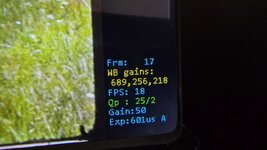
So the D OSD now has Frm / WB gains / FPS / Qp / Gain / Exp together with the x4 bitrate while recording.

Status: Release candidate

Still need more real-world testing (longer reels, more recordings, edge cases) before I'd call it done. If you try it and hit anything, please report - happy to dig in. Reminders: Type D only (check your reel type!), record on a FAT32 card.
 

Attachments

  • 20260704_090408.jpg
    20260704_090408.jpg
    899.6 KB · Views: 69
  • FWDV280.BIN
    3.8 MB · Views: 26

ArgieBargie

New Tinkerer
Jul 1, 2026
4
1
3
Welcome, and thanks for the kind words!

Interesting serial — it's not on the known list yet. The last two digits look like the year, and that roughly tracks the type era: A = 2021-22, B = 2023-24, C = 2024-25, D = 2025. Yours is …26…2026, i.e. newer than every catalogued unit so far.

Best guess: As a 2026 unit it could be Type D (the newest known type) — but you could also be a newer post-D variant. Either way the serial can't confirm it, so I wouldn't flash on a guess. The type (A/B/C/D) is decided by the hardware + the firmware's internal reel-type flag, not the serial.

If you have any way of obtaining the actual firmware version (and ideally your FWDVxxx.BIN) we could give you a definite answer. Congrats on the unit either way!

I suspect that I would find my FWxxx.bin would be what is given via the Kodak site? The only issue that I've run into with that, is that the guide says Kodak's taken down their firmware page, and I had no luck finding any such firmware on their site.


Edit:
From the post above, how do I check the reel type? I can't recall seeing that mentioned anywhere in the guides, or the thread so far (well, at least not mentioning how) other than yours and the post from melw.
 

ArgieBargie

New Tinkerer
Jul 1, 2026
4
1
3
Also, I'm taking a look at your guide for disassembly. If I have a guide like that, I may be able to attach UART leads (I have a TS-101 iron and magnifier) and if all the stars align correctly, possibly dump the firmware. In fact, if I were to go to the trouble of attaching UART leads I'd probably have them breakout to an external connector.

Also, I don't recall seeing this in any of the videos on youtube and such -- this unit seems to be able to detect the film type. It will prompt me on screen to switch the 8/super8 slider before starting recording. I've noticed that it tells me to switch it to the appropriate type of film, so somehow it must be able to detect. I'm guessing it's by the size/location of the sprocket holes, but that's exactly just a guess.

Edit: I have found the video. That looks quite doable. I'm going to at least 1 pass all of the films I have here, then this unit is getting disassembled, and possibly firmware dumped.
 
Last edited:
  • Like
Reactions: fishgee

Hook Line and Tinker

New Tinkerer
Mar 17, 2026
17
8
3
Also, I'm taking a look at your guide for disassembly. If I have a guide like that, I may be able to attach UART leads (I have a TS-101 iron and magnifier) and if all the stars align correctly, possibly dump the firmware. In fact, if I were to go to the trouble of attaching UART leads I'd probably have them breakout to an external connector.

Also, I don't recall seeing this in any of the videos on youtube and such -- this unit seems to be able to detect the film type. It will prompt me on screen to switch the 8/super8 slider before starting recording. I've noticed that it tells me to switch it to the appropriate type of film, so somehow it must be able to detect. I'm guessing it's by the size/location of the sprocket holes, but that's exactly just a guess.

Edit: I have found the video. That looks quite doable. I'm going to at least 1 pass all of the films I have here, then this unit is getting disassembled, and possibly firmware dumped.
When melw says to check the reel type in post #605, he's saying to verify whether you have type A, B, C, or D against the list of known types. His firmware drops to date are for type D.
reel type = Kodak Reels type.
The prompt you're seeing after you press record is simply a warning to manually switch to super 8 or regular 8 and the unit is not detecting anything, it just always comes up.
The latest confirmed list of types is in post #468: https://tinkerdifferent.com/threads...8mm-film-digitizer-new-thread.4885/post-45585
As you've discovered, your A3026 type is not yet confirmed so I think your plan to "1 pass" everything first is a sound one. Getting the firmware dump after your 1 pass effort is complete will help others with the same unit. Once you have the FWDV280.BIN file, you can go ahead and flash to the modified D. If that works, you have a D, if not, you can revert back to your stock version.
 

ArgieBargie

New Tinkerer
Jul 1, 2026
4
1
3
*facepalm* re the reel type. That makes perfect sense in hindsight. I spent plenty of time looking through this giant thread trying to work that out from additional context.

I was sure that it was detecting the film type. However, I just now loaded a regular8 and what it does do, is change the graphic depending on the position of the manual switch. So, technically it was reporting the correct film type, but only because I'd already changed the setting beforehand. What I can't tell from previous reviews, is whether this is a feature unique to this model, or if that's standard since A models.
 

Hook Line and Tinker

New Tinkerer
Mar 17, 2026
17
8
3
I was sure that it was detecting the film type. However, I just now loaded a regular8 and what it does do, is change the graphic depending on the position of the manual switch. So, technically it was reporting the correct film type, but only because I'd already changed the setting beforehand. What I can't tell from previous reviews, is whether this is a feature unique to this model, or if that's standard since A models.

Good observation; I never noticed that the image changed based on the switch location. Mine is a "D" so I can't answer your question of how long it has done that. It will update live as you toggle the switch though.
 

Hook Line and Tinker

New Tinkerer
Mar 17, 2026
17
8
3
Another update on the Type D: Two things I've wanted for a while now work, so I'm calling this a release candidate (not final — needs more testing).

Flicker-free OSD while recording

The HUD used to flicker badly during capture. It turned out to be simply a buffer problem:
The O1 OSD pool — from resolve(*(u32*)0x80e08df0), where resolve = 0x80006500 — has more than one buffer:
  • pool + 0x65400 — the one I was initially drawing to. It's intermittent and flickers during capture.
  • pool + 0 (the resolve base itself) — the UI panel buffer. Draw here every frame and it works.
There's a twist: pool+0 is 90 degree rotated and mirrored relative to the +0x65400 buffer. For an 864×480 screen the mapping is:
byte_offset = (863 - screenX) * 480 + screenY

Drawing the OSD there every frame is flicker free.

Frame counter

Found the encoded-frame counter at *(*(u32*)0x80e974dc + 0xD4). It resets to 0 at record start and increments once per encoded frame.
So the D OSD now has Frm / WB gains / FPS / Qp / Gain / Exp together with the x4 bitrate while recording.

Status: Release candidate

Still need more real-world testing (longer reels, more recordings, edge cases) before I'd call it done. If you try it and hit anything, please report - happy to dig in. Reminders: Type D only (check your reel type!), record on a FAT32 card.

I tried the post #605 drop - nothing new to report from me except that the flicker-free does work. I like that it allows you to see the frame number so I can estimate when I need to come back to shut it off. Unfortunately, I don't think I'll be able to help with reporting on performance with longer reels. The splices on my longer reels typically need babysitting and a stop/start.

I think I'm ready to scan my collection with the latest drop unless you tell us you're planning a major update to improve quality in the next few weeks. I don't have the tools for the mechanical mods.
 

melw

New Tinkerer
Jun 23, 2026
11
20
3
No further plans on modifying anything, unless new issues are covered. If it works, great! If there's issues, please report - and I'll have a look when I can.

Also planning to do a bigger recording session when I have time.
 

Akim

New Tinkerer
Jul 6, 2026
1
3
1
I'm new to the forum. Have a device with serial number K2225148BKxxxxx which should be a D model according to a post in this forum. So I flashed the latest firmware from @melw - thanks a lot for you effort to improve it! It works perfectly!

I tried to digitize a big reel. As result I got a movie with about 17000 frames, a duration of 16 minutes and a file size of 3.6GB without problems. Next was an even bigger reel. I split this into 2 recording sessions (I guess 4GB is max. file size for FAT32) and will concatenate them with DaVinciResolve. One file of size 2.7GB and the other is 3.2GB.

Overall I am now quite happy with the Kodak reels device. Thanks to all who contributed to the new firmware and made it available here in the forum!
 

hobbified

New Tinkerer
Apr 23, 2026
2
2
3
Status: Release candidate

Still need more real-world testing (longer reels, more recordings, edge cases) before I'd call it done. If you try it and hit anything, please report - happy to dig in. Reminders: Type D only (check your reel type!), record on a FAT32 card.

I've been holding off on doing any captures with my Type D until a solid custom FW was available. This one is doing the job for me, no issues so far. I'm hoping for manual WB (like 0dan0) sometime in the future but I'm happy for now. My grandfather seems to have done a lot of outdoor shooting on indoor film.
 
  • Like
Reactions: melw

ThePhage

Tinkerer
Oct 30, 2024
80
76
18
I've been holding off on doing any captures with my Type D until a solid custom FW was available. This one is doing the job for me, no issues so far. I'm hoping for manual WB (like 0dan0) sometime in the future but I'm happy for now. My grandfather seems to have done a lot of outdoor shooting on indoor film.
@melw can confirm, but it appears his firmware allows for some kind of manual white balance. Judging from this picture, there are off-standard WB (RGB) values of 689, 256, 218.

20260704_090408-jpg.29380
 
Last edited:

melw

New Tinkerer
Jun 23, 2026
11
20
3
Hi! Last time I looked into adjusting WB it wasn't straight forward to get the controls working with Type D units in similar way as in A/B/C patched firmwares. But yes, it's a fixed preset WB - so not auto-WB as with the factory firmware. The WB gains are overwritable in
0x80F9075C / 60 / 64.

I guess could have another attempt at adding WB controls now that I have more information on the unit, but unfortunately I'm bit busy with other things right now.

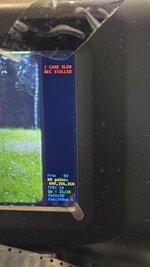
However there's a small update: I realized that the frame counter actually stalls with exFAT cards together when the recording freezes. So I added a warning at the top right when frame counter no longer advances. In case anyone is attempting to record on a slow card that cannot sustain the higher bitrates you will see this warning:
! CARD SLOW / REC STALLED

Screenshot on how it looks as a reference. It doesn't fix the write throughput on exFAT cards, but at least the write failure is no longer silent.

Also did a quick comparison on 1600x1200 vs. native 1728x1296 resolutions. There's some difference in the overall smoothness / graininess of the image quality - but I decided to keep 1600x1200 as in my eyes the higher resolution doesn't really look better (yes, bit more "detail" - but also more grain). Screenshots attached as a reference.

So, sharing one more Type D build: It's essentially the same as last one, 1600x1200, 18fps, ~31Mbps, only addition is the slow card warning.
 

Attachments

  • 20260710_080331.jpg
    20260710_080331.jpg
    504.7 KB · Views: 4
  • 1600_2.png
    1600_2.png
    346.3 KB · Views: 4
  • 1728_2.png
    1728_2.png
    344.1 KB · Views: 4
  • FWDV280.BIN
    3.8 MB · Views: 2
Last edited:

WowIndescribable

New Tinkerer
Dec 17, 2025
10
2
3
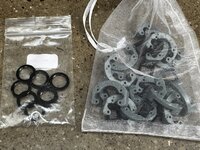
Hi, gang. I have some lens locking rings, standoffs, and backlight masks that are surplus to requirements. I'm not in a position to mail them to people individually, but if there is someone who would like to take them and distribute them to needy Kodak Reels tinkerers, I'd be happy to post them (from Ireland). - Randy
 

Attachments

  • extraKRparts.jpg
    extraKRparts.jpg
    1.3 MB · Views: 4

wilkiamieva

New Tinkerer
Jul 9, 2026
1
0
1
Hello everyone! New here, although I followed this thread and the previous one thoroughly, and I've been kindly surprised by all the advances and achievements from this community on this subject. Great collective work!!!

A couple of days ago, I bought a second-hand Kodak Reels 'type C' film scanner, an AZURE-1228MAC lens and some other parts, as I will try to do some tinkering... I've got a lot of rolls of regular 8mm and Super 8 from my family, and I also got another lot for a documentary project I am working on as a music producer. I live in Argentina, and here there are no offers for commercial 8mm/Super 8 film scanning services, only Telecine (I did transfer some of these rolls 20 years ago and got NTSC DVDs; now they give you 720p/30 fps uncompressed files at best). The alternative of sending all these rolls abroad and having them professionally scanned isn't logistically/economically viable, so... I figured that this might be my best shot. I'm not a stranger to tinkering with stuff myself; I have a lot of tools, and I'm quite proficient at soldering. I do my own maintenance work for speakers, mixing desks, effect modules, musical instruments, etc. I can also program in Python.

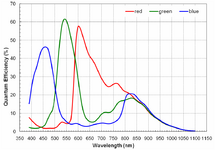
Now, while I wait for the parts to arrive, I do have some questions... For my main occupation (outside of music), I work at a satellite manufacturing company as a Data Science Specialist in the data division, which primarily focuses on Earth observation imagery. I have more than 25 years of experience in remote sensing. So, with that speciality bias, I took great interest in the AR0330 CMOS sensor from ON Semiconductor used in the Kodak Reels scanners. Its spectral response has a typical 'bump' around 750-850 nm for the three bands. This means that a significant (*) amount of near-infrared (NIR) light would be detected by the sensor as red/green/blue light. To avoid this, an infrared-cut filter is usually added to the light path before it reaches the sensor. Generally, this filter would be a coating over the lenses. Now, I've checked the specifications on the different M12 lenses that have been recommended in the threads, and I've found that none of these offers IR-cut.

So, my first question would be whether the stock M12 lenses have some kind of IR-cut or not (which I would find strange). Do we know the emitting spectrum of the light source on the Kodak Reels? Also, did anyone here try an IR-cut filter in their modified setup?

If the light source emits NIR, the effects of the lack of an IR-cut filter on the optical path would be noticeable:
- lack of contrast (blacks will receive NIR light)/loss of effective dynamic range/inconsistent black level
- colour shifting (as the three bands have different NIR sensitivities)/incorrect white balance
- higher brightness than expected/sensor saturation (which might create inter-frame ghosting, especially in the red band and when a light area in a frame is dark in the next frame)
- focus shift (NIR light would not be in focus at the same plane as visible light)/haze or glow around contrasting areas
- Bayer crosstalk (NIR light has more penetration on the sensor, which results in electrons being excited on neighbouring pixels)
- compression artefacts due to the above effects
I think some of these effects might have something to do with some of the unsolved issues that have been commented on so far, but we need to check the light source first.

(*) I have asked ON Semiconductor for the Quantum Efficiency tables so I can calculate this, but from the look of the spectra, about one-third to half of the total light received in each band would be outside of the respective range, and that would be a minimum. That is, if the light source emits NIR.

 

Attachments

  • ON_Semi_AR0330_Datasheet QE.png
    ON_Semi_AR0330_Datasheet QE.png
    25.6 KB · Views: 0
Last edited: