Hacking the Kodak Reels 8mm Film Digitizer (New Thread)

Hook Line and Tinker

New Tinkerer
Mar 17, 2026
15
8
3
Thanks so much for the detailed testing @Hook Line and Tinker.

It's almost certainly the card, not the menu/playback timing.

Both truncations were on the 128GB card. A 128GB card is formatted exFAT by default, and this firmware seems to write to exFAT / large cards a lot slower. During capture the motor and preview keep running normally, so it looks fine — but if the card can't keep up with the higher bitrate, the write buffer fills and the clip gets cut short. That would also explains the difference you saw: ×4 fills it faster (~8s), ×2 slower (~1min).

Meanwhile your 16GB card completed the full reel at ×4 — and I get the same result with a 32GB V10 card. Both are FAT32.

Recommendation:
  • Use a FAT32-formatted card, 32GB or smaller
  • Class 10 / V10 or better — there's plenty of headroom (×4 only needs ~4 MB/s - a V10 card support 10+ MB/s)

With a card like that, ×4 is the one to use — better quality, and it should run a full reel no problem.

Thanks again for helping testing this!
I think you nailed it with the formatting theory. I had forgotten that I had a 128GB SD that I formatted with FAT32 and was using an exFAT formatted 128GB card for the failed captures. I switched to the FAT32 128GB with the post #594 4X firmware and it worked. Both 128GB SD cards and the 16GB are V10.

So - same conditions as my first try of the post #594 drop also using the post #594 drop with only the formatting (FAT32) changed:

1. Pushed OK immediately when the playback/close screen popped up
2. I pressed playback
3. I used the 128GB card (formatted to FAT32)

Full 3:20 minute clip resulted.
 

ArgieBargie

New Tinkerer
Jul 1, 2026
3
1
3
Hello everybody (Nick Rivera voice)

Thanks for all your hard work in disenshittifying these units. That can't be stated enough; your sharing of this is phenomenal.

I have a serial number that looks like it's different to everybody else's. I've bought it recently, so I'm not sure where it sits in the firmware hierarchy. My serial is A3026148BK01272. It probably uses the B firmware, since it's not on The List but it also has a pattern reminiscent of the D firmware.

H2825148BKxxxx - the D
A3026148BK01272

I bought it via Amazon, in Australia. The plugs it shipped with are european style, UK style and US (I just bend those out to the angled AU shape, after verifying it can handle 240).

It scans ok, but with all the usual crappiness of the standard firmware. I'm not planning to go whole hog with 12mm lens upgrades and case mods, but having a better resolution and bitrate would be great. I also expect that the takeup reel motor has a finite lifespan given the issues others have reported with the motor.
 

melw

New Tinkerer
Jun 23, 2026
9
18
3
A couple of findings worth sharing.

1. "Recordings get cut short" — use FAT32 only

Same 128GB card: as exFAT it truncated the clip at higher bitrate; reformatted the same card to FAT32 and it recorded a full reel. The firmware's exFAT write path is too slow to keep up, so the buffer fills and the clip cuts off.
  • Record on a FAT32 card (any size — use Rufus/guiformat to force FAT32 on >32GB), Class 10 / V10+.
  • exFAT (the factory default on 64GB+ cards) cannot sustain higher bitrates.

2. The capture-mode OSD blink — unfortunately no progress

In my first post I asked for help in figuring out why the HUD flickers while recording, and whether anyone had a D RAM dump. I ended up soldering UART connector to the board to get the serial console + live mem dumpcode. Here's the the latest findings from the RAM dump:
  • In preview, the O1 OSD layer is stable — (we knew this already).
  • In recording, a display task recomposes the entire O1 layer ~3–4×/second, wiping whatever we draw on screen, causing flicker.
  • That recompose uses a cached pointer to the O1 buffer — it resolves the buffer once at setup and never again. So during recording there's no resolve() call, no per-frame flush, and no live handler to intercept.
  • No easy fix for the flicker so far. :(
No new builds to share for now. The previously shared versions are ok for Type D units as long as you're using FAT32 formatted cards.
 

melw

New Tinkerer
Jun 23, 2026
9
18
3
Hello everybody (Nick Rivera voice)

Thanks for all your hard work in disenshittifying these units. That can't be stated enough; your sharing of this is phenomenal.

I have a serial number that looks like it's different to everybody else's. I've bought it recently, so I'm not sure where it sits in the firmware hierarchy. My serial is A3026148BK01272. It probably uses the B firmware, since it's not on The List but it also has a pattern reminiscent of the D firmware.

H2825148BKxxxx - the D
A3026148BK01272

I bought it via Amazon, in Australia. The plugs it shipped with are european style, UK style and US (I just bend those out to the angled AU shape, after verifying it can handle 240).

It scans ok, but with all the usual crappiness of the standard firmware. I'm not planning to go whole hog with 12mm lens upgrades and case mods, but having a better resolution and bitrate would be great. I also expect that the takeup reel motor has a finite lifespan given the issues others have reported with the motor.

Welcome, and thanks for the kind words!

Interesting serial — it's not on the known list yet. The last two digits look like the year, and that roughly tracks the type era: A = 2021-22, B = 2023-24, C = 2024-25, D = 2025. Yours is …26…2026, i.e. newer than every catalogued unit so far.

Best guess: As a 2026 unit it could be Type D (the newest known type) — but you could also be a newer post-D variant. Either way the serial can't confirm it, so I wouldn't flash on a guess. The type (A/B/C/D) is decided by the hardware + the firmware's internal reel-type flag, not the serial.

If you have any way of obtaining the actual firmware version (and ideally your FWDVxxx.BIN) we could give you a definite answer. Congrats on the unit either way!
 
  • Like
Reactions: ArgieBargie

melw

New Tinkerer
Jun 23, 2026
9
18
3
Another update on the Type D: Two things I've wanted for a while now work, so I'm calling this a release candidate (not final — needs more testing).

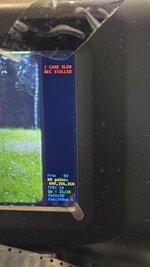
Flicker-free OSD while recording

The HUD used to flicker badly during capture. It turned out to be simply a buffer problem:
The O1 OSD pool — from resolve(*(u32*)0x80e08df0), where resolve = 0x80006500 — has more than one buffer:
  • pool + 0x65400 — the one I was initially drawing to. It's intermittent and flickers during capture.
  • pool + 0 (the resolve base itself) — the UI panel buffer. Draw here every frame and it works.
There's a twist: pool+0 is 90 degree rotated and mirrored relative to the +0x65400 buffer. For an 864×480 screen the mapping is:
byte_offset = (863 - screenX) * 480 + screenY

Drawing the OSD there every frame is flicker free.

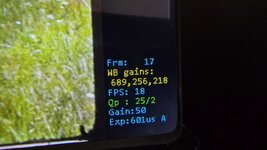
Frame counter

Found the encoded-frame counter at *(*(u32*)0x80e974dc + 0xD4). It resets to 0 at record start and increments once per encoded frame.
So the D OSD now has Frm / WB gains / FPS / Qp / Gain / Exp together with the x4 bitrate while recording.

Status: Release candidate

Still need more real-world testing (longer reels, more recordings, edge cases) before I'd call it done. If you try it and hit anything, please report - happy to dig in. Reminders: Type D only (check your reel type!), record on a FAT32 card.
 

Attachments

  • 20260704_090408.jpg
    20260704_090408.jpg
    899.6 KB · Views: 1
  • FWDV280.BIN
    3.8 MB · Views: 2
  • Like
Reactions: fishgee

ArgieBargie

New Tinkerer
Jul 1, 2026
3
1
3
Welcome, and thanks for the kind words!

Interesting serial — it's not on the known list yet. The last two digits look like the year, and that roughly tracks the type era: A = 2021-22, B = 2023-24, C = 2024-25, D = 2025. Yours is …26…2026, i.e. newer than every catalogued unit so far.

Best guess: As a 2026 unit it could be Type D (the newest known type) — but you could also be a newer post-D variant. Either way the serial can't confirm it, so I wouldn't flash on a guess. The type (A/B/C/D) is decided by the hardware + the firmware's internal reel-type flag, not the serial.

If you have any way of obtaining the actual firmware version (and ideally your FWDVxxx.BIN) we could give you a definite answer. Congrats on the unit either way!

I suspect that I would find my FWxxx.bin would be what is given via the Kodak site? The only issue that I've run into with that, is that the guide says Kodak's taken down their firmware page, and I had no luck finding any such firmware on their site.


Edit:
From the post above, how do I check the reel type? I can't recall seeing that mentioned anywhere in the guides, or the thread so far (well, at least not mentioning how) other than yours and the post from melw.
 

ArgieBargie

New Tinkerer
Jul 1, 2026
3
1
3
Also, I'm taking a look at your guide for disassembly. If I have a guide like that, I may be able to attach UART leads (I have a TS-101 iron and magnifier) and if all the stars align correctly, possibly dump the firmware. In fact, if I were to go to the trouble of attaching UART leads I'd probably have them breakout to an external connector.

Also, I don't recall seeing this in any of the videos on youtube and such -- this unit seems to be able to detect the film type. It will prompt me on screen to switch the 8/super8 slider before starting recording. I've noticed that it tells me to switch it to the appropriate type of film, so somehow it must be able to detect. I'm guessing it's by the size/location of the sprocket holes, but that's exactly just a guess.

Edit: I have found the video. That looks quite doable. I'm going to at least 1 pass all of the films I have here, then this unit is getting disassembled, and possibly firmware dumped.
 
Last edited:
  • Like
Reactions: fishgee

Hook Line and Tinker

New Tinkerer
Mar 17, 2026
15
8
3
Also, I'm taking a look at your guide for disassembly. If I have a guide like that, I may be able to attach UART leads (I have a TS-101 iron and magnifier) and if all the stars align correctly, possibly dump the firmware. In fact, if I were to go to the trouble of attaching UART leads I'd probably have them breakout to an external connector.

Also, I don't recall seeing this in any of the videos on youtube and such -- this unit seems to be able to detect the film type. It will prompt me on screen to switch the 8/super8 slider before starting recording. I've noticed that it tells me to switch it to the appropriate type of film, so somehow it must be able to detect. I'm guessing it's by the size/location of the sprocket holes, but that's exactly just a guess.

Edit: I have found the video. That looks quite doable. I'm going to at least 1 pass all of the films I have here, then this unit is getting disassembled, and possibly firmware dumped.
When melw says to check the reel type in post #605, he's saying to verify whether you have type A, B, C, or D against the list of known types. His firmware drops to date are for type D.
reel type = Kodak Reels type.
The prompt you're seeing after you press record is simply a warning to manually switch to super 8 or regular 8 and the unit is not detecting anything, it just always comes up.
The latest confirmed list of types is in post #468: https://tinkerdifferent.com/threads...8mm-film-digitizer-new-thread.4885/post-45585
As you've discovered, your A3026 type is not yet confirmed so I think your plan to "1 pass" everything first is a sound one. Getting the firmware dump after your 1 pass effort is complete will help others with the same unit. Once you have the FWDV280.BIN file, you can go ahead and flash to the modified D. If that works, you have a D, if not, you can revert back to your stock version.