Macintosh Portable: "pop" noise every 10s from Speaker & Headphones

David Cook

Tinkerer
Jul 20, 2023
152
199
43
Booted into System 7.1 with version 1.3 "Portable" Control Panel (stock from Apple, without any ResEdit hacks). Of course, I can hear that bothersome "pop" sound every 10 seconds in this case. Computer will sleep after 1 minute with PBTools, even with AppleTalk ON. When I remove PBTools and use only the "Portable" v1.3 CP, it won't sleep unless I first disable AppleTalk, and then it sleeps after 1 minute.

I can confirm the same. Backlit Portable, PowerBook 7.1 control panel, AppleTalk off, power adapter unplugged, maximum conservation. Sleep in about a minute.

What the heck?

Weird. On the same machine as above, but booting into 6.0.8. With Portable v1.2 or 1.3, the machine will go to sleep after 1 minute. So, my experience is definitely different from yours.

With Portable v1.3.1, no sleep. So, this confirms (for me at least) that we need to make this code slightly different.
 
  • Like
Reactions: JDW

JDW

Administrator
Staff member
Founder
Sep 2, 2021
2,566
2,003
113
54
Japan
youtube.com
On the same machine as above, but booting into 6.0.8. With Portable v1.2 or 1.3, the machine will go to sleep after 1 minute. So, my experience is definitely different from yours.
Do you have a BlueSCSI v2 or spinner drive?
Do you have a lead acid battery or Battery Eliminator?

My BSv2 is resistor modded to avoid wake-from sleep issues, but I don't see why that would PREVENT sleep, especially when I can sleep under System 7.1.

But I am glad your testing does show that the v1.3.1 Control Panel "solution" for the "pop" sound every 10 seconds needs to be revised. That's very important for people using Lead Acid battery power. (Unless they are content with MANUALLY putting their Portables to Sleep.)
 

David Cook

Tinkerer
Jul 20, 2023
152
199
43
Do you have a BlueSCSI v2 or spinner drive?

ZuluSCSI Compact RP2040

lead acid battery

Lead acid. Battery 50-60% full based on battery desk accessory.

No modem installed.
October 2023 Androda Portable RAM card 5 MB (no jumper lead or special option). So, 5 MB total (1MB motherboard + 4 MB card).

Finder running only (not Multifinder)

Backlight enabled.

Process:
1. Drag desired Portable control panel into System Folder.
2. Reboot.
3. Open Portable control panel and make sure sliders are set to 1 minute.
4. Reboot.
5. Do nothing and wait for sleep.
 

JDW

Administrator
Staff member
Founder
Sep 2, 2021
2,566
2,003
113
54
Japan
youtube.com
I have a MacEffects RAM card which I have artificially limited to 5MB by way of not running the required jumper. (Limited RAM is painful under System 7, but that horrid 26% performance drop when using >5MB RAM is even more excruciating.)

If you have a disk image you don't mind sharing with me, I could put that on my BlueSCSI to ensure you and I both are using the exact same software. Then if that too does not Sleep my Portable, then the only logical explanation must be the BlueSCSIv2 vs. ZuluSCSI Compact RP2024, and/or your use of a real Lead Acid battery vs. my using the Portable Battery Eliminator by @Androda.
 

David Cook

Tinkerer
Jul 20, 2023
152
199
43
I reduced my system down to a floppy disk and verified that it sleeps when booted from a FloppyEMU.

The .dsk is attached. It is not actually a .hex. I added that to allow it upload to the forum page. Download and just rename it without the .hex at the end.
 

Attachments

  • System 6.0.8 1.44MB.dsk.hex
    1.4 MB · Views: 5
  • Like
Reactions: JDW

David Cook

Tinkerer
Jul 20, 2023
152
199
43
I do use the Desktop Mgr extension (to not have the desktop rebuilt when switching between 6 and 7). I don't think that is a cause. But, who knows.
 

JDW

Administrator
Staff member
Founder
Sep 2, 2021
2,566
2,003
113
54
Japan
youtube.com
Thank you, David, I will try your disk image on my FloppyEMU tonight after work.

Desktop Manager has nothing to do with it because I tested with and without it, and my Portable still would not Auto Sleep under 6.0.8.

I will just delete the last 4 characters of the filename as shown below...

1768972288420.png


1768972308873.png
 

JDW

Administrator
Staff member
Founder
Sep 2, 2021
2,566
2,003
113
54
Japan
youtube.com
BTW, I checked and found that this forum already allows moof and dc42, so it makes no sense to disallow support of dsk, so I added it. Now everyone can upload *.dsk images without name changes. You can see that in the attachment to my message. Just reload this web page in your browser to see the change.

Also...

I noticed that you have Brightness in your System Folder (the attached disk image)...

1768972886633.png


I didn't have that in my S6.0.8 System Folder, if that matters.

Anyway, I will test later tonight. Thanks!
 

Attachments

  • System 6.0.8 1.44MB.dsk
    1.4 MB · Views: 3

JDW

Administrator
Staff member
Founder
Sep 2, 2021
2,566
2,003
113
54
Japan
youtube.com
I'm at home now and finished testing.

I booted from your *.dsk and 1 minute later, auto-sleep worked just fine. Of course, I hear that bothersome pop every 10 seconds because the Portable C.P. isn't the hacked version, but as we've discovered, the hacked version prevents sleep.

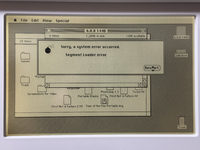
After that, I tied dragging the System Folder from the mounted floppy (via FloppyEMU) to my mounted BlueSCSI, but I got this strange error...

tempImagejZ1Bbg.png

I Restarted from the BlueSCSI, booting into System 7.1, and the copy of that System Folder now works fine.

I then did a Shutdown and disconnected my FloppyEMU. I then booted, chose the copied-over System Folder with System Picker, and booted from it. After the stopwatch vanishes, I waited 1 minute, and Auto-Sleep worked just fine. That proves something in my S6.0.8 System folder must be preventing Sleep, despite using INIT CDEV 3.0 to pretty much disable everything. Hmmm... Well, at least we are on the same page now, David.

I then Shutdown, reconnected my FloppyEMU, powered on, and booted from a System 6.0.7 floppy disk image that is for the Mac Portable 5120, which uses v1.2 of the Portable C.P., which means no backlight. It went to sleep automatically after 1 minute.
 

David Cook

Tinkerer
Jul 20, 2023
152
199
43
Based on the work of @SuperSVGA and @JDW, I created a system extension that quiets the 10 second popping. You can use this with either the backlit or non-backlit Portable, on any system version that the Portable supports, with any version of the Portable control panel.

Use StuffIt, BinHex, or Tiny Transfer to extract it from the .hqx format. Then drag the Quiet Portable extension into your System folder and reboot.

Let me know if you encounter any issues or have any suggestions.


- David
 
  • Love
Reactions: JDW

JDW

Administrator
Staff member
Founder
Sep 2, 2021
2,566
2,003
113
54
Japan
youtube.com
THE definitive solution for every 5126 Backlit Macintosh Portable owner's sanity!
@David Cook , you are a miracle worker!

I announced your Macintosh Garden page on my YouTube channel (via Community post) and in the Vintage Apple Macintosh Enthusiasts FB group just now. I also added a link to the v1.3 Control Panel from your new page on the Garden.

Bravo on a job well done!
 
  • Love
Reactions: David Cook

David Cook

Tinkerer
Jul 20, 2023
152
199
43
Well, it was a team effort. You were passionate about getting the issue attention to be fixed, and @SuperSVGA found and analyzed the faulty code.

The more I use the Portable, the more I fall in love with it. It has a really smooth keyboard and crisp screen. Now we just need to get the SLIMs working. : )
 
  • Love
Reactions: JDW

JDW

Administrator
Staff member
Founder
Sep 2, 2021
2,566
2,003
113
54
Japan
youtube.com
Agreed. But thank YOU, David, for your time and effort. I always stand in awe of your creations, and this time is no different.

Oh... Try putting the Portable on your lap in bed. I did that the other night and it was pretty crazy. Fun, but crazy. And I don't even have a lead acid battery. It's still pretty heavy. 😅