

Sorry for the late reply! I’ve been busy and haven’t had time to watch the video yet. I’ll watch it and get back to you, so please hang tight!”Hahaha! I didnt even notice it was crossing out what was the big apple! hilarious.
my first one had the exact same stickers as yours... two options..
I think I am FINALLY done with this project (yeah right) and I just made a short video and posted a new thread here with links to the video and some new photos: https://tinkerdifferent.com/threads/micro-mac-plus-macclock-hackintosh-with-all-the-balls-and-whistles.5170/#post-45567
I will eventually make a build video and maybe do a GitHub. I made a lot of changes over the last day to the startup scrips so it is very polished now. I also added an AtTiny that connects to the piece speaker and plays a tune when you plop a disk in. Initially i did this because you needed some "signs of life" because the screen was black for so long. I had it also play a little 2 tone "im busy" jingle every couple seconds until the screen came up with the mouse cursor. But after i added bluetooth, that board plays a chime when it connects so there really was no more need for any sounds. I left the disk drop sound in there though.
yes I can you you the STL'S etc.
MARCHintosh 2026 Projects
- Thread starter eric
- Start date
You are using an out of date browser. It may not display this or other websites correctly.
You should upgrade or use an alternative browser.
You should upgrade or use an alternative browser.
Haha that video was awesome. I love all the little details you added.Hahaha! I didnt even notice it was crossing out what was the big apple! hilarious.
my first one had the exact same stickers as yours... two options..
I think I am FINALLY done with this project (yeah right) and I just made a short video and posted a new thread here with links to the video and some new photos: https://tinkerdifferent.com/threads/micro-mac-plus-macclock-hackintosh-with-all-the-balls-and-whistles.5170/#post-45567
I will eventually make a build video and maybe do a GitHub. I made a lot of changes over the last day to the startup scrips so it is very polished now. I also added an AtTiny that connects to the piece speaker and plays a tune when you plop a disk in. Initially i did this because you needed some "signs of life" because the screen was black for so long. I had it also play a little 2 tone "im busy" jingle every couple seconds until the screen came up with the mouse cursor. But after i added bluetooth, that board plays a chime when it connects so there really was no more need for any sounds. I left the disk drop sound in there though.
yes I can you you the STL'S etc.
By the way — what was that robot voice?? Are you actually making the MacClock talk? It totally sounded like Speak & Spell or Kraftwerk style speech synth. I love that stuff.
And when it said something like “…Dave” and then “stupid” during shutdown — that was such a cool touch. That’s a HAL9000 reference right?
Honestly this feels like way more than just an emulator. You really went all in on the details and it shows — there’s a lot of love in this build.
Also thanks for offering the STL files, that’s incredibly generous. I’d love to see them. Did you design the internal mounts yourself?
If you're cool with it, can you DM them to me?

Haha that video was awesome. I love all the little details you added.
By the way — what was that robot voice?? Are you actually making the MacClock talk? It totally sounded like Speak & Spell or Kraftwerk style speech synth. I love that stuff.
And when it said something like “…Dave” and then “stupid” during shutdown — that was such a cool touch. That’s a HAL9000 reference right?
Honestly this feels like way more than just an emulator. You really went all in on the details and it shows — there’s a lot of love in this build.
Also thanks for offering the STL files, that’s incredibly generous. I’d love to see them. Did you design the internal mounts yourself?
If you're cool with it, can you DM them to me?
That’s the Talking Moose. Uses MacinTalk. You can get it on Macintosh garden or Macintosh repository. It’s a control panel. I had it on my Mac’s back in the 80s. Another good one is the Oscar’s the grouch one that pops out of the trash can when you empty the trash.
yes I designed everything they are very simple little parts. That hard part was all the measuring to get everything aligned right.
theres really two ways to go about aligning the LCD. One is to actually get the screen area aligned to the opening physically. This would involve cutting the plastic up and centering the lcd.
i didnt do it that way. On mine i drop it in and shift it as far as i can and then in software i move the mac screen offset over and scale it until its centered with the margins.
did you see the late night last minute mod I did to the floppy disk sound? Hilarious.
I swear the code so instead of the musical tones it now sounds like a motor
 (or as close as I could get it to with pwm haha).
Last edited:

Back from the beach and dropped the grlf off at the airport. Took a day off to crash and went a bit nuts with the grinder and wet tile saw today. 
Looking a bit better, but what crazy metal removal required. Remember, this friggin' tanks' rear armor plate is 14 Gauge/1.5mm thick!

Hogged out the slot section with the grinder. had to lower the assembly alongside the rip fence of the wet tile saw to begin the cut as there wasn't enough width for the diamond blade. It's set at a fixed height on a tile saw. Not as "bad" as lowering the entire plate across the punched in slot cover sockets, but still fun!

Got the top of the cutout done with full length support across the rip fence and then completed the bottom slot.
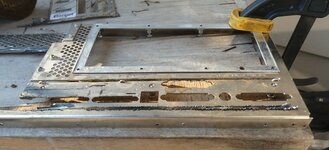
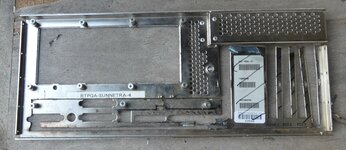
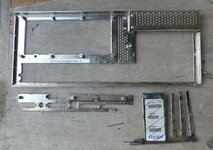
Pic from update #1 for comparison:
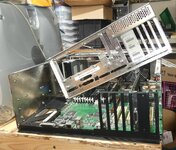
Looking a bit better, but what crazy metal removal required. Remember, this friggin' tanks' rear armor plate is 14 Gauge/1.5mm thick!
Hogged out the slot section with the grinder. had to lower the assembly alongside the rip fence of the wet tile saw to begin the cut as there wasn't enough width for the diamond blade. It's set at a fixed height on a tile saw. Not as "bad" as lowering the entire plate across the punched in slot cover sockets, but still fun!
Got the top of the cutout done with full length support across the rip fence and then completed the bottom slot.
Pic from update #1 for comparison:
Last edited:

Hahaha! I didnt even notice it was crossing out what was the big apple! hilarious.
Oh, I can now sleep easy at night knowing the answer to the mystery of the big six colour cross

Gonna print my own, too
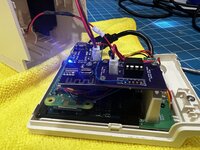
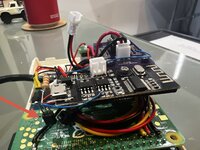
I’m STILL messing with this thing. I came up with a way to programmatically mute the bluetooth module and “hide” chimes it makes when connecting / disconnecting and I added more floppy disk sounds. It’s almost just like a real mac now!
In the photos you can see the 2222 transistor connected to a pin on the BT audio amp chip and blue wire goes back to the ATTiny. Another blue wire goes from gpio pin on the pi to the ATTiny. The ATTiny can then trigger the transistor and pull the pin low on the amp and mute the sound during startup and shutdown. No more Bluetooth alert chimes
In the photos you can see the 2222 transistor connected to a pin on the BT audio amp chip and blue wire goes back to the ATTiny. Another blue wire goes from gpio pin on the pi to the ATTiny. The ATTiny can then trigger the transistor and pull the pin low on the amp and mute the sound during startup and shutdown. No more Bluetooth alert chimes
Attachments
Last edited:
Apple Internet Router Administrator’s Guide—Addendum (Second Edition) – RFI
Hello everyone, it’s time to turn my attention to updating the Addendum to the AIR manual I released last year (along with the scanned and OCRed original manual).
This is a GlobalTalk-specific “request for input” on modifications and additions people might like to see, pretty well in line with the sections already present. Please DM me here with suggestions.
I’ll then work on what I can include and release near the end of the month.
Alongside this work, I’ll be releasing some updates to my emulation-based setup files (disk images can be used on real hardware).
These will remain 7.1-focussed (there are 7.6 images elsewhere).
Currently all these files are on Google Drive, but in parallel to the release of the next edition of the Addendum and setup files, they will all move to my (Unofficial) GlobalTalk Wiki (feel free to sign up for a sub-wiki there if you run a GlobalTalk node/network/zone – it works via http in Classical, too).
There’s been lots of exciting changes and announcements since last year (including my Wiki!), so I’m really looking forward to documenting the continued development of GlobalTalk, which doesn’t stop on 31 March each year.
Hope you’re all having fun on the network!
Sean
Hello everyone, it’s time to turn my attention to updating the Addendum to the AIR manual I released last year (along with the scanned and OCRed original manual).
This is a GlobalTalk-specific “request for input” on modifications and additions people might like to see, pretty well in line with the sections already present. Please DM me here with suggestions.
I’ll then work on what I can include and release near the end of the month.
Alongside this work, I’ll be releasing some updates to my emulation-based setup files (disk images can be used on real hardware).
These will remain 7.1-focussed (there are 7.6 images elsewhere).
Currently all these files are on Google Drive, but in parallel to the release of the next edition of the Addendum and setup files, they will all move to my (Unofficial) GlobalTalk Wiki (feel free to sign up for a sub-wiki there if you run a GlobalTalk node/network/zone – it works via http in Classical, too).
There’s been lots of exciting changes and announcements since last year (including my Wiki!), so I’m really looking forward to documenting the continued development of GlobalTalk, which doesn’t stop on 31 March each year.
Hope you’re all having fun on the network!
Sean

This is a pretty interesting use of an LLM on a G4 (and maybe even Mac Plus?!)
I Put Modern LLMs on a 2002 Macintosh - No Internet Required
I Put Modern LLMs on a 2002 Macintosh - No Internet Required
Old Apple Stuff | Blog | MacinAI Local: Building a Model-Agnostic LLM Inference Engine for Mac OS 9
How I built a complete AI platform (custom C89 inference engine, BPE tokenizer, AltiVec SIMD optimization, and a Python export pipeline) that runs GPT-2, TinyLlama, Qwen, and any HuggingFace model on a 2002 PowerBook G4.
oldapplestuff.com
On a hypothetical Mac Plus: AltiVec OFF, FPU OFF (SANE), 2MB arena, single-layer paging, 64-token KV cache, Tiny model only.

I posted in the Software Development section, but I thought I would cross-post here, this is my little #MARCHintosh project:
Altivec Intelligence is a containerized cross-compile environment that is built for retro tech-enthusiasts that want to build software for their retro Mac and iOS device. It builds Mac apps that run on all Macs with 10.4 Tiger and up including PowerPC, Intel, and Apple Silicon Macs. The iPhone toolchain can build apps that run on iPhone 3GS with iOS 4.3 and later.
Why include AI? Building apps that target these old platforms requires using old Objective-C that does not have the syntactic sugar provided by Objective-C 2.0 or Swift. So the AI will help with that by ensuring you are only using old APIs, helping you solve warnings, and typing out the very verbose Objective-C with no Properties, Automatic Reference Counting, or Block Syntax.
In the end, I think everyone that is a fan of retro Macs has an app idea or two that would make their old Mac more useful to them. But because of lack of time or lack of desire to program old-school Objective-C, they have never gotten around to building it. I hope that Altivec Intelligence will empower this niche community to make our favorite retro-tech more useful in the modern world.
Attachments

Finally got the backplane ports section of the 9500 donor case (shattered plasticitus syndrome) fit snugly into the slot I cut into the Netra's armor plate in the update above.
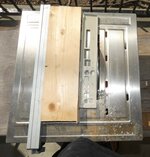
Took a bit of doing. Shim on 1x4 scrap and liberal application of hot glue to jig and panel squared up the slightly off top edge. Then I was able to use that edge to rip the bottom edge to square up/correct fit for slot. Cutting would have been easier on the bandsaw, but I think I got a cleaner edge with the wet tile saw, crappy rip fence notwithstanding.
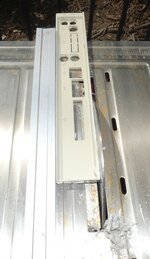

Mark I eyeball measurements of fitment are lookin' very good. Height is right on for audio jacks, but I'll need to shim the other side's and center standoffs to bring the SCSI port into alignment. Once all is hunky dory for the 4U 6500 effort I get to play the same games putting new standoffs for the PEx board.
Technical observations:
Loving the lack of onboard video on the 9500 with that knockout to cover the port for it. Makes it just perfect for this Batch A EVTA PEx/PowerMac9700 ProtoBoard which lacks the onboard video subsystem. Wondering if they'd intended to use that godforsaken crumblecase for the 9600 given that knockout.
Gotta fab a "knockout" for the AAIU port opening though. They dropped AAUI from 9500/9600 and going straight up 10bT only at long last!
Idiots at the Infinite Loopiness should have dropped the long obsolete DA-15 video connector and gone straight up HD-15 VGA, but noooooo!
PEx FINALLY moved from Fast/Narrow secondary internal only SCSI bus to UltraSCSI, both inside and out! Connector's different and may need a tad more clearance for the cable retaining "earclip" on that side next to the AAUI hole. Looking forward to seeing what a pair of my 2.5" Savio UltraSCSI server drives will sound like through the filter behind the grated drop-door front of the case.
Don't recall ever reading about that SCSI upgrade anywhere online, just noticed it. Beige G3 moved to Fast/Wide SCSI via PCI Card, so UltraSCSI would be dependent upon card installed?
Two ATA Bus connectors is a nice touch.
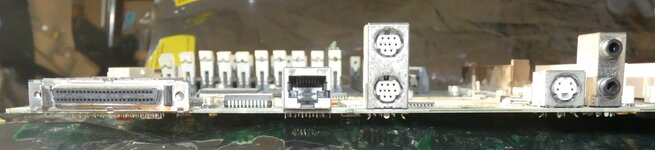
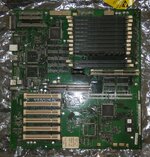
edit: I'll try to get a higher resolution/clearer pic of the board to swap into this post.
Took a bit of doing. Shim on 1x4 scrap and liberal application of hot glue to jig and panel squared up the slightly off top edge. Then I was able to use that edge to rip the bottom edge to square up/correct fit for slot. Cutting would have been easier on the bandsaw, but I think I got a cleaner edge with the wet tile saw, crappy rip fence notwithstanding.
Mark I eyeball measurements of fitment are lookin' very good. Height is right on for audio jacks, but I'll need to shim the other side's and center standoffs to bring the SCSI port into alignment. Once all is hunky dory for the 4U 6500 effort I get to play the same games putting new standoffs for the PEx board.
Technical observations:
Loving the lack of onboard video on the 9500 with that knockout to cover the port for it. Makes it just perfect for this Batch A EVTA PEx/PowerMac9700 ProtoBoard which lacks the onboard video subsystem.
Wondering if they'd intended to use that godforsaken crumblecase for the 9600 given that knockout.Gotta fab a "knockout" for the AAIU port opening though. They dropped AAUI from 9500/9600 and going straight up 10bT only at long last!
Idiots at the Infinite Loopiness should have dropped the long obsolete DA-15 video connector and gone straight up HD-15 VGA, but noooooo!
PEx FINALLY moved from Fast/Narrow secondary internal only SCSI bus to UltraSCSI, both inside and out! Connector's different and may need a tad more clearance for the cable retaining "earclip" on that side next to the AAUI hole. Looking forward to seeing what a pair of my 2.5" Savio UltraSCSI server drives will sound like through the filter behind the grated drop-door front of the case.
Don't recall ever reading about that SCSI upgrade anywhere online, just noticed it. Beige G3 moved to Fast/Wide SCSI via PCI Card, so UltraSCSI would be dependent upon card installed?
Two ATA Bus connectors is a nice touch.
edit: I'll try to get a higher resolution/clearer pic of the board to swap into this post.
Last edited:
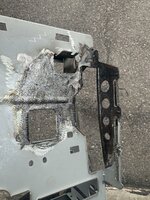
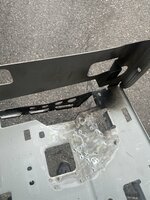
Project is definitely heading beyond Marchintosh deadline and well into Summer of Mac territory.
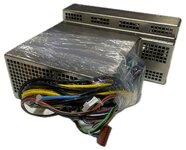
Dragged the 'Bay for drive rail tidbits, finding none but was completely blown away by high three and even four digit Netra-t listing prices! One PSU like mine (but for a bit newer model?) listed for $475+$18.24 shipped!
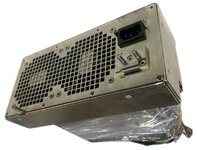
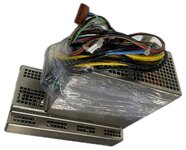
Next find was a Netrat-1125 just like mine listed for $416.68+$60.06 shipped! Immediate reaction: OMFG, WHAT HAVE i DONE?
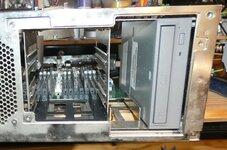
Settled down a bit when I found another Netrat-1125 listed for only $124.95+$84.95 shipped and very pleased to find some reference pics:
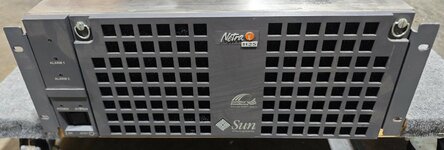
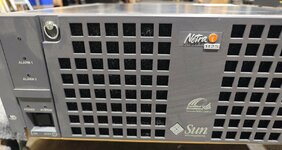
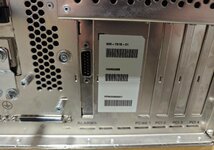
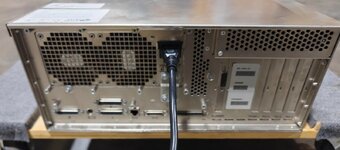

Detail of panel that wasn't replaced when drives stripped. Don't need it. This will likely be my seldom used bridge machine. FDD, Zip250 and front serviceable 3.5" cage for a pair of 2.5" drives etc. will reside there, needing no cover plate.

Trimmed, shallow 5.25" bay will house this multiple I/O and Media panel that will handle anything else for my collection.

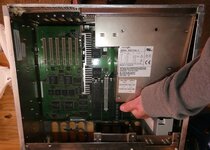
Best fitment check of all happened today. PSU bucket should cause no interference with Processor Cards! lots of room for mounting a fan if the filtered 120mm front panel unit doesn't provide enough airflow. It's edge aligns perfectly with all cards but the PCI slot at the side of the case.

PSU search and fiddly fitment coming up for SUMMER of MAC.
Dragged the 'Bay for drive rail tidbits, finding none but was completely blown away by high three and even four digit Netra-t listing prices! One PSU like mine (but for a bit newer model?) listed for $475+$18.24 shipped!
Next find was a Netrat-1125 just like mine listed for $416.68+$60.06 shipped! Immediate reaction: OMFG, WHAT HAVE i DONE?
Settled down a bit when I found another Netrat-1125 listed for only $124.95+$84.95 shipped and very pleased to find some reference pics:
Detail of panel that wasn't replaced when drives stripped. Don't need it. This will likely be my seldom used bridge machine. FDD, Zip250 and front serviceable 3.5" cage for a pair of 2.5" drives etc. will reside there, needing no cover plate.
Trimmed, shallow 5.25" bay will house this multiple I/O and Media panel that will handle anything else for my collection.
Best fitment check of all happened today. PSU bucket should cause no interference with Processor Cards! lots of room for mounting a fan if the filtered 120mm front panel unit doesn't provide enough airflow. It's edge aligns perfectly with all cards but the PCI slot at the side of the case.
PSU search and fiddly fitment coming up for SUMMER of MAC.
Attachments
Last edited:
Thanks for the likes! Was thinking about this update and figured a custom, laser cut clear plexi cover might be in order. Once I've gotten everything in the drive bays set up just so, back painting one with a complimentary color will look a whole lot better than the OEM unit. It'll hide the funky drive rail setup solutions very nicely.

Looks like a two level solution will suit my intentions best. As you can see, the drive bezels are set back about 6mm, so dropping a second layer flush with them will rock.
Looks like a two level solution will suit my intentions best. As you can see, the drive bezels are set back about 6mm, so dropping a second layer flush with them will rock.
Last edited:
Wrapping up for today, I snagged pics from that expensive 1120 unit on the 'Bay, so got details I've not seen before:
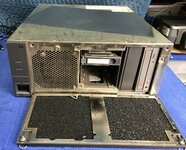
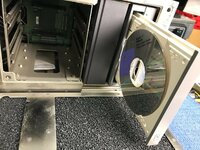
The hotswap bay in the left pic is new to me. The blank 5.25" bay cover bezel on the right I have. Pic clearly shows the gaps between and around the drive bezels. Definitely need to make that two level plexi frontspiece before I'm done.
Detail shot of 3.5" drive rack is handy for illustrative purposes here. My 1125 victim is a TeleCom server, so fits into my two poster TelCo Racks just as it should! Four sets of boltholes spaced evenly front to back for the mounting ears make for flexibility. Most of my shelves are set back so the main rack leans against the wall a bit for stability. Upright or even worse, leaning forward's no an option!
Tangent _________________________________________________________________________
In my furtive searches I ran across (and put in an offer for) what will make a great cover for my 2U Beige G3 project which was coming along nicely when last distracted. 2UBG3 will slide right in atop the ear mounted 4U PExNetrat 1125 shelf unit.
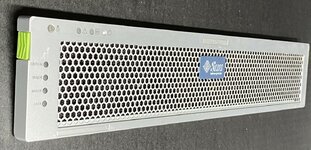
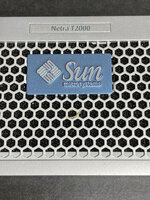
Netra T2000 manual shows it as full rack form factor, so case wouldn't do at all for my purposes.
The hotswap bay in the left pic is new to me. The blank 5.25" bay cover bezel on the right I have. Pic clearly shows the gaps between and around the drive bezels. Definitely need to make that two level plexi frontspiece before I'm done.
Detail shot of 3.5" drive rack is handy for illustrative purposes here. My 1125 victim is a TeleCom server, so fits into my two poster TelCo Racks just as it should! Four sets of boltholes spaced evenly front to back for the mounting ears make for flexibility. Most of my shelves are set back so the main rack leans against the wall a bit for stability. Upright or even worse, leaning forward's no an option!
Tangent _________________________________________________________________________
In my furtive searches I ran across (and put in an offer for) what will make a great cover for my 2U Beige G3 project which was coming along nicely when last distracted. 2UBG3 will slide right in atop the ear mounted 4U PExNetrat 1125 shelf unit.
Netra T2000 manual shows it as full rack form factor, so case wouldn't do at all for my purposes.
Last edited:
Hi, I have another MARCHintosh project to highlight.
I'm working on an update to the HIDHopper_ADB (QuokkADB) adapter which can be used to connect modern Bluetooth and USB devices (or a mix of both) to ADB Mac's ( or IIGS's).
The project has simple hardware, which uses a PI Pico (2040 or 2350), a level convertor and an ADB socket. Optionally you can add a screen for debugging.
The project will have a simple through hole PCB in Kikad format that can be easily manufactured at JLCPCB or PCBway.
I'm aiming to also add Gravis flightstick support from any gamepad supported by bluepad32 (most modern xbox/ps/nintendo sticks).
I'm working on an update to the HIDHopper_ADB (QuokkADB) adapter which can be used to connect modern Bluetooth and USB devices (or a mix of both) to ADB Mac's ( or IIGS's).
The project has simple hardware, which uses a PI Pico (2040 or 2350), a level convertor and an ADB socket. Optionally you can add a screen for debugging.
The project will have a simple through hole PCB in Kikad format that can be easily manufactured at JLCPCB or PCBway.
I'm aiming to also add Gravis flightstick support from any gamepad supported by bluepad32 (most modern xbox/ps/nintendo sticks).
YAY! 2U Netra T2000 frontspiece for the 2UBG3 project has been shipped! Next year's Marchintosh project maybe? Building an Acrylic case is right up my alley. Did a lot of Plexi fabrication back in my Manhattan Sign/Display shop days. Sooo much easier than modding an actual 4U Netrat case for a PEx board! Finally pieced together a workable RA setup for the PCI cards from bits collected over a few years now.


Backplane faces forward, set back from front bezel for cable management. Chopping up a pair of PCI risers will do for the PERCH Card if I don't get around to scaling the KiCAD learning curve by then.

6U of bridge machine goodness in Sun rackmount Server Clothing.
edit: I'm almost tempted to shelve the NetraPEx and start on this one before the bezel arrives in two days.
Whatcha all think about Summer of Mac? (as opposed to Summer of Sam) Do we already have too many dedicated project windows?
Backplane faces forward, set back from front bezel for cable management. Chopping up a pair of PCI risers will do for the PERCH Card if I don't get around to scaling the KiCAD learning curve by then.
6U of bridge machine goodness in Sun rackmount Server Clothing.
edit: I'm almost tempted to shelve the NetraPEx and start on this one before the bezel arrives in two days.
Whatcha all think about Summer of Mac? (as opposed to Summer of Sam) Do we already have too many dedicated project windows?
Last edited:
This is neat

 hachyderm.io

 github.com
theirongiant (@[email protected])
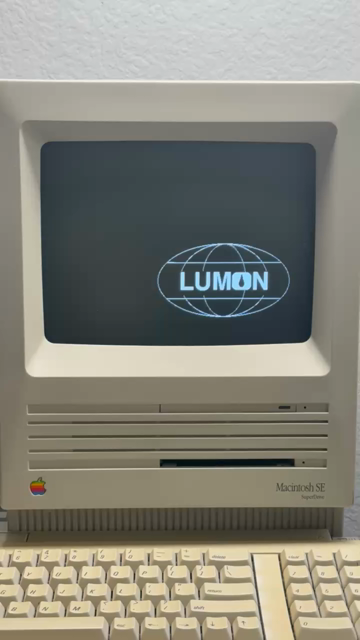
Attached: 1 video People of #marchintosh : come and join the Severed workers in Macrodata Refinement at LUMON Industries. Be a part of something mysterious and important. If you finish the file before anyone else, you may choose from a music-dance experience, or a catered office luncheon with...
hachyderm.io
GitHub - marciot/MacLumon: A Simulation of Macrodata Refinement for Classic Macs
A Simulation of Macrodata Refinement for Classic Macs - marciot/MacLumon
github.com

For any FireWire aficionados, I got to test a prototype Raspberry Pi HAT that adds on a single FireWire 400 port, and I wrote up a blog post about it: Bring back MiniDV with this Raspberry Pi FireWire HAT
In the course of testing (and working on the video that goes with that post), I got to refurbish an old G5 (Dual core 2.0 / 2005), tweak my MDD G4 (Dual 1.42 GHz), and get my old Canon GL1 camcorder in as good a condition as it's been in since it was last used in the late 00's!
I haven't tested whether I can do FireWire networking with a Mac, or use the Pi as a Target Disk Mode disk or something like that—would be awesome to make a Pi a little FireWire swiss army knife for G3-G5 era PowerPC Macs (and even a few early Intel models...).
In the course of testing (and working on the video that goes with that post), I got to refurbish an old G5 (Dual core 2.0 / 2005), tweak my MDD G4 (Dual 1.42 GHz), and get my old Canon GL1 camcorder in as good a condition as it's been in since it was last used in the late 00's!
I haven't tested whether I can do FireWire networking with a Mac, or use the Pi as a Target Disk Mode disk or something like that—would be awesome to make a Pi a little FireWire swiss army knife for G3-G5 era PowerPC Macs (and even a few early Intel models...).

This is neat
View attachment 27629
theirongiant (@[email protected])
Attached: 1 video People of #marchintosh : come and join the Severed workers in Macrodata Refinement at LUMON Industries. Be a part of something mysterious and important. If you finish the file before anyone else, you may choose from a music-dance experience, or a catered office luncheon with...
GitHub - marciot/MacLumon: A Simulation of Macrodata Refinement for Classic Macs
A Simulation of Macrodata Refinement for Classic Macs - marciot/MacLumon
Be sure and give @marciot all the love for making this. It's wonderful.
Make sure you take breaks at least 1 minute long every now and then. And you've got a lot of refining to do before you reach the Cold Harbor file.
If you try to Quit, your resignation will be denied.
P.S.: this runs on System 6 and 7. Tested on a Macintosh SE. The screensaver graphic is butter-smooth even on an 8 MHz 68000. Outstanding job.
Last edited:
Linux has FireWire networking. It should allow connecting Linux and macOS machines? I haven't tried it.I haven't tested whether I can do FireWire networking with a Mac, or use the Pi as a Target Disk Mode disk or something like that—would be awesome to make a Pi a little FireWire swiss army knife for G3-G5 era PowerPC Macs (and even a few early Intel models...).
A Mac in FireWire Target Disk Mode should look like a FireWire mass storage device to Linux?
A Linux machine in FireWire Target Disk Mode:
If there's no existing Linux code for creating a FireWire Target Disk Mode host, then you would have to make your own.
If there's no documentation describing how FireWire Target Disk Mode is implemented, then you could try examining and converting the Open Firmware Forth code that handles FireWire Target Disk Mode. I have dumps of the Forth code.
Target Disk Mode hosting on Macs exists only in Open Firmware or EFI.
Open Firmware supports FireWire Target Disk Mode.
EFI supports FireWire, Thunderbolt, and/or USB Target Disk Mode.
https://theapplewiki.com/wiki/USB_Target_Disk_Mode
SCSI Target Disk Mode existed on some 68K PowerBooks - it was implemented by the 68K ROM?
Implementing a Target Disk Mode in the OS requires taking over a block device or using a disk image as a target.