What did you do to your computer today?

MB.68k

New Tinkerer
Jan 25, 2026
9
13
3
Belgium
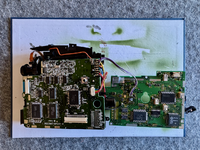
Disassembled a newly acquired QuickTake 150 and mentally prepared to desolder the dead power supply (12 normal pins and 2 humongous grounding pins).
IMG_9975.png
 

rplacd

New Tinkerer
Feb 9, 2023
1
2
3
Small steps. I'm exposing an emulated OPENSTEP 4.2's telnetd to my host macOS. I've learned:

1. It turns out you have to aggressively set TERM=xterm so that macOS telnet can report something OPENSTEP 4.2 understands:
TERM=xterm telnet [IP] [PORT]

2. Once you figure that out, a good AI agent will know what you mean when you say "Run commands on my OPENSTEP 4.2 virtual machine, which I have made accessible via telnet; you login as user: password with TERM=xterm telnet [IP] [PORT]. If you really need to, you can use su with the password [password here], and FTP in on port [port here]".

3. ChatGPT 5.6 makes an enthusiastic but very novice NeXTSTEP sysadmin...

It did teach me, though, that you can get a serial console on an OPENSTEP/x86 host! If you have an emulated serial port, and a corresponding serial device setup in Configure.app, you can also configure a "TTY Port Server" device on Configure.app. Edit /etc/ttys to configure ttya, and bob's your uncle.
 
Last edited:

Certificate of Excellence

Active Tinkerer
Nov 1, 2021
987
689
93
48
United Sates
Today I took a different route to getting cores installed in Retroarch. Instead of a blanket permissions override via terminal, I redirected RA to install cores within my home folder. MX25 locks down the apps default folder directory /usr/lib/libreto/ so while RA will DL the core, it cant install to that folder and will fail. What I ultimately did that was successful, was to go to settings > core > directory > cores and redirect RA to download cores to this folder that is within /home .

This worked perfectly. The weird thing about this is that I had to repeatedly hit "parent directory" to descend back to /home. This was not intuitive at all at least to my monkey brain, so it took me a minute to understand what I was doing/where I was going. Anyways, this worked for me and kept me out of terminal potentially srcewing up user permissions lol so wanted to document this.

This is on a 2008 unibody macbook running MX25 & retroarch v1.20.0.
 
  • Like
Reactions: Froggy814

MB.68k

New Tinkerer
Jan 25, 2026
9
13
3
Belgium
Disassembled a newly acquired QuickTake 150 and mentally prepared to desolder the dead power supply (12 normal pins and 2 humongous grounding pins).
Removing the PS was not easy, but could be done, and many leaking caps were found inside. However, a complete recapping did not bring it back to life. Still suspecting voltage controller MB3776A (small IC on the right), but it could also be some external input that prevents it from working properly. What could V10K stand for, leading from the control panel to the PS? Sorely missing QuickTake schematics.

IMG_0035.png
 

Certificate of Excellence

Active Tinkerer
Nov 1, 2021
987
689
93
48
United Sates
Yesterday I “fixed” the BT on my 08 MacBook. This is a Mac I use Pithos to stream music to my BT record player that is connected to some nice KRK g1 studio monitors and that my middle son uses as a retro console station when he’s trying to beat Super Mario World. Anyways, post MX update and reboot, it decided to not work as in MX25 no longer even saw it as a device in Terminal using Bluetoothctl. MX was telling me “what Bluetooth radio?”. Haha ok fine. Being a busy Sunday, I pushed it off until I had some time this week to futz or worst case scenario, replace the radio/antenna assembly in the screen with one from a donor machine I have. I wake up this morning and my middle son is asking to play SMB so I go up and notice the machine was off … not sure why as I leave this one up 24/7 for music streaming duty. Anyways I figured the boys did something as three under 10y/o’s will collectively do things yet have zero recollection or explanation of how they were done (ie: I don’t know daaaad?) 🙄 haha so not worth my energy to investigate between firing up breakfast & lunches etc. and getting them on the school bus and off to daycare.

Aaanyways, reboot the MacBook and voila, it mysteriously worked again. This would have been after reboot # 3 I think? I really don’t understand why but whatevs I’ll take the “win”. One less thing to have to do/fix in the ocean of things to clean, do and fix around here lol.

One other update was to enable and map rewind and fast forward to their PS clone controllers on this 08mb and their 09 iMac in their bedroom. That was rather painless in retroarch actually. I had to look up how to it as I myself do t play that way but they could use the help especially on harder platformers, reducing their stress and making learning easier for them.

oh yeah I did also break open the red PS controller and gave it a good clean as the kids spilled something sticky on the start/select buttons. Took the time to clean and lube everything so that one’s working like a champ now.
 
Last edited:
  • Like
Reactions: Froggy814