WON'T POWER ON: PowerBook Wallstreet PDQ

JDW

Administrator
Staff member
Founder
Sep 2, 2021
2,810
2,195
113
55
Japan
youtube.com
I have two PowerBook Wallstreet PDQ notebooks that once worked fine several years ago), but now neither will power-on when I press the POWER button (long or short press).

When I first plug-in the Apple AC Adapter, the fan spins at full blast and the green power LED lights for a couple seconds, and then the fan and LED power off. After that, pressing the power button does nothing.

I have no working battery anymore, so I only have AC power from the stock adapter. I've tested both PDQ machines with nothing in either drive bay and with even the hard drive removed, but to no avail. Both PDQ machines respond in the exact same way — power button doesn't power them on, despite my hearing the fan spin and LED light initially after connecting the AC Adapter. I've swapped their CPU cards, but again, it doesn't resolve the problem.

Here's a video overview of what I explained and mentions a couple voltage measurements I made too...


Wallstreet repair experts...
How can I fix these machines?
 

JDW

Administrator
Staff member
Founder
Sep 2, 2021
2,810
2,195
113
55
Japan
youtube.com
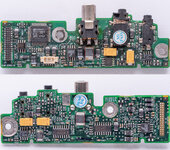
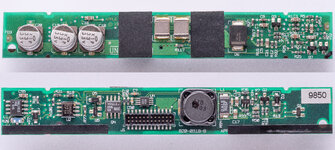
This video shows the two DC boards, showing how there is nothing wrong with the solder joints at the barrel plug, and showing the electrolytic capacitors on the primary (big) DC board located near the trackpad.


JDW

Administrator
Staff member
Founder
Sep 2, 2021
2,810
2,195
113
55
Japan
youtube.com
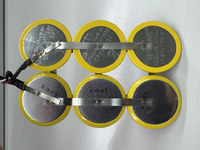
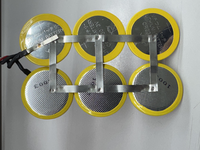
Here are photos of the insides of the Newer Technology Nupower PRAM battery (for PB G3 Wallstreet) that is now dead, and which I purchased back in the day from OWC...

tempImagei23T3S.png
tempImage7BiXDB.png

Here is a schematic showing how they are wired...

1787880308704.png


Interestingly, the CR2330 3V button cells they used are NOT rechargeable. Hmmm.

tempImageX6dwOU.png

Here is the OWC web page from which I originally purchased it (now found only on the Wayback Machine):


Garth Beagle

Tinkerer
Oct 28, 2021
34
33
18
I can't see it actually stated anywhere (but I can't believe you've not tried it) but I assume you've hit the power button?

It's normal for these to behave like the one in your video did, where when you initially connect power to one that has no (main) battery, it powers on with full fans for a few moments, then powers off. Then it may just power on on its own right afterwards or you'd need to hit the power button (and it might take awhile, few seconds, for it to show any signs of life)

Again I'm sure you did that but just pointing out the normal behaviour I saw in the video. It not turning on of course is not normal.

I've probably worked on a dozen of these over the years, some in absolutely terrible shape, some with bad CPU cards, etc and have never come across this.

Additionally, I assume you've tried a different power adapter, confirmed its voltages are good.

These are my favourite PowerBooks!

(EDIT) Duh I see you noted hitting the power button in your post. I will say if both are experiencing the same failure, based on the clearly good condition they're in, and they were working before, I'd focus on external common factors, the main one is the power adapter. Good luck!
 
Last edited:
  • Like
Reactions: JDW

JDW

Administrator
Staff member
Founder
Sep 2, 2021
2,810
2,195
113
55
Japan
youtube.com
Thank you for providing me with feedback.

Yes, I pressed the power button for a long and a short period of time, multiple times, but nothing happens.

I have two different power adapters and neither work in terms of getting the machine to power on when I press the power button. But if they were dead, and I should not hear the fan going at full speed nor see the LED, at least I wouldn’t think so.

With that said, the 3.5 mm jack is hidden inside that metal shield on the barrel plug and I can only touch my multimeter probe to the tip, and that doesn’t seem to be positive voltage. Trying to stick a meter probe deep inside would risk a short circuit. So I’m not able to adequately test voltages from those Apple power adapters as a result.

There are five electrolytic capacitors on the primary DC board. Since you have pretty good experience with multiple machines, and since you didn’t mention recapping at all, I would assume that most people are finding those capacitors to be just fine and not part of the problem, correct? That said, they are from 1998, which is almost 30 years ago. And fluid filled capacitors don’t have eternal life. Even so, they are on that particular DC board only, so I wonder if a few bad caps would prevent it from powering on. That’s something I simply don’t know.

Y mentioned NOT having a similar experience to mine, but you also mentioned encountering bad CPUs. So that raises the question, what happens when you have a bad CPU and then press the power button.
 

This Does Not Compute

Emeritus Board Member
Staff member
Oct 27, 2021
370
531
93
www.youtube.com
It's been a while since I've used my Wallstreet, but I've had other PowerBooks (like the 2400/3400) sometimes behave the same way. I've found that pressing the Reset button on the back can often get them going, though occasionally I have to let the machine sit for a while (plugged in) first. The 2400 is known for the "green light of death" where the sleep LED gets stuck on and the machine seems dead otherwise, and IIRC it's related to the power management circuitry and dead PRAM batteries -- I wouldn't be surprised if later models were similar.
 
  • Like
Reactions: JDW

JDW

Administrator
Staff member
Founder
Sep 2, 2021
2,810
2,195
113
55
Japan
youtube.com
It's been a while since I've used my Wallstreet, but I've had other PowerBooks (like the 2400/3400) sometimes behave the same way. I've found that pressing the Reset button on the back can often get them going...
I have the 2nd Gen. Wallstreet called the PDQ which has not Reset button on back. Instead PDQ owners must press Shift + Fn + Control + Power button for about 5 to 10 seconds. I've done that though, to no avail.

... IIRC it's related to the power management circuitry and dead PRAM batteries -- I wouldn't be surprised if later models were similar.
This is the area where most people I've spoken to are not crystal clear about. No one can definitely tell me "you need to have a working PRAM battery to boot". Because my PRAM battery was dead, I removed it. But there was no change from having a dead PRAM battery installed to not having any PRAM battery installed. Also, if you review my earlier posts, you will see that NewerTech used "CR" batteries, which are not rechargeable, and so far, no one has been able to make any sense of that. I can't either. Never noticed it until I sliced one open yesterday. It is 3-wire, so maybe the way it was wired avoided trouble? Not sure. But I don't see that as having stopped my PDQs from booting.

As I recall, I had better luck in the past with a good main battery. Today, I have no main battery. I am only trying to use the stock AC Adapter power to get them booted. Juice is clearly coming into the machine as per my video in my opening post which shows the green LED and the fan spinning at full blast for a couple seconds. A truly dead AC adapter wouldn't even generate that.

So I'm still not sure what to do at this point.

Not a single person has discussed recapping, although I've been putting together a recapping list for that, just in case that is the "miracle cure." Gut feeling is that may not be the root problem though. Hmmm...
 

Garth Beagle

Tinkerer
Oct 28, 2021
34
33
18
You can safely test the power adapter voltage by using a bit of heat shrink tubing around the center pin in its connector so that it isolates it from the outer shield when jamming the meter's probes in.

I have not had a working PRAM battery in any of these PowerBooks. I do know of a case with the later PowerBook 101 (and maybe Pismo too) where if there's a *dead* PRAM battery still installed, it may prevent power on, but the fix for that is to remove that battery so it doesn't really apply here.

I've thus far have not needed to recap any part of these.

IIRC, when I had a bad CPU board, it would power on, but no chime or video. I cannot say for sure but I don't ever remember experiencing what you're seeing (so yes this is indeed strange and thus really peaked my interest).

I'm also a strong proponent for looking for patterns from experimenting with simplifying setups (even more so interesting with two (seemingly) identical failing setups) like what does it do with no RAM installed, with the keyboard disconnected, with no CPU board (probably nothing), or even using an external ADB keyboard's power button?
 

Garth Beagle

Tinkerer
Oct 28, 2021
34
33
18
Also these same PSUs can be used with other PowerBooks (IIRC at least 2400, 3400, original iBook) so if by chance you have one of those you could confirm it works with them.
 

JDW

Administrator
Staff member
Founder
Sep 2, 2021
2,810
2,195
113
55
Japan
youtube.com
You can safely test the power adapter voltage by using a bit of heat shrink tubing...
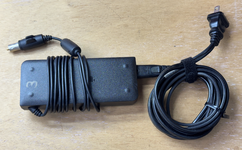
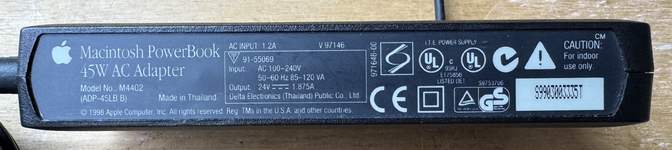
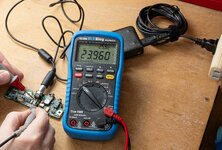
I found the ideal way to measure the voltage output...

PDQ_AC-Adapter-Voltage.jpg

IIRC, when I had a bad CPU board, it would power on, but no chime or video. I cannot say for sure but I don't ever remember experiencing what you're seeing (so yes this is indeed strange and thus really peaked my interest).
But I too am not getting any chime or video, and yet you say your experience differs from mine, so what in particular was different in your case? Did the LED never turn off in your case? Because my green LED lights only a couple seconds and then turns off.
 

thecloud

Tinkerer
Oct 2, 2025
58
59
18
My Wallstreet PowerBook G3 died in a similar way. It also had a long-dead (or mostly dead) battery, and so I always relied on powering it via the AC adapter. One day I was doing something CPU intensive and I got an alert that the battery was low and would turn off at any moment. Then I noticed that the battery indicator in the menu bar started showing red without any indication of AC power, and it actually had switched to battery power. That lasted all of 10 seconds before dying and switching off.

So my first thought was: "AC adapter must've died". But no! That works just fine and powers another machine. I also tried a different known-good adapter without success. So maybe it's just that the PMU reset button needs pushing? But no! After a PMU reset, pressing the power button *tries* to boot but acts as if no AC power is present, in that I'll sometimes get the green light for a fraction of a second before it immediately shuts off again.

The troubleshooting page at iFixIt seems to suggest that the PMU might be faulty and needs replacement. https://www.ifixit.com/Wiki/PowerBook_G3_Wallstreet_Troubleshooting#Section_PMU_Reset_Needed
 
  • Like
Reactions: JDW

JDW

Administrator
Staff member
Founder
Sep 2, 2021
2,810
2,195
113
55
Japan
youtube.com
...maybe it's just that the PMU reset button needs pushing?
Where is there a PMU "reset button" on the "PDQ"? (Mine is indeed a "Wallstreet" in that it is 2nd gen., but technically it is "PDQ"). I don't think the PDQ has such a button, but I'd long to be proven wrong about that.


Which is shown in this iFix it photo...

1787888501595.png


Unfortunately, that is speculation at this point.

There are two things I know to be true:

1. The 5 electrolytic capacitors on the main DC board (not the PMU board) have not been replaced and they date from 1998.
2. I have two PDQs. Is it likely the PMU board is bad in both?
 

thecloud

Tinkerer
Oct 2, 2025
58
59
18
Where is there a PMU "reset button" on the "PDQ"? (Mine is indeed a "Wallstreet" in that it is 2nd gen., but technically it is "PDQ"). I don't think the PDQ has such a button, but I'd long to be proven wrong about that.
On the PDQ it's a key sequence rather than a button. I found an article that mentions the PMU reset is holding down Fn-Ctrl-Shift-Power for 5 seconds. Looks like this came from a Tech Info Library article.
 
Last edited:

JDW

Administrator
Staff member
Founder
Sep 2, 2021
2,810
2,195
113
55
Japan
youtube.com
On the PDQ it's a key sequence rather than a button. I found an article that mentions the PMU reset is holding down Fn-Ctrl-Shift-Power for 5 seconds. Looks like this came from a Tech Info Library article.
Yes, and that keyboard sequence is on the back of the computer too. I've tried it without success multiple times.

1787890284789.png


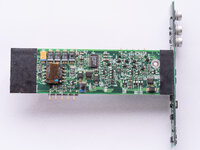
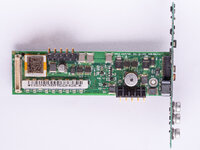
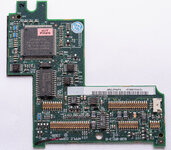
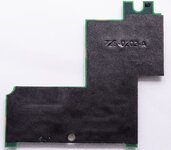
Here are high resolution photos of the component side and black side of the PMU circuit board. And while the utter lack of burned components doesn't guarantee something is bad on that PCB, it's a bit challenging to troubleshoot.

PMU_PCB_ComponentSide.jpg PMU_PCB_BlackSide.jpg