Hacking the Kodak Reels 8mm Film Digitizer (New Thread)

  • Board Nominations
    Nominations have now closed and the results are available here.
  • Hey Guest, MARCHintosh 2026 is upon us. Check out community projects, join GlobalTalk, and have fun!

0dan0

Active Tinkerer
Jan 13, 2025
438
582
93
Ok great I will try that.
When you change the Qp during a live capture, is it adjusting the bitrate on the fly or only when it finishes and writes the file to the SD card? (while stored in the buffer)

*BTW, I love the auto stop function! I thought it may have detected an empty scan with only white and stopped it.
What are the requirements to auto stop the scan? Does it test for white, and frame count?
On the fly, data is encoded and write to the sd card continuously.

Auto stop is looking of about 20 frames of nothing.
 

ThePhage

Tinkerer
Oct 30, 2024
67
65
18
Ok great I will try that.
When you change the Qp during a live capture, is it adjusting the bitrate on the fly or only when it finishes and writes the file to the SD card? (while stored in the buffer)

*BTW, I love the auto stop function! I thought it may have detected an empty scan with only white and stopped it.
What are the requirements to auto stop the scan? Does it test for white, and frame count?
As a public service announcement for those who are relatively new here and trying out 0dan0's custom firmware (hardware units A, B, and C), please review the User Guide posted here as it is a helpful resource:

https://tinkerdifferent.com/resourc...irmware-for-the-reels-8mm-film-digitizer.165/
 
  • Like
Reactions: Federico

HGSiegel

New Tinkerer
Mar 23, 2026
6
0
1
Device: Kodak Reels Type D (H-series, Serial: H2825148BK...)
Achievement: 1600x1200 output resolution working on D variant hardware!


Background​


The Type D variant has been unsupported by existing firmware mods due to significant differences from A/B/C variants. After extensive reverse engineering, I've successfully ported core functionality to D hardware.


What's Working​


✅ 1600x1200 output resolution (vs 1728x1296 stock) ✅ Device boots normally ✅ Menus fully functional
✅ Stable recording ✅ Currently recording at 20fps (stock)


Technical Details​


Key Discovery: Type D firmware cannot use simple offset calculations from Type C. Each data location and function address must be individually mapped.


Process:


  1. Identified device-specific addresses (NVM: 0x80E0D600)
  2. Mapped 17 external function calls from Type C to Type D equivalents
  3. Updated 0dan0's ~29KB custom code block with D-specific addresses
  4. Inserted custom code at 0x0033a08c
  5. Found resolution values via pattern matching (not offset calculation)

Confirmed Mappings (Type C → Type D):


  • Console Print: 0x80080160 → 0x80080c60
  • Resolution Width: 0x00ddb754 → 0x00ddc718
  • Resolution Height: 0x00ddb758 → 0x00ddc71c
  • Input buffer setup: 0x802ea95c → 0x800160a0
  • Plus 13 other function mappings

Critical Finding: Offsets vary wildly across the firmware:


  • Console print: +0xb00
  • Resolution: +0xfc4
  • Some functions: negative offsets!
  • Conclusion: Each address must be found individually

Current Limitations​


⚠️ Only basic resolution change implemented so far ⚠️ OSD, histogram, RGB controls not yet functional ⚠️ 18fps not yet working (requires additional mapping)


Next Steps​


Working on:


  1. 18fps frame rate (finding correct location)
  2. White balance controls
  3. Hooking custom code for OSD/histogram features
  4. Full feature parity with 0dan0's Type C firmware

For Other D Variant Owners​


DO NOT flash Type A/B/C firmware on D hardware - it will not work.


If you want to help test D variant firmware development or have a D variant device, please reply. The systematic porting approach I've developed can be applied to add more features incrementally.


Files​


Attaching:


  • FWDV280.BIN - D variant firmware with 1600x1200 resolution
  • Based on 0dan0's freed-space D base firmware
  • Flash at your own risk (standard firmware update procedure)

To flash:


  1. Copy FWDV280.BIN to root of FAT32 SD card
  2. Create empty folder "NVTDELFW" on SD card
  3. Power on device with SD card inserted
  4. Wait ~30 seconds for flash to complete

Huge thanks to:


  • @0dan0 for the original firmware work and ReelsChangeNotes.txt
  • @Mac84 for the extensive documentation
  • The TinkerDifferent community

This is just the beginning for D variant support. More features coming soon!

Hi, I have a new Kodac Reels bought at Amazon recently. The serial is K2225148BK00779 and it is supposed to be a D version. I am very keen on using your firmware. Before I take the risk of loading your much appreciated software can you tell me, what resolution your D firmware reels has? My manual states it is a 8.08 megapixels (3280x2464) 1/3" CMOS sensor. Native reolution is 1296p. I take it that if yours should be different I might have a differnet hardware setup which means I will brick the reels?
 

ThePhage

Tinkerer
Oct 30, 2024
67
65
18
Hi, I have a new Kodac Reels bought at Amazon recently. The serial is K2225148BK00779 and it is supposed to be a D version. I am very keen on using your firmware. Before I take the risk of loading your much appreciated software can you tell me, what resolution your D firmware reels has? My manual states it is a 8.08 megapixels (3280x2464) 1/3" CMOS sensor. Native reolution is 1296p. I take it that if yours should be different I might have a differnet hardware setup which means I will brick the reels?
The manual for your model matches what the manual for my older scanner (B version) states. I believe in the earlier (locked) thread, 0dan0 and others validate that the stated resolution is both misleading and also factually innacurate. Maybe an earlier scanner version had a sensor with those specs, but most of the scanners in the wild have a different sensor than what the 1 vesion of the manual specifies. Add to that the fact that when you are "zooming" in on your film frame, that "digital zoom" is further decreasing the resolution of your scan. Basically, the specs in the marketing and manual are just marketing-speak that don't really help depict real-world results. However, on the custom firmware from 0dan0, there is a live readout on the OSD that displays the affective sensor resolution of your target area (tyipcally less than 1600x1200), while then encoding that area into a 1600x1200 resolution video file.

Assuming that your scanner is indeed a version D scanner, you can try the Work-in-progress firmware for D scanners from user videodoctor (mentioned recently by user cogniclaw). However, there are still some roadblocks from that being a stable release. Based on most reports here, it seems that you can safely revert your model back to stock firmware (of which this forum does have a stock version D provided) if you need to.

All that said, do some additional reading through this thread and the previous thread, head the cautions, and proceed at your own risk. Unintentional bricking during a firmware update is possible (if you pulled power while updating for example) but hasn't been reported significantly.
 

HGSiegel

New Tinkerer
Mar 23, 2026
6
0
1
The manual for your model matches what the manual for my older scanner (B version) states. I believe in the earlier (locked) thread, 0dan0 and others validate that the stated resolution is both misleading and also factually innacurate. Maybe an earlier scanner version had a sensor with those specs, but most of the scanners in the wild have a different sensor than what the 1 vesion of the manual specifies. Add to that the fact that when you are "zooming" in on your film frame, that "digital zoom" is further decreasing the resolution of your scan. Basically, the specs in the marketing and manual are just marketing-speak that don't really help depict real-world results. However, on the custom firmware from 0dan0, there is a live readout on the OSD that displays the affective sensor resolution of your target area (tyipcally less than 1600x1200), while then encoding that area into a 1600x1200 resolution video file.

Assuming that your scanner is indeed a version D scanner, you can try the Work-in-progress firmware for D scanners from user videodoctor (mentioned recently by user cogniclaw). However, there are still some roadblocks from that being a stable release. Based on most reports here, it seems that you can safely revert your model back to stock firmware (of which this forum does have a stock version D provided) if you need to.

All that said, do some additional reading through this thread and the previous thread, head the cautions, and proceed at your own risk. Unintentional bricking during a firmware update is possible (if you pulled power while updating for example) but hasn't been reported significantly.
Thank you for the time you invested for answering! So after all it seems to be a good idea to update to the proper version this forum supplies for better image quality. Do you by any chance know, if you brick the reels by updating to an improper version? i.e. Putting a D an a B or a B version on a D hardware? If that would not really matter I would only need a stock version B firmware, so that I could go back to the original firmware without having to open the scanner.
 

milek7

New Tinkerer
Feb 27, 2026
4
0
1
I uploaded B firmware on my D scanner first and was able to reflash with stock D and later with videodoctor D firmware.
 

HGSiegel

New Tinkerer
Mar 23, 2026
6
0
1
Looks like more and more model D's out there! I've been preoccupied the last couple of months with other work, but I'm getting back on track with moving firmware D updates in the coming weeks.
That sounds very promising!
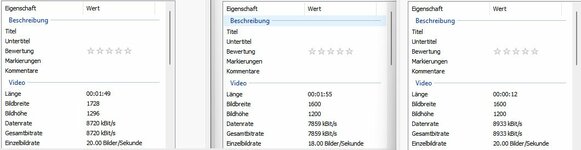
I have tried your January firmware first than reloaded the stock firmware D. All this proceeded with no problems at all. I was able to scan a film with your firmware and after that with the stock firmware D. Since I encountered no problem I take it that I have version D for serial K2225148BK00779. Or do I have an even newer kind of firmware? In the attached image you can see the on the left the basic data after scanning a film with my original firmware. In the middle is the result using your firmware. 18 pic/sec works and the resolution is as described - but lower than on the original firmware. Reverting to the stock D firmware (on the right) returns to 20 pic/sec but the marginally better original resolution is not reset. Exposure seems to be better in your firmware but sharpness is not visibly improved. Bitrate has even decreased slightly. What do you make of this information?
 

Attachments

  • KodalReelsFirmwareD.jpg
    KodalReelsFirmwareD.jpg
    42 KB · Views: 15

videodoctor

Tinkerer
Jan 8, 2026
82
39
18
I have with an update on the Type D firmware work:

@0dan0 's overlay code reads a custom 7x12 bitmap font from a specific firmware address to render all the on-screen text (FPS, Qp, ISO, exposure, WB gains, etc). I hadn't come across any notes on the font embedding, so it took some binary diffing between the stock and modded C firmware to find where it lives. Once I spotted the glyph data sitting where the old shutdown JPG used to be, everything clicked.

With Claude Code help, I extracted the font from the modded C binary, worked out that the injected hist/manwb code was actually overlapping the original font address, and relocated everything to fit properly in the free space region.

What's in this build:

  • Core patches: device type, NVM base, printf suppression
  • Native resolution — no more forcing 1600x1200, the OS04D10 outputs 1728x1296 natively which is better than what we were patching to
  • 18fps framerate patch (single byte, still needs real-world validation)
  • @0dan0 's histogram + manual white balance overlay code with our Type D addresses
  • Auto-exposure control enabled
  • Font bitmap injected — OSD text should actually render for the first time on D

What this does NOT include:
  • No sensor resolution changes — we're leaving the native capture path alone
  • Rate control hooks are NOT wired up yet — we found the three D addresses (0x1b9354, 0x1b9444, 0x23fdf0) but the actual rate control code still needs to be ported. So the FPS/Qp values will display in the overlay but changing them won't affect the encoder yet
  • Bitrate/Qp enforcement at the encoder level is not active

What to look for when testing:

  1. Does it boot and show preview normally?
  2. Can you see colored debug rectangles on the LCD? (small squares at various positions)
  3. Can you see actual TEXT on the overlay? (WB gains, resolution, ISO, exposure values)
  4. Do the buttons navigate between controls during recording?
  5. Does recording produce a usable file at 18fps?

This is a test build, and I haven't tested this yet as I'm on the road this week to Canada. Flash at your own risk, keep your stock firmware handy. Standard disclaimer applies. :)

Would love to hear from anyone with a Type D unit willing to give this a go.
 

Attachments

  • FWDV280.BIN
    3.8 MB · Views: 7

Hook Line and Tinker

New Tinkerer
Mar 17, 2026
5
4
3
I'm a little hesitant to post because I might not be able to get back on for another day but I hope this helps. I downloaded the firmware in post #509 and followed the procedure to update the reels unit. Firmware loaded and looked normal but the control buttons did not scroll through any options. Power button did not function until I long-pressed it, then the unit powered down. Tried flashing again with same results. In all cases, a horizontal line appeared across the screen. I power cycled again and before the horizontal line appeared, I was able to scroll through options but this was very brief, a few seconds, and then the buttons were inactive. Good news is that I was able to revert back to the post #225 firmware and all seems well. I did see a small square in addition to the horizontal line. I'll try to jump on tomorrow if there are any replies.

Thank you @videodoctor for continuing the effort.
 

videodoctor

Tinkerer
Jan 8, 2026
82
39
18
I'm a little hesitant to post because I might not be able to get back on for another day but I hope this helps. I downloaded the firmware in post #509 and followed the procedure to update the reels unit. Firmware loaded and looked normal but the control buttons did not scroll through any options. Power button did not function until I long-pressed it, then the unit powered down. Tried flashing again with same results. In all cases, a horizontal line appeared across the screen. I power cycled again and before the horizontal line appeared, I was able to scroll through options but this was very brief, a few seconds, and then the buttons were inactive. Good news is that I was able to revert back to the post #225 firmware and all seems well. I did see a small square in addition to the horizontal line. I'll try to jump on tomorrow if there are any replies.
Thanks for the report! I did leave an inclusion to try to use the exposure section of @0dan0 's hist.c code, and that may have locked up the unit.
 

Hook Line and Tinker

New Tinkerer
Mar 17, 2026
5
4
3
I wanted to take another shot at the post #509 firmware to make sure what I saw wasn't operator error on my part. For the load I did in my post #510, I used a 128GB SD formatted to FAT32 which has been working for me but the guidance here recommends 32GB or less formatted to FAT32. I downloaded a fresh copy of the post #509 version to a 16GB card formatted to FAT32 and flashed the Reels again. Unfortunately I had the same outcome but I did grab some pics of the screen. Not sure if they are helpful but @videodoctor asked about the debug rectangles.

On power-up, the film "initializes" or advances a frame or so as you would expect before the screen goes inactive. I also rapidly pushed the OK button to get it to capture before the screen locked up and it did mechanically behave as expected, advancing the film and appearing to capture frames. The only way to stop though, is to long press the power button and no file was saved.

I was again able to revert back to the post #225 firmware and scan a reel with results that are still better than stock.

1776297279072.png
1776297390079.png
 

lrussell887

New Tinkerer
Nov 22, 2025
2
0
1
Is it possible to lock the scanner at ISO 50 using @0dan0's firmware? It seems to only let me go as low as 50 / 100. I intend to do post-processing on the film, so the scanner jumping between ISO 50 and 100 causes flickering that's quite hard to denoise effectively, and I've noticed it tends to "panic" between scene changes, overexposing at the start of a scene. Basically, I'm aiming for ISO 50 with ev+1 which, as I understand it, raises up the blacks to be more "grey", more effectively capturing data in the, well, 8-bit 4:2:0 full-range H.264 container. I have all the RGB levels overlapping in the color histogram to be neutral, and about 75% across when the scanner's camera is looking directly at the backlight without film. I know ISO 50 won't produce an optimal image in the dimmest of scenes, especially given that exposure has been limited to 16ms (1/60)? But I'm trying to limit the "smarts" of the scanner so I can push everything else to post. So far I'm getting good results with my scripts, it's just the last few percent of getting a stable image across a reel. Unless I just have the wrong approach here? Perhaps I'm asking for something unnecessary. I have a Type B scanner.

An example original vs denoised frame (on a particularly bad reel):

1776309576582.png
 

videodoctor

Tinkerer
Jan 8, 2026
82
39
18
Ok, I've created a new version of Rev D firmware---thanks for the feedback, @Hook Line and Tinker ! I wish I could test these builds first, but as I mentioned earlier, I'm traveling for a week and not gonna fly with the unit---especially on float planes. :) I've made this more of a diagnostic version that allows testers to give me some answers I can work with. Thank you!

---
Diagnostic Build — Stage Progress Test (April 15)

This firmware is for Revision D models ONLY. Do not flash on Type A, B, or C units.

This build adds numbered stage markers to the screen so we can pinpoint exactly where the overlay code gets to before
stopping. It also tests whether font rendering works on Type D.

What's new in this build:
- Numbered green squares (1-7) appear on screen as the code progresses
- If a stage is blocked, it shows as a RED square instead of green
- Auto-exposure code is DISABLED in this build to prevent the lockup
- Preview buffer fix — was pointing at the wrong image pipeline

*** ADDENDUM ****

This build also includes new 4:3 sensor patches from the previous build. These are separate from the overlay/stage marker changes but could independently cause issues:

  • OS04D10 sensor output changed from 1936x1076 (16:9 crop) to 1728x1296 (native 4:3)
  • Sensor register table patched: y_start, y_end, x_start, x_end, output width/height
  • ISP mode table updated to expect 1728x1296 input (modes 0-2)
  • Framerate set to 18fps
If the unit crashes immediately on power-up (before any stage markers appear), the sensor patch may be the cause — the ISP might reject the new dimensions, or the encode pipeline might not handle 4:3. If you see at least stage 1 (a green square), the sensor init passed and the crash is in the overlay code.

*************


How to flash: Same as before — copy FWDV280.BIN to a FAT32-formatted SD card (16-32GB recommended), create an empty
NVTDELFW folder, insert and power on.

What to look for: After powering on and letting the unit initialize, look at the screen for small colored squares with
numbers.

┌───────┬─────────────────────────────────────────────────┐ │ Stage │ What it means │ ├───────┼─────────────────────────────────────────────────┤ │ 1 │ Overlay code is running │ ├───────┼─────────────────────────────────────────────────┤ │ 2 │ Frame counter initialized (startup complete) │ ├───────┼─────────────────────────────────────────────────┤ │ 3 │ Preview mode detected │ ├───────┼─────────────────────────────────────────────────┤ │ 4 │ Histogram data found in image buffer │ ├───────┼─────────────────────────────────────────────────┤ │ 5 │ Histogram rendered to memory │ ├───────┼─────────────────────────────────────────────────┤ │ 6 │ Histogram drawn to frame buffer │ ├───────┼─────────────────────────────────────────────────┤ │ 7 │ Auto-exposure checkpoint (stops here by design) │ └───────┴─────────────────────────────────────────────────┘

Please answer these questions:

  1. How many green squares do you see? (e.g. "I see green 1 through 5")
  2. Are any squares RED? If so, which number? (Red = code stopped at that stage)
  3. Can you see numbers inside/next to the squares? (This tells us if font rendering works on D)
  4. Where on the screen are the squares? (Top/bottom/left/right — helps us understand LCD rotation)
  5. Does the unit lock up or stay responsive? Can you navigate menus, or does it freeze?
  6. Does pressing OK still advance film? (Mechanical test)
  7. If you start a capture, do any squares change? (Stages may differ between preview and recording)

To revert: Same as before — format the SD card, or use the stock firmware .BIN to reflash.
 

Attachments

  • FWDV280.BIN
    3.8 MB · Views: 2
Last edited: