Hacking the Kodak Reels 8mm Film Digitizer (New Thread)

jmccabe

New Tinkerer
Sep 23, 2026
4
2
3
I'm using Davinci Resolve to post-process these clips, and it's a big learning process since I haven't done any video editing in 20 years.

When working with "Color Space Transform" nodes in Davinci Resolve, what are people using as the "Input color space" and "input gamma" on clips captured with this firmware?
 

JohnCT

New Tinkerer
Sep 8, 2026
9
6
3
Well, I think I reached the end of the road.. :(

I removed the hacked-in micro reader thingy and installed a new SD socket onto the main board, then installed a new SD card. The unit powered up, and this time it went to the scan screen when I pushed the OK button and it didn't ask for the card like last time.. But, then it again asked for the card. With it running (I know), I fiddled with the SD card and found that the new socket is, I believe, defective. The card won't lock into the socket - the spring inside pushes the card back out. There is no flux inside the socket as I'm very experienced with that type of repair.

But while I fiddled with the SD card and tried to get it to lock, the Kodak shut off. I pushed the power button and no white power LED. I unplugged it for half an hour and still nothing. I disassembled and reseated all the ribbons (they are in good shape as are the ribbon sockets), but still nothing. I get 12V on the input board and 3.3VDC on the main board. I get 3.3 on the keyboard, but I don't see any SDA info on the keyboard. Under a microscope, I don't see any fuses. The board stays "cold" when power is applied.

There are four pins on the SC socket reading at ground potential, which seems like two or three too many. I'll check the pinout if I can find one on line and see if that's correct, and if not, see if removing the socket will clear the shorts to ground.

EDIT: the pic of the card socket with the red pins show which pins are reading short to ground. I haven't removed the socket yet, but will. But if this is the end, then thanks everyone for the advice!!

John

View attachment 30366View attachment 30367
View attachment 30380

SECOND EDIT: I found out that pin 4 is Vdd (power source), so it should not be grounded. When I get a chance, I'll remove the socket and see if the short goes away. If it does, I'll order a socket that doesn't use a spring loaded mechanism because internet searching suggests the new socket could have failed mechanically inside shorting pins. Hopefully it didn't trash the board.

Good news everyone - I removed the new SD socket I installed in place of the missing one (I bought the Kodak Reels cheap on the bay for parts) and the shorts on the board disappeared, and the Kodak sprang back to life. Display is back and it's calling for an SD card. So the brand new socket failed internally. I took the new failed socket apart and found two pins that were pushed back and then up into the grounded cover. The front lip of the pins are shrouded so I don't know how the two wayward pins could get snagged on the card unless it was assembled wrong and those two pins were above the shroud and snagged on the SD card. I will order another socket that is a push pull type and not a spring loaded push push like the last one that crapped out..

I'll update after the new socket arrives. Meanwhile, if anyone knows what socket I can buy for this, I'd appreciate it. It would probably save me a couple of hours of work. Thanks!!

EDIT: It turns out that I can't use the simpler push-pull socket because those have a different footprint on the board and do not interchange. The cheapest socket I found that will fit is a push push (with shipping) was ordering an Arduino module with that same socket on the Arduino board. I'll remove that one and put it in the Kodak. I'll report back next week.

John
 
Last edited:
  • Like
Reactions: melw

Boojakascha

New Tinkerer
Jun 20, 2026
21
12
3
I have something new to report:

As a reminder: My unit, type D, custom melw firmware turned black and unresponsive. Just able to turn on/off but nothing else. Pretty sure it's not the firmware's fault.

Apparently the capacitor drain takes very long on my type D. More then a week. I left the unit unplugged 2.5 Weeks now and it then flashed melw's most recent FW 270 like a champ and worked again.

Until I power cycled it. Not it's back to black, and probably it would start again after another 2.5 weeks. Does anybody have an idea what could be wrong?

I have to assume, that I caused a hardware error while making the hardware mod. But when it runs, it runs. So it's hard to know what I messed up. I once already unplugged and re-plugged every ribbon connector I used to no effect.

But I think I will just try over doing that, until something better comes into my mind.
 
Last edited:
  • Like
Reactions: melw

JohnCT

New Tinkerer
Sep 8, 2026
9
6
3
I have something new to report:

As a reminder: My unit, type D, custom melw firmware turned black and unresponsive. Just able to turn on/off but nothing else. Pretty sure it's not the firmware's fault.

Apparently the capacitor drain takes very long on my type D. More then a week. I left the unit unplugged 2.5 Weeks now and it then flashed melw's most recent FW 270 like a champ and worked again.

Until I power cycled it. Not it's back to black, and probably it would start again after another 2.5 weeks. Does anybody have an idea what could be wrong?

I have to assume, that I caused a hardware error while making the hardware mod. But when it runs, it runs. So it's hard to know what I messed up. I once already unplugged and re-plugged every ribbon connector I used to no effect.

But I think I will just try over doing that, until something better comes into my mind.

I haven't been following your problem, but did you at any point try a different firmware or reinstalling the original?

John
 

Boojakascha

New Tinkerer
Jun 20, 2026
21
12
3
I haven't been following your problem, but did you at any point try a different firmware or reinstalling the original?

John

The problem first appeared while running a melw Type D firmware and since then I reflashed to a more current melw firmware. I have not flashed back to a stock firmware in regards to this problem (I did before for other reasons sometimes).

I reformatted the SD card several times and the device behaves the same, independent of whether a SD card is inserted or not.
 

melw

Tinkerer
Jun 23, 2026
25
55
13
The problem first appeared while running a melw Type D firmware and since then I reflashed to a more current melw firmware. I have not flashed back to a stock firmware in regards to this problem (I did before for other reasons sometimes).

I reformatted the SD card several times and the device behaves the same, independent of whether a SD card is inserted or not.
Hi @Boojakascha - that sounds really unfortunate!

Just to be sure I've got the details right: You modded the camera in the unit and soon after that the issue with black screen and unit not initializing started? First time back in August?

If the motor doesn't spin and the firmware file stays on the card that means the unit is not getting to the bootloader, nor getting as far as into the firmware initialization, which sounds more like a hardware issue than software.

Few ideas: Check the screws, drilling debris and the sensor cable, anything you might have touched during the hardware mod. Even a tiny chip of resin or dust in the wrong place could cause unwanted contact. Blowing out the connectors before reseating them might help.

If you're comfortable doing a more practical isolation test: with the unit unplugged, open it, disconnect the sensor cable, then power on with a firmware file on the SD card. If the bootloader now flashes (the file disappears from the card), the fault is in the sensor or spacer area. If it still ignores the card, look more at the main board and the power side. Be gentle with the flat-cable connectors, they're fragile.
 
  • Like
Reactions: Boojakascha

Boojakascha

New Tinkerer
Jun 20, 2026
21
12
3
Just to be sure I've got the details right: You modded the camera in the unit and soon after that the issue with black screen and unit not initializing started? First time back in August?
Indeed, just after the hardware mod. The firmware ran fine =)

Thank you very much for the tips, I will work through them and disassemble and clean the whole unit thoroughly! :D
 

JohnCT

New Tinkerer
Sep 8, 2026
9
6
3
Apparently the capacitor drain takes very long on my type D. More then a week. I left the unit unplugged 2.5 Weeks now and it then flashed melw's most recent FW 270 like a champ and worked again.

Back in the early 2000s, a lot of flat TV main boards used a SOT23 - 3 pin reset IC that would activate whenever the main board received power on start. Sometimes the board had a "rst" tie point on the board near the reset IC. But that was years ago, and with integration of ICs being so ridiculous these days, it would surprise me if the reset function wasn't part of and buried deep inside another IC, maybe even the main processor.

But, if your problem can't be resolved and gets to the point where it renders the Reels not worth the trouble to play with, you can unplug the Kodak and look for residual voltage on the main board. When I was putzing around with my Reels that had a shorted SD card socket that rendered the Reels dead, I found 3.3V on the keyboard. You can try grounding the 3.3 with the machine unplugged and see if it achieves reset immediately after. There are other points on the board you can probe with your meter to see if any voltages are not bleeding off.

If manually bleeding works, you can use a "break before make" switch and use it to disconnect the 12V input before grounding. Use a DPDT that uses an ON-OFF-ON arrangement. Run the 12V that comes from the power supply through one set of "ON" contacts and the use the other set of "ON" contacts to ground the voltage that's causing the hang. You can ground through a resistor to limit discharge current. Label the contacts that switch the main 12V "ON" as "RUN" (or "ON") and the other "ON" set used to ground the voltage as "RESET". The middle off position guarantees the 12V gets disconnected before you ground the main board. Alternatively, instead of using a switch you can try adding a medium/high value resistor from the floating voltage source causing the hang to ground that will bleed it off in say 30 seconds or so after the Reels is powered down. That parasitic drag from the bleed resistor won't have any affect on the buck converters supplying that particular voltage, and the KODAK will come back to life after 30 seconds.

All that presupposes of course that your issue is caused by a reset issue that requires a complete bleed off of voltage to achieve reset.

John
 
Last edited:
  • Like
Reactions: Boojakascha

Hook Line and Tinker

New Tinkerer
Mar 17, 2026
34
20
8
I have something new to report:

As a reminder: My unit, type D, custom melw firmware turned black and unresponsive. Just able to turn on/off but nothing else. Pretty sure it's not the firmware's fault.

Apparently the capacitor drain takes very long on my type D. More then a week. I left the unit unplugged 2.5 Weeks now and it then flashed melw's most recent FW 270 like a champ and worked again.

Until I power cycled it. Not it's back to black, and probably it would start again after another 2.5 weeks. Does anybody have an idea what could be wrong?

I have to assume, that I caused a hardware error while making the hardware mod. But when it runs, it runs. So it's hard to know what I messed up. I once already unplugged and re-plugged every ribbon connector I used to no effect.

But I think I will just try over doing that, until something better comes into my mind.
Is it possible it's temperature related rather than time?
What if a component starts failing when the unit gets slightly warm or a bad solder joint is opening up? Could you carefully apply freeze spray to see if anything improves when cooled?
 

Boojakascha

New Tinkerer
Jun 20, 2026
21
12
3
Is it possible it's temperature related rather than time?
No, I don't think so. I can leave it off for a day and it still won't restart. But thank you for the suggestion! =)

Few ideas: Check the screws, drilling debris and the sensor cable, anything you might have touched during the hardware mod. Even a tiny chip of resin or dust in the wrong place could cause unwanted contact. Blowing out the connectors before reseating them might help.

If you're comfortable doing a more practical isolation test: with the unit unplugged, open it, disconnect the sensor cable. If it still ignores the card, look more at the main board and the power side. Be gentle with the flat-cable connectors, they're fragile.
I now cleaned all ribbon cables and sockets, but the problem remains. I was able to turn the unit on without the camera module attached once now while testing. But shutting the unit off, I come to the same problem. I agree that it looks like the main or power boards are to blame here. I have the cam attached now again.

Back in the early 2000s, a lot of flat TV main boards used a SOT23 - 3 pin reset IC that would activate whenever the main board received power on start. Sometimes the board had a "rst" tie point on the board near the reset IC.

Alternatively, instead of using a switch you can try adding a medium/high value resistor from the floating voltage source causing the hang to ground that will bleed it off in say 30 seconds or so after the Reels is powered down. That parasitic drag from the bleed resistor won't have any affect on the buck converters supplying that particular voltage, and the KODAK will come back to life after 30 seconds.

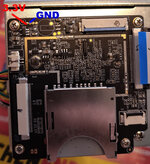
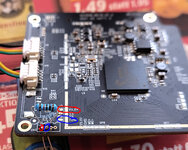
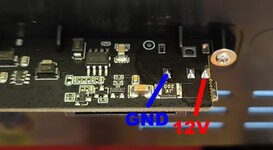
Thank you John! I now added 10 kOhm resistors between 3.3 V and Gnd and 12 V and Gnd. I will see what will be the effect on the "time out" duration. It's over 10 minutes still, but I will time and look every couple of hours to see whether there is an effect. I think it did affect the unit somehow, because after disassembly I was able to start the unit for one time, without leaving it for multiple days.

If I can't get it to work, I will just buy a new unit and move the guts. I put in enough time, that I could live with that thought now^^
 

Attachments

  • 3-3voltsTop.jpg
    3-3voltsTop.jpg
    381.7 KB · Views: 11
  • 3-3volts.jpg
    3-3volts.jpg
    273.8 KB · Views: 11
  • powerboard.jpg
    powerboard.jpg
    156.7 KB · Views: 15
  • Like
Reactions: fishgee

videodoctor

Tinkerer
Jan 8, 2026
85
51
18
Type D — New build, found and fixed a freeze bug (please test!)

Short version: Found a bug in my code that causes a freeze, and it's fixed in this build.

I can't promise it was the only one. So please try this build and report back — including "no problems here", which is also as useful. The only way to measure a random failure is over a lot of captures.

Freeze bug in detail

The firmware hooks the device's UI timer. A piece of hand-written assembly that jumps back into the original timer routine was holding the jump address in a CPU register that is reserved for the interrupt handler. If an interrupt took place in a two-instruction window, the handler overwrote that register, and the jump went to a garbage address. Instant hard lock: screen frozen, film still advancing, buttons dead, no file saved.

That fits the issues reported and what I've seen in my testing:
  • Random timing — it needs an interrupt in a ~2-instruction window, so it can hit at frame 100 or frame 3000
  • No correlation with anything — not Qp, not frame size, not bitrate, not recording length. It's interrupt timing, so none of those matter
  • Motor keeps running — the motor is driven by hardware, not controlled in the same code path

Also fixed: Random "CARD STALLED" auto-stops

Separate bug. The stall detector declared a problem after ~1.5 s without a new frame — but the scanner only produces about 1.8 frames per second, so frames are normally ~0.55 s apart. That left almost no margin, and a slightly larger frame or a momentary film-advance hiccup could trip it and abort a otherwise healthy capture.

Regarding the changes done:
  • Thresholds are now ~3 s to warn, ~5 s to stop — a real stall still gets caught quickly, a hiccup doesn't kill your capture
  • The message is now "REC STALLED", not "CARD STALLED" as the stalling may not be related to SD card performance at all
  • If you reported the auto-stop firing on normal footage — could you tell me whether the message said CARD STALLED or REEL ENDED? If it said CARD STALLED, it was likely hitting this bug

Other changes

  • Bitrate is selectable — new BR menu item: x1 (~8 Mbps, stock), x2 (~16), x4 (~32). Default stays x4
  • The Qp floor is now OFF by default. It was added to prevent an encoder crash that, as far as I can tell, was never actually happening — and at x4 it caused auto-stops by pinning the rate control so it could never reach its target. Still selectable (-, or 15–22) if you want to experiment, but leave it off unless you're troubleshooting. Raising it at x4 bitrate can cause auto-stops
  • Diagnostics survive a stop — Qp / Sz / C u m no longer reset to zero the instant recording ends, so they can still be read after an auto-stop
  • Build number on screen — FW 265 in the top right. Please include it in any report — makes it easier to distinguish which build version was used

The settings menu has been reworked

Now the [ ] marks the value you are editing, directly:

Code:
WB gains:
[689],256,204     <- editing red
FPS: [18]
BR: [x4]
ASt: [ON]
Qp:22/16 f[-]
Date:
[1984]-09-01
[Reset]

  • Up / Down — move between settings; the brackets walk down the list and wrap around
  • Left / Right — change the value by a big step (white balance moves in 16s, the year in 10s)
  • Minus / Plus — fine adjustment, one step at a time

Few things worth knowing:

  • Settings can only be changed during a recording. In preview the stock firmware owns the buttons, so there is nothing to find there — you are not missing a menu
  • Settings are saved and survive a power cycle. So the easy way is to start a short throwaway recording, set everything up, stop, and then do your real captures. [Reset] puts everything back to defaults
  • FPS and BR settings only apply for the next recording cycle, not the currently ongoing one

What I'd like from you

  • Try it on your normal reels and say how it goes — good or bad
  • If you do hit a freeze, photograph the frozen screen. It now shows the build number, bitrate, Qp range, frame sizes and total bytes in one shot
  • If anything else behaves oddly, just let me know!
Hey all, I know I've been MIA for most of this year on the development front. I was occupied still getting settled in with my new life back in my hometown of St. Louis, and planning a big wedding party with my new wife. I'm going to have more time this month to try to test the D revision, and this work by @melw looks great! Thank you for putting time into it. I have a lot of old student footage of my own to transfer and I've been holding off until the D unit had the improvements from the @0dan0 firmware updates.

On a side note, I'm also trying to come up with Super 8 sound transfer workflows. I have a decent Eumig Mark S 802 that has a 5-pin DIN plug that I need to adapt to an XLR out---my plan was to project and capture Super 8 sound footage using my Sony FS5 camera and it's XLR in from the projector and then sync the footage in Adobe Premiere to Kodak Reels capture. Has anyone else tried something similar?
 
  • Like
Reactions: melw

JohnCT

New Tinkerer
Sep 8, 2026
9
6
3
No, I don't think so. I can leave it off for a day and it still won't restart. But thank you for the suggestion! =)


I now cleaned all ribbon cables and sockets, but the problem remains. I was able to turn the unit on without the camera module attached once now while testing. But shutting the unit off, I come to the same problem. I agree that it looks like the main or power boards are to blame here. I have the cam attached now again.


Thank you John! I now added 10 kOhm resistors between 3.3 V and Gnd and 12 V and Gnd. I will see what will be the effect on the "time out" duration. It's over 10 minutes still, but I will time and look every couple of hours to see whether there is an effect. I think it did affect the unit somehow, because after disassembly I was able to start the unit for one time, without leaving it for multiple days.

If I can't get it to work, I will just buy a new unit and move the guts. I put in enough time, that I could live with that thought now^^

You can go much lower than 10K ohms. 3.3v at 10K is a current draw of just 0.33ma (for the 3.3v source) from the buck converters that supply the 3.3 and 12V which is basically nothing. I would start with a 1K bleeder resistor and even go down from there if there seems to be an improvement in reboot time. The buck converters will shut down if they detect excessive current with no damage, so don't be afraid to experiment with lower value bleeders. Most of these buck converters are good for a minimum of 200ma to start with.

John
 
Last edited:
  • Like
Reactions: Boojakascha

Boojakascha

New Tinkerer
Jun 20, 2026
21
12
3
You can go much lower than 10K ohms. 3.3v at 10K is a current draw of just 0.33ma (for the 3.3v source) from the buck converters that supply the 3.3 and 12V which is basically nothing. I would start with a 1K bleeder resistor and even go down from there if there seems to be an improvement in reboot time. The buck converters will shut down if they detect excessive current with no damage, so don't be afraid to experiment with lower value bleeders. Most of these buck converters are good for a minimum of 200ma to start with.

John

Thank you, I shall try =)

Worst thing that can happen is that I end up with multiple units. I now ordered one to have one for sure and continue working on thicker spacers for the D model (as Balto1986 already discussed the full zoom out still crops at the D).
 
  • Like
Reactions: JohnCT

JohnCT

New Tinkerer
Sep 8, 2026
9
6
3
Good news everyone - I removed the new SD socket I installed in place of the missing one (I bought the Kodak Reels cheap on the bay for parts) and the shorts on the board disappeared, and the Kodak sprang back to life. Display is back and it's calling for an SD card. So the brand new socket failed internally. I took the new failed socket apart and found two pins that were pushed back and then up into the grounded cover. The front lip of the pins are shrouded so I don't know how the two wayward pins could get snagged on the card unless it was assembled wrong and those two pins were above the shroud and snagged on the SD card. I will order another socket that is a push pull type and not a spring loaded push push like the last one that crapped out..

I'll update after the new socket arrives. Meanwhile, if anyone knows what socket I can buy for this, I'd appreciate it. It would probably save me a couple of hours of work. Thanks!!

EDIT: It turns out that I can't use the simpler push-pull socket because those have a different footprint on the board and do not interchange. The cheapest socket I found that will fit is a push push (with shipping) was ordering an Arduino module with that same socket on the Arduino board. I'll remove that one and put it in the Kodak. I'll report back next week.

John

Success!! Short version of story > bought Kodak Reels cheap because it needed "SD card reader". I found that the original SD card socket was missing and a mini SD card adapter was wired soldered by jumper wire and not working. I installed new SD card and it went dead (found brand new socket had two pins shorted to ground). Installed second socket and it's up and running and recording!!!

But attached is my first scan. It's an 8mm film but the actual image is about 1/3 of the total surface scanning area considering that it's scanning the sprocket holes. And from this scan, it seems the sprocket holes are in the actual picture area? Is there something else wrong? It looks like it's zoomed all the way out, but I don't think these have a zoom feature. It seems to be in focus..

John
Kodak Scan.jpg
 
Last edited:
  • Like
Reactions: Boojakascha

Boojakascha

New Tinkerer
Jun 20, 2026
21
12
3
it seems the sprocket holes are in the actual picture area? Is there something else wrong?

Congratulation very nice!

I am not an expert. I just scanned some relatives reels and some Italian Stag. I would say your film strip is uncommon and special.