WON'T POWER ON: PowerBook Wallstreet PDQ

JDW

Administrator
Staff member
Founder
Sep 2, 2021
2,865
2,227
113
55
Japan
youtube.com
I have two PowerBook Wallstreet PDQ notebooks that once worked fine several years ago), but now neither will power-on when I press the POWER button (long or short press).

When I first plug-in the Apple AC Adapter, the fan spins at full blast and the green power LED lights for a couple seconds, and then the fan and LED power off. After that, pressing the power button does nothing.

I have no working battery anymore, so I only have AC power from the stock adapter. I've tested both PDQ machines with nothing in either drive bay and with even the hard drive removed, but to no avail. Both PDQ machines respond in the exact same way — power button doesn't power them on, despite my hearing the fan spin and LED light initially after connecting the AC Adapter. I've swapped their CPU cards, but again, it doesn't resolve the problem.

Here's a video overview of what I explained and mentions a couple voltage measurements I made too...


Wallstreet repair experts...
How can I fix these machines?
 

JDW

Administrator
Staff member
Founder
Sep 2, 2021
2,865
2,227
113
55
Japan
youtube.com

JDW

Administrator
Staff member
Founder
Sep 2, 2021
2,865
2,227
113
55
Japan
youtube.com
Well, the verdict is in. Recapping does nothing to fix these problems.
My gut instinct was 100% correct.

More specifically, I replaced all 5 electrolytic capacitors with high quality polymer capacitors. Absolutely no changes in machine behavior occurred after recap. After reassembly and connecting the AC Power Adapter, pressing the power button did nothing. After waiting 24 hours, pressing power also did nothing (as usual). I waited another 24 hours and pressing power worked. The machine was on for just under 1 hour, then it suddenly lost power. So no, recapping a Wallstreet PDQ does NOT fix any of the issues I have mentioned throughout this thread.

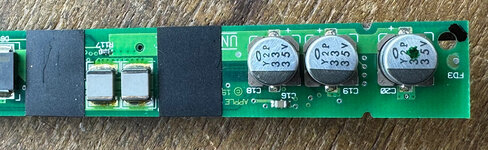
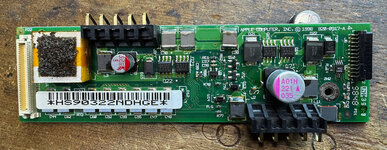
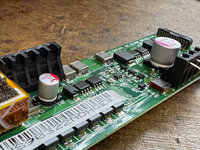
The two PCBs recapped sit between the drive bays. High resolution photos showing the stock capacitors are here ("Primary DC Board with Daughtercard Attached" & "Daughtercard"):

CAPACITOR INFO​

(DE-5000 was used to make measurements)​


C49​

STOCK CAPACITOR​

Frequency Tested: 120Hz
Capacitance: 31.9µF
D = 0.075
Q = 12.79
ESR: 3.2Ω
θ = -85.6°

REPLACEMENT CAPACITOR (C49)​

(Wurth Aluminum Organic Polymer 875105545004)​

Frequency Tested: 120Hz
Capacitance: 34.82µF
D = 0.015
Q = 67.8
ESR: 0.5Ω
θ = -89°

C18​

STOCK CAPACITOR​

Frequency Tested: 120Hz
Capacitance: 32.39µF
D = 0.065
Q = 15.21
ESR: 2.7Ω
θ = -86.2°

C19​

STOCK CAPACITOR​

Frequency Tested: 120Hz
Capacitance: 32.6µF
D = 0.092
Q = 11
ESR: 3.5Ω
θ = -84.9°

C20​

STOCK CAPACITOR​

Frequency Tested: 120Hz
Capacitance: 32.26µF
D = 0.065
Q = 15.55
ESR: 2.5Ω
θ = -86.4°

REPLACEMENT CAPACITORS (C18/19/20)​

(Kemet Polymer Tantalum T521V336M035ATE065)​

Frequency Tested: 120Hz
Capacitance: 36.04µF
D = 0.007
Q = 137.5
ESR: 0.2Ω
θ = -89.5°

C71​

STOCK CAPACITOR​

Couldn't measure because my hot tweezers weren't wide enough to get around the cap, and my attempt at using dual soldering irons failed. So I had to remove it by the twist-off method. Pads were OK, but the cap seems to have been destroyed in the process because I couldn't get any reading from it after removal.

REPLACEMENT CAPACITOR (C71)​

(Kyocera AVX Aluminum Organic Polymer APA1010221M035R)​

Frequency Tested: 120Hz
Capacitance: 215.6µF
D = 0.021
Q = 45.3
ESR: 0.1Ω
θ = -88.6°


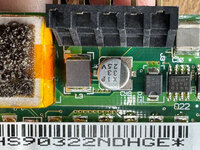
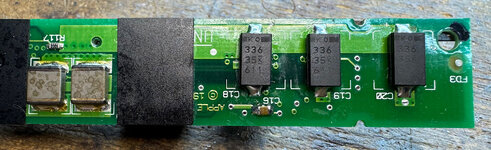
STOCK CAP PHOTOS (all 5 caps)​

C18-19-20-stock_TopDown.JPG​

C49-stock_TopDown.JPG

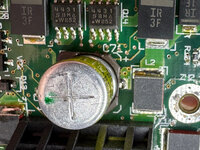
C71-stock_SideViewZoom.JPGC71-stock_TopDownZoom.JPG

​

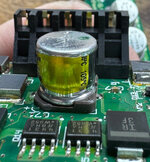
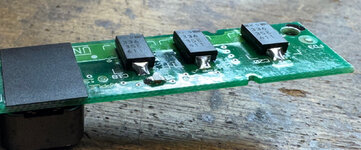
REPLACEMENT CAP PHOTOS (all 5 caps)​

C18-19-20_TopDown.JPG
C18-19-20_SideView.JPG
C49_C71_TopDown.JPG
C49_C71_SideView.JPG

Shouldn't you replace electrolytic caps that are more than 25 years old? Yes! But that is a different topic. The point here is that recapping doesn't fix the "won't power on" and "sudden power loss" issues inherent to many Wallstreet PowerBooks.

Now I'm back to square one, trying to figure out what's wrong.

:cry:
 

JDW

Administrator
Staff member
Founder
Sep 2, 2021
2,865
2,227
113
55
Japan
youtube.com
I appreciate your reply.

A "weak power line" is a phrase that is extremely broad. Technically, any PCB trace that carries 5V or 12V power is a "power line" throughout the entire machine. So because that statement doesn't nail down a specific location in the machine, it's not a question I can answer.

With that said, some people who own Wallstreet machines have reported that replacing the PMU PCB resolves "won't power on" issues, although I seem to be the lone person on the planet who is also experiencing "sudden power loss" after the machine has powered up. That could be because in the past, more people had working batteries, and even I myself don't remember having these issues when I had a working battery. But on AC power only, I do have the problems.

Anyway, the PMU PCB is technically the board that is the "Power manager" you refer to. I don't know if it handles Soft Power though. But it would be correct to call the pressing of the Power button "soft power" insofar as that button doesn't directly make/break connections to the external AC Power Adapter.

The main issue is, we don't know precisely WHERE inside the machine the problem lies.

If we argue it is the PMU board, why is it that board? What chip on that board is "failing"?

Assuming it is the PMU board, we cannot say the PMU board has 100% failed because I can power-on my PDQ if I leave it connected 48 hours, but then it loses power suddenly about an hour later. That is the most perplexing part of this entire problem. The machine works a little bit, but not completely. It's weird. And I cannot say if a PMU PCB swap is the magic fix because that is just a guess based on case reports I dug up on the internet. Sadly, there isn't much talk about the Wallstreet machines out there. This thread is perhaps the most detailed of anything I've come across thus far.

I just fired off an email to Nick Gillard of 1-bit Rainbow in the UK since I've bought from him before, and he has various Wallstreet parts I could use. It's just kind of pricey to get "all the parts," so nailing down what might work is key. I asked for his opinion and am waiting for his feedback. Maybe he can offer some good insights.