Hacking the Kodak Reels 8mm Film Digitizer (New Thread)

0dan0

Active Tinkerer
Jan 13, 2025
391
536
93
Hi guys, I have some newbie questions about post-scanning enhancement of the footage.
I'm using (using is an overstatement) DaVinci but I am no expert at all.
I can do editing and basic enhancement (removing dust, scratches, etc.) but I have no method nor experience, so each project is different.
I know that this is a bit off topic, but probably, given the output of the Kodak, there may be some settings/procedures that work better with this kind of footage.
  • I'd like to know what FPS you use to capture, and why. Do you maintain it throughout the whole editing process? What is the final FPS for your 8mm and super 8mm footage? Do you render at 16 (or 18) and keep it at 16 (or 18) all the way through?

Classic 8mm is 16fps.
Most Super8 is 18fps.

Best not to mix as video files do support changing frame rates.

If you have to mix, then use a 24.0Hz timeline, both 16 and 18fps will look okay within 24fps file.

  • what filters/corrections do you apply?

Very minimal contrast controls.

  • what is the final format/settings you use for the rendered version: are you aiming to reduce the compression completely - I think that given the quality of the original footage there is a point where very low compression is irrelevant if not worsening the output - or what do you use to judge the output compression? About this point I believe that most of us want to preserve the best quality of the footage but keep it somehow sharable: having 1Gb/minute seems too much to me: what's your POV?

If it going to youtube I export at 2160p (4K), or 2880x2160 (for 4:3 source). Youtube does value HD content, only 4K will have okay compression.

For local copies in original resolution, the GPU or software compression engine is way better than in the Reels scanner. I use ~20Mb/s of HD, ~45Mb/s 4K.

  • Is there any way to avoid compression while rendering: I mean if I feed a 1Gb footage, what settings/format should I use to obtain a similar size output without pushing high compression? It seems that the original compression/quality cannot be maintained without using a 'low-quality' setting: every medium-high quality setting do increase the rendered file size.
No way.
 

videodoctor

New Tinkerer
Jan 8, 2026
50
23
8
Classic 8mm is 16fps.
Most Super8 is 18fps.

Best not to mix as video files do support changing frame rates.

If you have to mix, then use a 24.0Hz timeline, both 16 and 18fps will look okay within 24fps file.


Very minimal contrast controls.


If it going to youtube I export at 2160p (4K), or 2880x2160 (for 4:3 source). Youtube does value HD content, only 4K will have okay compression.

For local copies in original resolution, the GPU or software compression engine is way better than in the Reels scanner. I use ~20Mb/s of HD, ~45Mb/s 4K.


No way.
I've done a lot of video compression with my professional work, and I use ffmpeg regularly. YouTube is going to recompress anything you upload, so as a mezzanine format, high-bitrate H.264 is the way to go. For archiving locally, or for my own players/streaming setups, I use ffmpeg and libx264 as it has a CRF control that automatically adjusts bitrate to the complexity of the video frame. Traditional VBR (Variable Bit Rate) does this too, but x264 is known for its superior compression. The default flag in ffmpeg is -crf 23, but I usually use a -crf 21, as it's going to retain more details. Going below 21 won't likely yield noticeable quality gain for the increased bitrate/file size. (Lower CRF is higher quality, higher bitrate.)
 

videodoctor

New Tinkerer
Jan 8, 2026
50
23
8
As I continue work to find the AE hook to run 0dan0's custom code, I wanted to share my current bash script to update 0dan0's freed up space version of the Stock D firmware. I typically like to use Ubuntu (or wsl on Windows 11) to run Linux commands, and compile there too. Are there Linux equivs of the bfc4ntkVS.exe and ntkcalcVS.exe files? I could use wine to run those on Ubuntu. Right now I switch between a wsl tab and a PowerShell tab to compile new test firmware.


Bash:
#!/bin/bash
# Kodak Reels Type D - Resolution and Framerate Patch Script
# Applies 1600x1200 resolution and 18fps to 0dan0's base firmware

# Source and output files
SOURCE="FWDV280-D_0dan0.rbn"
OUTPUT="FWDV280-D-phase9.rbn"

# Copy base firmware
cp "$SOURCE" "$OUTPUT"

echo "Patching $OUTPUT..."

# ============================================
# RESOLUTION PATCHES (1600x1200)
# ============================================

# Width: 1600 = 0x640
# Height: 1200 = 0x4B0

# Patch 1: 0x1c5c48 - width 1600
printf '\x40\x06' | dd of="$OUTPUT" bs=1 seek=$((0x1c5c48)) conv=notrunc 2>/dev/null

# Patch 2: 0x1c5c50 - height 1200
printf '\xb0\x04' | dd of="$OUTPUT" bs=1 seek=$((0x1c5c50)) conv=notrunc 2>/dev/null

# Patch 3: 0x1c5cac - width 1600
printf '\x40\x06' | dd of="$OUTPUT" bs=1 seek=$((0x1c5cac)) conv=notrunc 2>/dev/null

# Patch 4: 0x1c5cb4 - height 1200
printf '\xb0\x04' | dd of="$OUTPUT" bs=1 seek=$((0x1c5cb4)) conv=notrunc 2>/dev/null

# Patch 5: 0x1c7170 - width 1600
printf '\x40\x06' | dd of="$OUTPUT" bs=1 seek=$((0x1c7170)) conv=notrunc 2>/dev/null

# Patch 6: 0x1c7178 - height 1200
printf '\xb0\x04' | dd of="$OUTPUT" bs=1 seek=$((0x1c7178)) conv=notrunc 2>/dev/null

# ============================================
# FRAMERATE PATCH (18fps)
# ============================================

# 18fps = 0x12
printf '\x12' | dd of="$OUTPUT" bs=1 seek=$((0x1015e8)) conv=notrunc 2>/dev/null

# ============================================
# VERIFICATION
# ============================================

echo ""
echo "Verifying patches..."
echo ""

echo "Resolution patches (should show 4006 for width, b004 for height):"
echo -n "  0x1c5c48 (width):  "; xxd -s $((0x1c5c48)) -l 2 "$OUTPUT" | cut -d: -f2 | cut -c1-5
echo -n "  0x1c5c50 (height): "; xxd -s $((0x1c5c50)) -l 2 "$OUTPUT" | cut -d: -f2 | cut -c1-5
echo -n "  0x1c5cac (width):  "; xxd -s $((0x1c5cac)) -l 2 "$OUTPUT" | cut -d: -f2 | cut -c1-5
echo -n "  0x1c5cb4 (height): "; xxd -s $((0x1c5cb4)) -l 2 "$OUTPUT" | cut -d: -f2 | cut -c1-5
echo -n "  0x1c7170 (width):  "; xxd -s $((0x1c7170)) -l 2 "$OUTPUT" | cut -d: -f2 | cut -c1-5
echo -n "  0x1c7178 (height): "; xxd -s $((0x1c7178)) -l 2 "$OUTPUT" | cut -d: -f2 | cut -c1-5

echo ""
echo "Framerate patch (should show 12 for 18fps):"
echo -n "  0x1015e8 (fps):    "; xxd -s $((0x1015e8)) -l 1 "$OUTPUT" | cut -d: -f2 | cut -c1-3

echo ""
echo "Done! Output: $OUTPUT"
echo "Run build_local.bat to create final firmware package."
 

0dan0

Active Tinkerer
Jan 13, 2025
391
536
93
Yes, you can make Linux versions, I could potential use that too.

Here is the source, I should forked the original and offered patches.
 

Attachments

  • bfc4ntk.zip
    14.5 KB · Views: 12
  • ntkcalc.zip
    32.2 KB · Views: 8

0dan0

Active Tinkerer
Jan 13, 2025
391
536
93
For recent US purchasers from Amazon, what serial numbers are you getting?

H2825, D2825 or something else?
 

videodoctor

New Tinkerer
Jan 8, 2026
50
23
8
I updated my type-D firmware with the above code changes. This has not merge in your other patches. So you should just grab bytes from 338f28 - 340008. Repo is up to date. Note: the code from 338f28 - 33b200 still will need some Type D support.

Like this motor shutdown code:
View attachment 26344

If has branches for A thru C, not D yet.

I will have some more time this weekend.

P.S. Attached is the WIP for motor shutdown fix.
View attachment 26348

I guessing the motor shutdown is at 80ddb670

You can confirm by starting a capture, then:
mem w 80ddb670 30

The motor should immediately stop.
Thanks 0dan0! I ran that mem command, and the motor did not stop. To be clear, the BIN you provided is your code update for the motor shutdown hack and should be inserted at whatever address we find in Firmware D that stops the motor?

Also, should we have a dedicated thread for code development?
 

0dan0

Active Tinkerer
Jan 13, 2025
391
536
93
Thanks 0dan0! I ran that mem command, and the motor did not stop. To be clear, the BIN you provided is your code update for the motor shutdown hack and should be inserted at whatever address we find in Firmware D that stops the motor?

Also, should we have a dedicated thread for code development?
The code dev stuff could scare some away, but I always ported my findings in the main thread, just in case someone can learn from it.

Opps! I made a typo

Try this:
mem w 80ddc670 30

You do not need the motor stop patch code yet, as that is hook to the encode crash, which only happens once you hooked up the rate control (you are ways off from that.)

I'm slowly creating a D-type patch.
1769279877128.png
 

videodoctor

New Tinkerer
Jan 8, 2026
50
23
8
Ok, thanks for providing the source code for the RBN utilities, @0dan0.

Indeed, the new command works and stops the motor!

Code:
mem w 80ddc670 30

As an aside, I'm seeing this error continuously during capture. Is it normal?

Code:
ERR:UIFlowWndMovie_OnTimer() Record400MinTimeOut 0

I've attached compiled executables that work on my Ubuntu WSL environment in Win11. AFAIK, there's no linked dependencies. I ported your build_local.bat to a build_local.sh, also attached. I think the executables run faster. I've got the SD card reader at /mnt/d.

I run this shell script from the root of my fork of your repo.

Code:
#!/bin/bash

# Find the most recently modified .rbn file
latestFile=$(ls -t *.rbn 2>/dev/null | head -1)

if [ -z "$latestFile" ]; then
    echo "No .rbn files found"
    exit 1
fi

echo "Latest file: $latestFile"

# Replace .rbn extension with .bcl
bclFile="${latestFile%.rbn}.bcl"

# Run the tools (adjust paths as needed)
./utils/ntkcalc -cw "$latestFile"
./utils/bfc4ntk -c "$latestFile" "$bclFile"
./utils/ntkcalc -cw "$bclFile"

# Create output directory and copy files
# Change this path to wherever your SD card mounts
sudo mount -t drvfs 'D:' /mnt/d 2>/dev/null

OUTPUT_DIR="/mnt/d"
mkdir -p "$OUTPUT_DIR"

cp "$bclFile" "FWDV280.BIN"
cp "FWDV280.BIN" "$OUTPUT_DIR/"

echo "Done. Output copied to $OUTPUT_DIR/FWDV280.BIN"


Here's my current "starter patch" script that works with @0dan0's starter RBN file for freed up space on Stock Firmware D. It will address the issues that @0dan0 points out in this thread.

Code:
#!/bin/bash
# Kodak Reels Type D - Starter Patch Script

echo "========================================================"
echo "  Kodak Reels Firmware D Patches :: 1600x1200 @ 18 fps, 0dan0's initial patches"
echo "========================================================"
echo ""

SOURCE="${1:-FWDV280-D_0dan0.rbn}"
OUTPUT="FWDV280-D-phase9.rbn"

echo "Source: $SOURCE"
echo "Output: $OUTPUT"
echo ""

if [ ! -f "$SOURCE" ]; then
    echo "ERROR: Source file not found: $SOURCE"
    exit 1
fi

cp "$SOURCE" "$OUTPUT"

echo "Applying patches..."

# ============================================
# DEVICE TYPE AND NVM ADDRESS (at 0x340000)
# ============================================

# Device type = 4 (Type D)
printf '\x04\x00\x00\x00' | dd of="$OUTPUT" bs=1 seek=$((0x340000)) conv=notrunc 2>/dev/null

# NVM base address = 0x80E0ADA4
printf '\xa4\xad\xe0\x80' | dd of="$OUTPUT" bs=1 seek=$((0x340004)) conv=notrunc 2>/dev/null

# ============================================
# NOP OUT PRINTF (0dan0's first code change)
# ============================================
printf '\x00\x00\x00\x00' | dd of="$OUTPUT" bs=1 seek=$((0x1d430)) conv=notrunc 2>/dev/null

# ============================================
# RESOLUTION PATCHES (1600x1200)
# ============================================
printf '\x40\x06' | dd of="$OUTPUT" bs=1 seek=$((0x1c5c48)) conv=notrunc 2>/dev/null
printf '\xb0\x04' | dd of="$OUTPUT" bs=1 seek=$((0x1c5c50)) conv=notrunc 2>/dev/null
printf '\x40\x06' | dd of="$OUTPUT" bs=1 seek=$((0x1c5cac)) conv=notrunc 2>/dev/null
printf '\xb0\x04' | dd of="$OUTPUT" bs=1 seek=$((0x1c5cb4)) conv=notrunc 2>/dev/null
printf '\x40\x06' | dd of="$OUTPUT" bs=1 seek=$((0x1c7170)) conv=notrunc 2>/dev/null
printf '\xb0\x04' | dd of="$OUTPUT" bs=1 seek=$((0x1c7178)) conv=notrunc 2>/dev/null

# ============================================
# FRAMERATE PATCH (18fps)
# ============================================
printf '\x12' | dd of="$OUTPUT" bs=1 seek=$((0x1015e8)) conv=notrunc 2>/dev/null

# ============================================
# VERIFICATION
# ============================================
echo ""
echo "Verifying patches..."
echo ""

echo "Device type and NVM (04000000 = Type D, a4ade080 = NVM addr):"
echo -n "  0x340000: "; xxd -s $((0x340000)) -l 8 "$OUTPUT" | cut -d: -f2 | cut -c1-20

echo ""
echo "NOP printf (should show 0000 0000):"
echo -n "  0x1d430:  "; xxd -s $((0x1d430)) -l 4 "$OUTPUT" | cut -d: -f2 | cut -c1-10

echo ""
echo "Resolution (4006=width, b004=height):"
echo -n "  0x1c5c48: "; xxd -s $((0x1c5c48)) -l 2 "$OUTPUT" | cut -d: -f2 | cut -c1-5
echo -n "  0x1c5c50: "; xxd -s $((0x1c5c50)) -l 2 "$OUTPUT" | cut -d: -f2 | cut -c1-5
echo -n "  0x1c5cac: "; xxd -s $((0x1c5cac)) -l 2 "$OUTPUT" | cut -d: -f2 | cut -c1-5
echo -n "  0x1c5cb4: "; xxd -s $((0x1c5cb4)) -l 2 "$OUTPUT" | cut -d: -f2 | cut -c1-5
echo -n "  0x1c7170: "; xxd -s $((0x1c7170)) -l 2 "$OUTPUT" | cut -d: -f2 | cut -c1-5
echo -n "  0x1c7178: "; xxd -s $((0x1c7178)) -l 2 "$OUTPUT" | cut -d: -f2 | cut -c1-5

echo ""
echo "Framerate (12 = 18fps):"
echo -n "  0x1015e8: "; xxd -s $((0x1015e8)) -l 1 "$OUTPUT" | cut -d: -f2 | cut -c1-3

echo ""
echo "Done! Output: $OUTPUT"
echo "Run build_local.bat to create final firmware package."
 

Attachments

  • ubuntu_tools.zip
    13.8 KB · Views: 11

0dan0

Active Tinkerer
Jan 13, 2025
391
536
93
There are a lot of error messages I had suppressed with a NOP over the print console call. I don't remember if this is one of them.

For any string message to find where is it called from:
search on "UIFlowWndMovie_OnTimer"

found at offset 0x32ef2c

This address will be in stored in a0 or a1. As the ERR: UIFlowWndMovie_OnTimer, "ERR:" will be pointed to by a0, and the string we need is in a1.

To find the in the code.

The compiler commonly set up the addresses like this:

lui $a0, 0x8033
..
addiu $a0, $a0, 0xef2c

If is but confusing at 0xef2c will be treated as -0x10d4 (sign bit, in unsigned math)

So I'm always look for addiu $a0, $a0 ... or addiu $a1, $a1, next to a jal 0x80c60 (call to console - 18 03 02 0C)

addiu $a0, $a0, 0xef2c is (little endian) as 2c ef 84 24
addiu $a1, $a1, 0xef2c is (little endian) as 2c ef a5 24

1769288514531.png


MIPS run one extra instruction after a call, so it is not wrong that a1 setup is after the jal call.

So string message can be used to find the code. Then use Ghidra at offset 113ef0 to see what is the cause of the message.

However in this case, the error message did not exist in Type A-C, so this is new code.

This will hurt the brain. They are probably better ways.
 

ThePhage

Tinkerer
Oct 30, 2024
51
46
18
Also, should we have a dedicated thread for code development?

My 2 cents here: feel free to continue sharing the technical info here in thread. While you two are engaging quite a bit above my head, I think it's fine to keep it documented here. I grab some popcorn and am pleased to see some fine work being done to support the latest hardware. The occasional summary posts are helpful markers as to the progress being made.

For those who are new to this thread: for context, 0dan0 and Deano are actively working toward developing a custom firmware for the latest Reels hardware (we're calling Version D). If you are the new owner of a recently manufactured Reels scanner, and you are brave enough regarding firmware updates and testing, feel free to engage in this process to provide specific, technical feedback to those who are pouring their time and energy into this community effort.
 
  • Like
Reactions: WowIndescribable

ThePhage

Tinkerer
Oct 30, 2024
51
46
18
Hi guys, I have some newbie questions about post-scanning enhancement of the footage.

Like you, I am relatively new to Davinci Resolve (DR), however I've had semi-professional experience (and a lot of amateur/hobby experience) with Final Cut Pro and Adobe Premiere. Here is a brief summary/recomendations on my approach to the Post-scan process:

1. Take some time to determine your process so you can be consistent throughout and not have to re-do your efforts half-way through. So, do some testing with some footage, go through the entire process from start to finish, and document it so you can repeat it for each reel you work on.

2. Learn well your edting tool (whether Davinci Resolve or whatever NLE you're using). Check on YouTube (and use some Gen AI tools like ChatGPT) for training information on general editing tips and techniques. Even learning some keyboard shortcuts can help speed up your workflow.

3. If using 0dan0's firmware, set the correct frame rate during capture/scan: typically 16fps for 8mm (althought occasionally 18), and 18fps for Super8 (or occasionally 24). If unsure during scanning, don't worry, you can losslessly adjust this after scanning.

4. Before scanning, several frames into the first reel, adjust the scanner framing/Zoom to scan just a little wider than the full frame itself (crop it in post)

5. In your NLE (Davinci Resolve or otherwise), set your project/sequence to a standard HD resolution (1920x1080, or it's 4x3 counterpart: 1440x1080) at the same frame rate as your native footage (16, 18 or possibly 24). On the "Format" settings for the timeline, set "Mismatched Resolution" to "Center Crop with No Resizing." This way, when you add footage to your timeline that's larger than 1080p into your 1080p timeline, the footage can be scaled down without loosing quality.

6. After adding footage to your timeline, adjust the "Transform" settings of the clip(s) to zoom and position the footage to just barely crop off the edges of the film frame in the timeline. The position may shift through-out a long scan, especially if multiple small reels were spliced together into a larger reel, so scrub through the footage on your timeline to different areas to see if/how the position shifts over time. If it shifts drammaticaly, consider cutting into smaller clips and adjust transform individually.

7. Consider using the "detect scene cuts" feature for your timeline. Remove any over/under-exposed frames (often the first frame after a cut in the footage). Remove the heads and tails or anything that obviously doesn't belong in the finished product.


Basic Filters:

8. Using the "Color" mode in DR, add some serial nodes (for filters) to the entire timeline: My first node is Noise Reduction (I use the paid Neat plugin, but DR Studio also has it's own. Learn and know your NR tool well. Be careful to not overdue it by trying to make your 8mm film look like noise-less digital video. Second node for the timeline is DR's sharpening tools (mid-detail to 50 and reduce blur to 45) - but this is preferential and dependant upon the "sharpen" setting that you use while scanning (I favor -1.5, or possibly -1 with a modified scanner lens). 3rd node for the entire time is for a slight, overall color correction if I didn't nail it during capture (I simply adjust Temp and Tint adjustments). There's obviously a lot more that could be done regarding color & brightness, but hopefully the initial capture got it right the first time around (easier with 0dan0's Auto Exposure controls, bias, lock, etc). And shot-by-shot correction can be done, but that will add to the time needed to finish the process.

9. Once I'm happy with all of that, I typically export that as it's own "master file" in ProRes 422 (although some may prefer ProRes 422 HQ). This preserves the native frame rate of the footage. Alternatively, it may work to nest that timeline into another timeline for the next step, but nested timelines in DR don't always behave nicely.


Frame Rate Interpolation (to 24p, a personal preference). It is a "drastic" change from the native footage, but I think most casual viewers will appreciate it, as it feels more like the movies they are used to watching):

10. I will typically take that ProRes file and bring it into a new timeline that is set to 24fps. I will use DR's Optical Flow (AI Speed Warp) setting to interpolate the 16 or 18fps footage to 24p. To do this well, it is best to first split the entire timeline into it's individual clips first (so that the interpolation doesn't akwardly morph/blend consecutive clips together).

11. Then, in the Color mode, I add a node to the entire timeline with DR's Film Grain effect. I have found the 16mm Preset with an opacity of 0.8 is about right. Adding this grain effect in the 24p timeline instead of the earlier native frame rate will help make the 24p interpolation seem legitimate/authentic.

12. Add a simple, boring title at the head (white text on black background) to introduce the reel and provide some date/people/location information. For some fun effect, add some subtle "projector running" sound effect to the duration of the timeline.

13. Export a "24p Master file" using ProRes 422.


Delivery:

14. Transcode that 24p master file in Handbrake (for x264 codec) with a preset that meets your needs (ideally with constant quality around RF 20, as previously mentioned). This MP4, perhaps with some added metadata (title, genre, type, date, etc), is the final deliverable to friends/family.

15. As 0dan0 mentioned, if you're going to upload to YouTube, it would be best to scale up to 4k in a high quality format: this will preserve detail and grain of your footage after YouTube transcodes it into it's various destination resolutions.

16. Tell your firends and family who are watching this footage to turn off their TV's damned settings that interpolates up to 60p! It's ludicrous!


In the near future, I hope to provide a resource (possibly here at TinkerDifferent) that documents in better detail my personal process, from start to finish, with scanning, editing, and delivering, footage scanned with a firmware-modified Reels Scanner.

 
Last edited:

videodoctor

New Tinkerer
Jan 8, 2026
50
23
8
In my hunt for the auto exposure function/hook in Ghidra in Firmware D, I found this function. The most interesting bit is at the end where there's a jal instruction (not shown in this copy of the function) to printf calls:

Code:
void FUN_802b6a08(void)

{
  uint uVar1;
  int iVar2;
  undefined4 uVar3;
  undefined4 uVar4;
  undefined4 uVar5;
  uint uVar6;
  int iVar7;
  undefined *puVar8;
  int iVar9;
  undefined4 local_d8;
  undefined4 local_d4;
  undefined4 local_d0;
  uint local_cc;
  undefined4 local_c8;
  undefined4 local_c4;
  undefined auStack_c0 [12];
  undefined auStack_b4 [12];
  undefined auStack_a8 [12];
  undefined auStack_9c [12];
  undefined4 local_90;
  uint local_8c;
  uint local_88;
  uint local_84;
  uint local_80;
  undefined4 local_7c;
  undefined4 local_78;
  uint local_74;
  uint local_70;
  undefined4 local_6c;
  undefined4 local_68;
  undefined4 local_64;
  uint local_60;
  uint local_5c;
  uint local_58;
  undefined4 local_54;
  undefined4 local_50;
  undefined4 local_4c;
  undefined4 local_48;
  undefined4 local_44;
  undefined4 local_40;
  undefined4 local_3c;
  int local_38;
  int local_34;
  int local_30;
  uint local_2c;
  
  _DAT_80f82464 = _DAT_80f82464 + 1;
  if (_DAT_80f82464 != (_DAT_80f82464 / 3) * 3) {
    return;
  }
  if (_DAT_80f823a0 == 1) {
    if (_DAT_80f823ac - 0x140U < 0x141) {
      uVar5 = FUN_8027c7dc(0,0x43210005);
      iVar2 = FUN_802b643c(uVar5);
      if (iVar2 == 0) {
        FUN_80301dc8(0,&local_cc,&local_d0);
      }
      else {
        FUN_80301dc8(1,&local_cc,&local_d0);
      }
      iVar2 = FUN_802b609c(local_d0,&local_c4,&local_c8);
      if (iVar2 == 0) {
        puVar8 = &DAT_80f82570;
        _DAT_80f82588 = (_DAT_80f82578 * _DAT_80f82574) / local_cc;
        if (local_cc == 0) {
          trap(7);
        }
        local_34 = -0x7f080000;
        _DAT_80f82584 = local_cc;
        local_38 = -0x7f080000;
        local_2c = (uint)(local_cc != _DAT_80f82574);
        if (_DAT_80f82578 != _DAT_80f82588) {
          local_2c = local_cc != _DAT_80f82574 | 2;
        }
        if (_DAT_80f8257c != _DAT_80f8258c) {
          local_2c = local_2c | 4;
        }
        FUN_801df0ac(0,&local_d4);
        FUN_801df99c(0,_DAT_80f82584,local_d4,auStack_a8);
        FUN_801df88c(0,_DAT_80f82588,auStack_9c);
        *(uint *)(local_38 + 0x245c) = local_2c | *(uint *)(local_38 + 0x245c);
        FUN_802b620c(auStack_a8);
        FUN_802b61b4(auStack_9c);
        local_90 = 0;
        FUN_80275fb4(0xb,&local_90);
        local_60 = local_84 / local_8c;
        if (local_8c == 0) {
          trap(7);
        }
        local_7c = local_c8;
        local_78 = local_c4;
        local_58 = 3;
        local_54 = 0x31;
        local_50 = 10;
        local_64 = 0x80f825a0;
        local_4c = 0xf5;
        local_48 = 0x3c;
        local_44 = 0x50;
        local_40 = 0x40;
        local_3c = 0x1a;
        local_74 = local_8c;
        local_70 = local_88;
        local_6c = 0;
        local_68 = 0;
        local_5c = local_80 / local_88;
        if (local_88 == 0) {
          trap(7);
        }
        local_30 = local_88 * local_8c;
        FUN_80301cb4(&local_7c);
        iVar2 = local_30 * 2;
        do {
          FUN_8027e078(0,0);
          FUN_8027e078(0,0);
          FUN_8027e078(0,0);
          iVar7 = -0x7f07da60;
          iVar9 = 0;
          do {
            FUN_8027e078(0,0);
            FUN_8030ac64(0,0x80f855a0,0x80f85da0,0x80f865a0,local_30);
            FUN_800adef4(iVar7,0x80f85da0,iVar2);
            iVar9 = iVar9 + 1;
            iVar7 = iVar7 + iVar2;
          } while (iVar9 != 6);
          FUN_80301e78();
        } while ((local_58 & 2) != 0);
        _DAT_80f82584 = _DAT_80f82574;
        _DAT_80f82588 = _DAT_80f82578;
        _DAT_80f823a0 = 0;
        FUN_801df0ac(0,&local_d4);
        FUN_801df99c(0,_DAT_80f82584,local_d4,auStack_a8);
        FUN_801df88c(0,_DAT_80f82588,auStack_9c);
        *(uint *)(local_38 + 0x245c) = *(uint *)(local_38 + 0x245c) | 3 | local_2c;
        FUN_802b620c(auStack_a8);
        FUN_802b61b4(auStack_9c);
        FUN_8027e078(0,0);
        FUN_8027e078(0,0);
        FUN_8027e078(0,0);
        goto LAB_802b6aa0;
      }
      local_34 = -0x7f080000;
      FUN_80080c60(s_^RERR:%s()_AEAFD:_sensor_dont_su_80dbc3c0,s_AE_AutoFlickerDetectProc_80dbc4e0);
      _DAT_80f823a0 = 0;
    }
    else {
      local_34 = -0x7f080000;
      FUN_80080c60(s_^RERR:%s()_AvgY(%d)_out_of_range_80dbc394,s_AE_AutoFlickerDetectProc_80dbc4e0,
                   _DAT_80f823ac,0x280,0x140);
    }
    puVar8 = (undefined *)(local_34 + 0x2570);
  }
  else {
    local_34 = -0x7f080000;
    puVar8 = &DAT_80f82570;
  }
  local_38 = -0x7f080000;
LAB_802b6aa0:
  iVar2 = FUN_8027c7dc(0,0x43210007);
  if (iVar2 == 0) {
    uVar5 = 0;
  }
  else if (iVar2 == 1) {
    uVar5 = 1;
  }
  else if (iVar2 == 2) {
    uVar5 = 2;
  }
  else if (iVar2 == 3) {
    uVar5 = 3;
  }
  else {
    uVar5 = 0;
  }
  FUN_802b5a58(uVar5);
  FUN_8027c7dc(0,0x4321000d);
  uVar5 = FUN_8027c7dc(0,0x43210005);
  iVar2 = FUN_802b643c(uVar5);
  if (iVar2 == DAT_80e009d0) {
    _DAT_80f823d0 = 0;
  }
  else {
    if (iVar2 == 0) {
      _DAT_80f823d4 = &DAT_80dbc734;
    }
    else {
      _DAT_80f823d4 = &DAT_80dbc630;
    }
    _DAT_80f823b4 = 0x280000;
    _DAT_80f823b0 = 0x50;
    _DAT_80f823bc = 0x640;
    _DAT_80f823b8 = 0x32;
    _DAT_80f823d0 = 1;
    DAT_80e009d0 = iVar2;
  }
  uVar5 = FUN_8027c7dc(0,0x4321000d);
  uVar5 = FUN_802b5ec8(uVar5);
  uVar3 = FUN_8027c7dc(0,0x43210005);
  uVar3 = FUN_802b643c(uVar3);
  uVar4 = FUN_8027c7dc(0,0x43210001);
  uVar4 = FUN_802b5dcc(uVar4);
  FUN_802b5afc(uVar5,uVar3,uVar4,0x80f823a4);
  _DAT_80f823ac = FUN_802b64b0(0x40,_DAT_80f823cc);
  iVar2 = FUN_801144e8(0);
  _DAT_80f823e4 = (uint)(iVar2 * 0x280) / 100;
  FUN_801e4854(0x80f823a4,&DAT_80f82580,0x80f82590,0,0);
  iVar2 = _DAT_80f8258c;
  uVar1 = _DAT_80f82588;
  uVar5 = _DAT_80f82580;
  uVar6 = (uint)(*(uint *)(puVar8 + 4) != _DAT_80f82584);
  if (*(uint *)(puVar8 + 8) != _DAT_80f82588) {
    uVar6 = *(uint *)(puVar8 + 4) != _DAT_80f82584 | 2;
  }
  if (*(int *)(puVar8 + 0xc) != _DAT_80f8258c) {
    uVar6 = uVar6 | 4;
  }
  *(uint *)(puVar8 + 4) = _DAT_80f82584;
  *(int *)(puVar8 + 0xc) = iVar2;
  *(uint *)(puVar8 + 8) = uVar1;
  *(undefined4 *)(local_34 + 0x2570) = uVar5;
  FUN_801df0ac(0,&local_d8);
  iVar2 = FUN_801df99c(0,_DAT_80f82584,local_d8,auStack_c0);
  FUN_801df88c(0,(iVar2 * _DAT_80f82588) / 100,auStack_b4);
  if (iVar2 != 100) {
    uVar6 = uVar6 | 2;
  }
  *(uint *)(local_38 + 0x245c) = uVar6 | *(uint *)(local_38 + 0x245c);
  FUN_802b620c(auStack_c0);
  FUN_8027e078(0,0);
  FUN_8027e078(0,0);
  FUN_802b60fc(_DAT_80f8258c);
  FUN_802b61b4(auStack_b4);
  if (_DAT_80f82468 != (code *)0x0) {
    (*_DAT_80f82468)(_DAT_80f82588,_DAT_80f82584);
  }
  FUN_802bdbc0(0x12d);
  if (_DAT_80f82398 != 1) {
    return;
  }
  FUN_80080c60(s_^RERR:%s()_%3d_%3d_%8d_%3d_%7d,_%_80dbc3f8,s_AE_Process_80dbc4d4,_DAT_80f823ac,
               _DAT_80f82450,_DAT_80f8244c,_DAT_80f82588,_DAT_80f82584,_DAT_80f8258c,_DAT_80f82598,
               _DAT_80f82594,_DAT_80f8259c,_DAT_80f823dc);
  FUN_80080c60(s_^RERR:%s()_---------------------_80dbc42c,s_AE_Process_80dbc4d4);
  return;
}

@0dan0, does this look like the right function to use for your histogram functions? Claude.ai was suggesting I replace a jal at the end of this function (FUN_8008c60), but there some conditions above the end that would cause a return and thus not fire the hook.
 

0dan0

Active Tinkerer
Jan 13, 2025
391
536
93
The offset looks about right, but I'm away from my computer, so I can't compare, but clearly the auto exposure function has changed significantly from the earlier models. I have been patching a lot of things for type D. The AE hook was one of the last things to do. I will have something to try sometime tomorrow
 
  • Like
Reactions: videodoctor

Federico

New Tinkerer
Mar 2, 2024
16
15
3
Like you, I am relatively new to Davinci Resolve (DR), however I've had semi-professional experience (and a lot of amateur/hobby experience) with Final Cut Pro and Adobe Premiere. Here is a brief summary/recomendations on my approach to the Post-scan process:

1. Take some time to determine your process so you can be consistent throughout and not have to re-do your efforts half-way through. So, do some testing with some footage, go through the entire process from start to finish, and document it so you can repeat it for each reel you work on.

2. Learn well your edting tool (whether Davinci Resolve or whatever NLE you're using). Check on YouTube (and use some Gen AI tools like ChatGPT) for training information on general editing tips and techniques. Even learning some keyboard shortcuts can help speed up your workflow.

3. If using 0dan0's firmware, set the correct frame rate during capture/scan: typically 16fps for 8mm (althought occasionally 18), and 18fps for Super8 (or occasionally 24). If unsure during scanning, don't worry, you can losslessly adjust this after scanning.

4. Before scanning, several frames into the first reel, adjust the scanner framing/Zoom to scan just a little wider than the full frame itself (crop it in post)

5. In your NLE (Davinci Resolve or otherwise), set your project/sequence to a standard HD resolution (1920x1080, or it's 4x3 counterpart: 1440x1080) at the same frame rate as your native footage (16, 18 or possibly 24). On the "Format" settings for the timeline, set "Mismatched Resolution" to "Center Crop with No Resizing." This way, when you add footage to your timeline that's larger than 1080p into your 1080p timeline, the footage can be scaled down without loosing quality.

6. After adding footage to your timeline, adjust the "Transform" settings of the clip(s) to zoom and position the footage to just barely crop off the edges of the film frame in the timeline. The position may shift through-out a long scan, especially if multiple small reels were spliced together into a larger reel, so scrub through the footage on your timeline to different areas to see if/how the position shifts over time. If it shifts drammaticaly, consider cutting into smaller clips and adjust transform individually.

7. Consider using the "detect scene cuts" feature for your timeline. Remove any over/under-exposed frames (often the first frame after a cut in the footage). Remove the heads and tails or anything that obviously doesn't belong in the finished product.


Basic Filters:

8. Using the "Color" mode in DR, add some serial nodes (for filters) to the entire timeline: My first node is Noise Reduction (I use the paid Neat plugin, but DR Studio also has it's own. Learn and know your NR tool well. Be careful to not overdue it by trying to make your 8mm film look like noise-less digital video. Second node for the timeline is DR's sharpening tools (mid-detail to 50 and reduce blur to 45) - but this is preferential and dependant upon the "sharpen" setting that you use while scanning (I favor -1.5, or possibly -1 with a modified scanner lens). 3rd node for the entire time is for a slight, overall color correction if I didn't nail it during capture (I simply adjust Temp and Tint adjustments). There's obviously a lot more that could be done regarding color & brightness, but hopefully the initial capture got it right the first time around (easier with 0dan0's Auto Exposure controls, bias, lock, etc). And shot-by-shot correction can be done, but that will add to the time needed to finish the process.

9. Once I'm happy with all of that, I typically export that as it's own "master file" in ProRes 422 (although some may prefer ProRes 422 HQ). This preserves the native frame rate of the footage. Alternatively, it may work to nest that timeline into another timeline for the next step, but nested timelines in DR don't always behave nicely.


Frame Rate Interpolation (to 24p, a personal preference). It is a "drastic" change from the native footage, but I think most casual viewers will appreciate it, as it feels more like the movies they are used to watching):

10. I will typically take that ProRes file and bring it into a new timeline that is set to 24fps. I will use DR's Optical Flow (AI Speed Warp) setting to interpolate the 16 or 18fps footage to 24p. To do this well, it is best to first split the entire timeline into it's individual clips first (so that the interpolation doesn't akwardly morph/blend consecutive clips together).

11. Then, in the Color mode, I add a node to the entire timeline with DR's Film Grain effect. I have found the 16mm Preset with an opacity of 0.8 is about right. Adding this grain effect in the 24p timeline instead of the earlier native frame rate will help make the 24p interpolation seem legitimate/authentic.

12. Add a simple, boring title at the head (white text on black background) to introduce the reel and provide some date/people/location information. For some fun effect, add some subtle "projector running" sound effect to the duration of the timeline.

13. Export a "24p Master file" using ProRes 422.


Delivery:

14. Transcode that 24p master file in Handbrake (for x264 codec) with a preset that meets your needs (ideally with constant quality around RF 20, as previously mentioned). This MP4, perhaps with some added metadata (title, genre, type, date, etc), is the final deliverable to friends/family.

15. As 0dan0 mentioned, if you're going to upload to YouTube, it would be best to scale up to 4k in a high quality format: this will preserve detail and grain of your footage after YouTube transcodes it into it's various destination resolutions.

16. Tell your firends and family who are watching this footage to turn off their TV's damned settings that interpolates up to 60p! It's ludicrous!


In the near future, I hope to provide a resource (possibly here at TinkerDifferent) that documents in better detail my personal process, from start to finish, with scanning, editing, and delivering, footage scanned with a firmware-modified Reels Scanner.
Thank you ThePhage!
And thanks to 0Dan0 and VideoDoctor as well for your answers! I'll elaborate them and give it a try!
Next reel will be a 1943, 8mm, footage recorded in Tunisia by my grandfather, with a lot of German tanks and my grandfather's crash-landed Macchi c.202
Ciao!
 

0dan0

Active Tinkerer
Jan 13, 2025
391
536
93
@videodoctor For your initial testing only

This build will very likely crash, and/or dump a lot of error messages. I've ported anything I could, but with no way to verify, now up to you. I need to see the complete shell output from your unit. Start from "Hello, World!"

1769371390476.png


There might a lot of repeating errors, or crash, or it might work (unlikely).

The AE Hook was tricky, as the code is so different.
 

Attachments

  • FWDV280-D.zip
    5.5 MB · Views: 9
  • Like
Reactions: videodoctor

videodoctor

New Tinkerer
Jan 8, 2026
50
23
8
Thanks for the effort, @0dan0 ! No hard crash, but the buttons are unresponsive on the unit. Here's the complete output from the "Hello World!" string:

Code:
Hello, World!
> TestProtection begin
 EDesEn_Crypt pass
SC CRC PowerOnCheck: OK!
Enter DSC
bind - begin!
bind - end!
event loop - begin!
ERR:ramdsk_setParam() No Implement! uiEvt 1
Init!
System_OnStrgInit_FWS(): ^M LD_BLOCK=16384
System_OnStrgInit_FWS(): ^M FW_MAX_SIZE=003C0000
System_OnStrgInit_FWS(): ^MFW_validate-update:System_OnStrgInit_FWS():
^MFW is just updated.
System_OnStrgInit_FWS(): ^M ok
ERR:PartLoad_Init() ^RLoaded Addr 0x(80E08DAC)!= Verified Addr 0x(80106000)
ERR:xFwSrv_Err() -21
Init!
[LOAD-FW]
Total Sections = 10
   Section-01: Range[0x80000000~0x801055F0] Size=0x001055F0 (LOAD)
System_OnStrg_DownloadFW(): ^M P1_LOAD_SIZE=00E08DAC, TIME=28017927
System_OnStrg_DownloadFW(): ^MPL_check_Ld:
System_OnStrg_DownloadFW(): ^M PL_EN=00000000
System_OnStrg_DownloadFW(): ^M LZ_EN=00000000
ERR:IPL_GetCmd() -E- Cmd fail 9

---------------------------------------------------------
LD VERISON: LD658
FW --- Daily Build: Aug 22 2025, 11:52:51
---------------------------------------------------------

dispdev_openIFDsi(): Original SrcClk(297)Mhz
dispdev_openIFDsi(): DEVDSI: Chg PLL2 to(480)Mhz
ERR:DrvLCDState() state=0x06 not support!
[DOUT1]: device = [Display_LCD], state = [STOP], mode = [0x0d, 864x480]
[DOUT2]: device = [N/A], lockdevice = [N/A]
-11-GPIOMap_LCDStatus------
-22-GPIOMap_LCDStatus------
dispdev_closeIFDsi(): DEVDSI: Chg PLL2 from (480)MHz to(297)MHz
dispdev_closeIFDsi(): DEVDSI: Chg PLL2 to(297)Mhz done
dispdev_openIFDsi(): Original SrcClk(297)Mhz
dispdev_openIFDsi(): DEVDSI: Chg PLL2 to(480)Mhz
System_OnStrgInsert(): Card inserted
WRN:sdioHost_setBusClk() SDIO host0 : real clock (396694Hz) is not equal to desired (399000Hz)
Detected A:\NVTDELFW, delete A:\FWDV280.BIN
UINet_SetPASSPHRASE(): 12345678
 Parameter error in Get_SceneModeValue()
MULTIREC_OFF!!!!!!!!!!
pathid=0
on=1
pathid=1
on=0
SetupExe_OnWifiSetSSID CarDV_
UINet_SetSSID(): CarDV_
 UIInfo: PStore sys param not save before load pstore!!!
ERR:PStore_OpenSection() Section not found, name: SERIAL_NUM, op: 0x3
 Read SN:
 uhInfoSize:  1652
 Parameter error in Get_SceneModeValue()
MULTIREC_OFF!!!!!!!!!!
pathid=0
on=1
pathid=1
on=0
SetupExe_OnWifiSetSSID CarDV_
UINet_SetSSID(): CarDV_
DNUI_FuncADJInit FlimType 0
Mode {MAIN} Open begin
CHK: 50, ModeMain_Open
ERR:xDispSrv_Err() -29
ERR:FileDB_GetInfoByHandle() This Handle is not created(0)
fileid:0
MULTIREC_OFF!!!!!!!!!!
pathid=0
on=1
pathid=1
on=0
ERR:IPL_GetCmd() -E- Cmd fail 9
CHK: 203, UIMenuCommonItem_1x3_OnOpen
Mode {MAIN} Open end
ERR:IPL_GetCmd() -E- Cmd fail 9
Info.IdxSP8OUT=16
CHK: 234, UIMenuCommonItem_1x3_OnCustom1
CHK: 239, UIMenuCommonItem_1x3_OnCustom1
Mode {MAIN} Close begin
Mode {MAIN} Close end
Mode {MAIN} Open begin
CHK: 50, ModeMain_Open
ERR:pll_selectClkSrc() (0x0, 0x4) not supported
1.0-----------------------------true
Id=0
Mode=1
ERR:Init_OS04D10() OS04D10_init...
Init_OS04D10, DATALANE: 0 1 2 3
MULTIREC_OFF!!!!!!!!!!
pathid=0
on=1
pathid=1
on=0
ERR:NH_Custom_SetFolderPath() setFolderPath id error 2!
ERR:NH_Custom_SetFolderPath() setFolderPath id error 3!
ERR:IPL_SetDZoom() IPL_SetDZoom fail (Current Mode = 0)
ERR:ChgMode_OS04D10() ChgMode_OS04D10 to 1...
csi_setEnable(TRUE)=0
CHK: 560, ChgMode_OS04D10
csi_waitInterrupt(CSI_INTERRUPT_FRAME_END)=65536
CHK: 562, ChgMode_OS04D10
pll_setPLLEn(PLL_ID_6, TRUE)=0
ERR:AF_Open() #Register AF event table.
Id=0
Mode=1
Id=0
Mode=1
Id=0
Mode=1
Id=0
Mode=1
ERR:IPL_SIEClkCBFlowC() SIEclk = 240000000
CHK: 1026, IME_IQparam
CHK: 696, IPE_IQparam
Id=0
Mode=1
CHK: 24, IPL_SIESetOB_FCB
ERR:IPL_SIESetCAVIG_FCB() CA VIG Setting not ready
ERR:AF_Tsk() #Entered AF_Tsk
Id=0
Mode=1
Id=0
Mode=1
ERR:PStore_OpenSection() Section not found, name: AWBD, op: 0x1
ERR:AWB_Init() KGain = 100 100
 no CB2222222
MULTIREC_OFF!!!!!!!!!!
MEDIAREC_VER_3_0!
 TEMPSTART OK!!
ERR:IPL_FCB_Alg3DNR() ^G3DNR on..
ERR:IPL_FCB_AlgWDR() ^GIPL_FCB_AlgWDR = 6..
fileid:0

In my version, I've got a hook working for the histogram, but a crash just before it starts to draw the histogram. (I've kept a test green rectangle in the video frame to see how far down the code in hist.c I can get before the crash). I don't think I have the right expo_iso yet. I used the value you had in your commit two days ago for reelType 4, but you may have updated in your working version.

My current reelType == 4 values are:

Code:
expo_iso = (int *)0x80e5590c; //sensor ISO by 0dan0;
nvm_base = (int *)0x80E0ADA4; // confirmed by 0dan0
button = (uint32_t *)0x80E8B7D0; // confirmed working
frameno = (int *)0x80f82464;
 

0dan0

Active Tinkerer
Jan 13, 2025
391
536
93
That's annoying, crash or looping error messages would have been easier for next steps.

hist.c code will not run without the support from the other functions starting at 0x338f80.

Some good news, and some bad news.

From Type D
> ERR:ChgMode_OS04D10() ChgMode_OS04D10 to 1...

From Type C
> ERR:ChgMode_AR0330() ChgMode_AR0330 to 4...

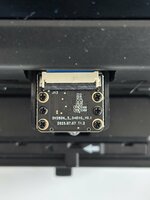
Look like we know what has changed in these newer units, they have switched out the image sensor from Aptina AR0330, to an OmniVision OS04D. The good news is this is a nice newer sensor, not really more resolution, but better signal to noise. Can you remove the sensor hood and photograph your sensor board?

AR0330 board (Type A,B & C):
1769378791410.png


The bad news, this likely why things are so different and will slow full support.
 
Last edited:

videodoctor

New Tinkerer
Jan 8, 2026
50
23
8
That annoying, crash or looping error messages would have been easier for next steps.

hist.c code will not run without the support from the other functions starting at 0x338f80.

Some good news, and some bad news.

From Type D
> ERR:ChgMode_OS04D10() ChgMode_OS04D10 to 1...

From Type C
> ERR:ChgMode_AR0330() ChgMode_AR0330 to 4...

Look like we know what has changed in these newer units, they have switched out the image sensor from Aptina AR0330, to an OmniVision OS04D. The good news is this is a nice newer sensor, not really more resolution, but better signal to noise. Can you remove the sensor hood and photograph your sensor board?

AR0330 board (Type A,B & C):
View attachment 26402

The bad news, this likely why things are so different and will slow full support.
Here’s the sensor on my D unit.
 

Attachments

  • IMG_1168.jpeg
    IMG_1168.jpeg
    678.9 KB · Views: 23

0dan0

Active Tinkerer
Jan 13, 2025
391
536
93
Here’s the sensor on my D unit.
From at 2019 to 2025 board date. I think I will have to get a type D unit, both to work the port, and test the quality.

What you can do, is add prints to the code, to find where it is stopping.

Type D: fileid:0 <- last message???

Type C:
fileid:6
ERR:IPL_FCB_AlgIE() ^GWDR OFF..
MULTIREC_OFF!!!!!!!!!!
pathid=0
on=1
pathid=1
on=0
ERR:IPL_FCB_AlgIE() ^GWDR ON..
Mode {MAIN} Open end
Info.IdxSP8OUT=3
corner :632 328
size :800 600
new crn:312 88
new sze:1440 1080
proc:1440 1080

The last five lines is from my code. Code at 0x339d60.
 

videodoctor

New Tinkerer
Jan 8, 2026
50
23
8
From at 2019 to 2025 board date. I think I will have to get a type D unit, both to work the port, and test the quality.

What you can do, is add prints to the code, to find where it is stopping.

Type D: fileid:0 <- last message???

Type C:


The last five lines is from my code. Code at 0x339d60.
I’ll test again, but that’s where the process froze. We’ll get this solved!
Did you determine all four type 4 variables for your host.c?