Hacking the Kodak Reels 8mm Film Digitizer (New Thread)

0dan0

Active Tinkerer
Jan 13, 2025
439
599
93
I have now had the chance to set out the new firmware and comeaccross 2 problems i do not seem to able to access some of controls eg setting fps rate . Secondly when i try to replay a recording most of the time nothing happpensd and i cannot then either scroll down the screen or return to the main menu none of buttons seem to work. Occasionally if i hold down to button to replay the screen comes up but ask to restart which takes me back to begining. Any ideas should i reinstall firmware?
That is normal for the hacked firmware, playback is broken. To improve the image quality, more memory is used for capture, so on the unit playback suffered.
 

ThePhage

Tinkerer
Oct 30, 2024
72
66
18
I have now had the chance to set out the new firmware and comeaccross 2 problems i do not seem to able to access some of controls eg setting fps rate . Secondly when i try to replay a recording most of the time nothing happpensd and i cannot then either scroll down the screen or return to the main menu none of buttons seem to work. Occasionally if i hold down to button to replay the screen comes up but ask to restart which takes me back to begining. Any ideas should i reinstall firmware?

Playback function from the scanner has been broken in the recent firmware mod efforts. It is documented in the user guide:
Scanner Cannot Playback Captured Files. Some firmware versions have broken the scanner's playback capability. Workaround is to transfer your files to a computer for reviewing/editing/storage. Discussed in post #870 and elsewhere in thread.

As to the frame rate setting (while using 0dan0's firmware for A,B, and C units) have you tried this during capture?
  • During Capture, press the up/down arrow buttons so that the OSD "FPS" value is selected in brackets
  • Then press the +/- buttons to adjust the frame rate
  • Is not written to the file until the capture is stopped
  • 8mm film is 16 or 18 fps; Super8 film is 18 or 24 fps

However, if you are attempting to use VideoDoctor's work-in-progress firmware for Version D scanners, the frame rate change may not currently be supported or needs work.
 

GilDS

New Tinkerer
May 2, 2026
1
0
1
Hello everyone,

I bought my device two weeks ago. I have a few questions, and I'm sure you're the best people to answer them!
I received it on April 17th, and everything was working fine. However, after performing some test scans, when I decided to proceed to the final scan, the scanner's flash/lamp completely stopped working. In other words, it's now unusable because no light reflects onto the strip.

I've already received a refund and was able to keep the device, but I'm now looking to fix this problem and possibly modding it!
Has anyone else encountered this issue? Were they able to resolve it?

The serial number is K2225148BK0xxxx, which doesn't seem to be listed, and therefore starts with a K.
I have a 64GB SanDisk SD card - 170MB/s currently formatted as exFAT.
 

Mark Dawson

New Tinkerer
Mar 11, 2026
8
0
1
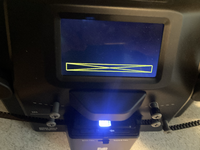
Hello, I hope someone out there can help with this issue. I've got myself into a bit of a downward spiral having tried the firmware updates. Has anyone else experienced this screen before and if so what does it mean? All appears to be fine but this appears when "record" is selected and it's impossible to proceed beyond that. Grateful for any info! And could someone point me towards the link for the original Kodak firmware please; I think I want to try to restore the factory settings, make sure everything works and then start from the beginning again. It's a RODREELSEU model, Serial number is C1725148BK00614, which I assumed to be a "C" model but I'm wondering if this is correct, any thoughts?
 

Attachments

  • tempImageh31hJg.png
    tempImageh31hJg.png
    5.1 MB · Views: 12
Last edited:

omega

New Tinkerer
Jul 29, 2025
36
13
8
Hello, I hope someone out there can help with this issue. I've got myself into a bit of a downward spiral having tried the firmware updates. Has anyone else experienced this screen before and if so what does it mean? All appears to be fine but this appears when "record" is selected and it's impossible to proceed beyond that. Grateful for any info! And could someone point me towards the link for the original Kodak firmware please; I think I want to try to restore the factory settings, make sure everything works and then start from the beginning again. It's a RODREELSEU model, Serial number is C1725148BK00614, which I assumed to be a "C" model but I'm wondering if this is correct, any thoughts?
Don't you have a firmware file on the card? That's what happened to me with the forgotten file. Or a different card format, it should be FAT32.
 

Mark Dawson

New Tinkerer
Mar 11, 2026
8
0
1
Don't you have a firmware file on the card? That's what happened to me with the forgotten file. Or a different card format, it should be FAT32.
Thanks for the reply. Strangely, several hours after installing the firmware, the problem seems to have resolved itself and that strange screen is no longer appearing, no idea why! I do have a few other issues and queries but I'll put these in a new post.