Hacking the Kodak Reels 8mm Film Digitizer (New Thread)

JohnCT

New Tinkerer
Sep 8, 2026
16
6
3
No, the metal flap has no window.


Is that in both directions zoom in and out? Or just one?

Mine zooms in both directions (in and out) and at some stage just does an awkward crop instead of changing zoom. Maybe the second to last click.. I have a Model D too.

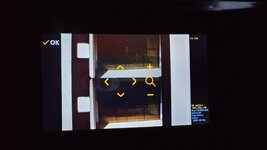
After I posted it, I tried to move the frame and zoom with the software controls. The arrows blink in response to when I hit the buttons, but nothing actually changes. I tried reflashing the firmware to stock D but nothing changes, so I have a hardware issue I'm afraid. Thanks.

John
 

melw

Tinkerer
Jun 23, 2026
30
57
18
Thank you so much.

Unfortunately, there's something else going on. I followed your instructions and flashed the stock firmware, but it's got the same problem. Every other adjustment works except the frame positioning and zoom. Again, the arrows blink as I push the buttons to affect the changes, but no actual changes occur.

After flashing, both the .bin and the folder are gone from the SD card, so I assume it took the flash.

I'll pull the camera and main boards out looking for something, but I'm not all that hopeful. Hopefully I can get some usable scans with editing software.

Thanks again!

EDIT: If I go by the scans I'm getting, it looks like only about a quarter of the camera sensor is being used. Is that correct, or is has the previous owner messed with the camera lens? Is what I'm seeing the Reels in full zoom out? If that's true that the zoom is software based and not a mechanical lens movement, then these are really being hampered.

When I edit this, I will be getting about a quarter of the picture. Am I missing something?


View attachment 30746


John

Thanks for testing! Since the stock firmware has the same problem and the flash clearly ran, it doesn't sound likely this would be a firmware issue. I think it's more likely something on the hardware side.

One cheap test to try first: the 8mm / Super 8 switch. Flip it fully both ways and see whether zoom or frame adjust starts working in either position.

About the quarter of the picture: at full zoom-out a working Reels shows the whole film frame. Could you describe what you see or share a screenshot? Is the film frame small inside a big black or white surround, or is the frame cropped so that you only see part of it?
 

RMConverter

New Tinkerer
Oct 7, 2026
2
0
1
I have been trying to load an alternate version of a BIOS onto my Kodak Reels machines that was developed by some amazingly smart people on this forum. The captures I have been trying to make have been completely pixelated, and were unacceptable.

The serial number of my device is D3024148BK00409

I tried loading version 771. The menus were grainy and unreadable.
I reset to the original BIOS. That restored okay.
I tried loading melw's Type D software That loaded okay. None of the buttons worked.

The following was an assessment from Google:

--------------------------------------------


The text flashing "for Type D" on startup verifies that your processor successfully accepted and executed the new custom software. Your display looks normal now because melw's version contains the updated screen instructions missing from the standard Type B build.
However, the fact that none of your physical buttons respond means we have hit the ultimate engineering roadblock for your specific machine:

Why the buttons are locked up

Your machine has a D3024... serial number, which means it was built mid-way through 2024. The Type D firmware from Post #666 was specifically reverse-engineered for the True Type D hardware (units built in late 2025/2026 with an H2825... serial number).
Even though your machine's new screen uses the exact same driver as the Type D, Kodak did not use the Type D button layout on your assembly line. The software is constantly sending button signals to the wrong hardware pathways inside your motherboard, leaving your physical keys completely paralyzed.

The Bad News for Your Unit

Because your 2024 D3024 unit is a "hybrid" model (it has a newer 2025-style display screen but uses the older 2024 button wiring), there is currently no public custom firmware build on the internet that supports your exact combination of components.
• If you flash 0dan0's Type B software, the buttons work, but your screen is a scrambled, unreadable mess.
• If you flash melw's Type D software, the screen works perfectly, but all your buttons are permanently dead.

Because of this hardware mismatch, you cannot safely unlock the custom 35 Mbps high-quality bitrate or the 1600x1200 resolution on this specific machine.

----------------------------------------------
Question: Are you aware of anyone who is working on a BIOS version for these transitional machines? (In other words, should I keep this machine and just wait, or restore the original BIOS and get rid of it?)

Thank you
 

JohnCT

New Tinkerer
Sep 8, 2026
16
6
3
Thanks for testing! Since the stock firmware has the same problem and the flash clearly ran, it doesn't sound likely this would be a firmware issue. I think it's more likely something on the hardware side.

One cheap test to try first: the 8mm / Super 8 switch. Flip it fully both ways and see whether zoom or frame adjust starts working in either position.

About the quarter of the picture: at full zoom-out a working Reels shows the whole film frame. Could you describe what you see or share a screenshot? Is the film frame small inside a big black or white surround, or is the frame cropped so that you only see part of it?

I tried on both 8mm and Super, and the adjustments have no effect. The arrows on screen blink, but no changes occur. It's like it's sitting and locked at full zoom out.

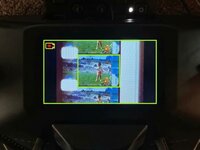
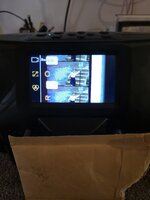
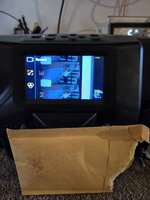
Here is what I'm getting. I highlighted in green the LCD screen and the scan frame I'm getting. Assuming that there is no mechanical zoom, doesn't that mean that the quarter of the image that actually contains the pictures is being blown up with software and the other **3/4 of the CMOS sensor is not being used?

**EDIT: giving this more thought, the fact that these old frames are 4X3 and camera imagers are 16X9, these could never use 100 percent of the CMOS surface, so I'm going to revise this to 1/3 of the imager used..

SECOND EDIT: The build date of the camera module is 7/2025 which means my Reels could have been built even this year. Any possibility I have a version later than D and that the previous owner tried flashing the modified D, lost functionality of the frame and zoom, then tried installing stock D?


kodak with borders.jpeg
 
Last edited:

melw

Tinkerer
Jun 23, 2026
30
57
18
I have been trying to load an alternate version of a BIOS onto my Kodak Reels machines that was developed by some amazingly smart people on this forum. The captures I have been trying to make have been completely pixelated, and were unacceptable.

The serial number of my device is D3024148BK00409

I tried loading version 771. The menus were grainy and unreadable.
I reset to the original BIOS. That restored okay.
I tried loading melw's Type D software That loaded okay. None of the buttons worked.

Question: Are you aware of anyone who is working on a BIOS version for these transitional machines? (In other words, should I keep this machine and just wait, or restore the original BIOS and get rid of it?)

Thank you

Thanks for the detailed testing, that's really useful.

My build (FW 270) is based on the stock Type D firmware. Button handling there is the stock D code; my additions only read the buttons. So dead buttons mean the D firmware doesn't match your unit, which suggests it isn't a Type D.

Two questions:
  1. Which file did you use to restore the original firmware, and what version number does the settings menu show with it?
  2. If you're willing: flash 0dan0's stock D recovery image (post #143) and check whether the buttons work. If they're dead there too, your unit is definitely not a D. You can restore your original firmware afterwards the same way.
With those answers we'll know which type it is. If it's a B or C, the scrambled menus would be something for the A/B/C builds. So I'd keep the machine for now; it isn't something to give up on yet.
 

melw

Tinkerer
Jun 23, 2026
30
57
18
I tried on both 8mm and Super, and the adjustments have no effect. The arrows on screen blink, but no changes occur. It's like it's sitting and locked at full zoom out.

Here is what I'm getting. I highlighted in green the LCD screen and the scan frame I'm getting. Assuming that there is no mechanical zoom, doesn't that mean that the quarter of the image that actually contains the pictures is being blown up with software and the other **3/4 of the CMOS sensor is not being used?
I compared with my own unit: fully zoomed out, mine looks very similar to yours (see attached picture). So your optics are fine, and that is simply the full zoom-out view. Sorry for the confusion earlier!

So the only real problem is that zoom and position don't respond. The buttons clearly work (the arrows blink), and zoom/position are done in software, so I don't think this is hardware. Since it happens on stock firmware too, my guess is a saved setting stuck in a bad state. Settings are stored separately from the firmware and survive reflashing, possibly left there by the previous owner. Could you try Settings → Factory reset, then test zoom and position again? The option is in the stock firmware too.
 

Attachments

  • 20261008_184315.jpg
    20261008_184315.jpg
    418 KB · Views: 3

JohnCT

New Tinkerer
Sep 8, 2026
16
6
3
I compared with my own unit: fully zoomed out, mine looks very similar to yours (see attached picture). So your optics are fine, and that is simply the full zoom-out view. Sorry for the confusion earlier!

So the only real problem is that zoom and position don't respond. The buttons clearly work (the arrows blink), and zoom/position are done in software, so I don't think this is hardware. Since it happens on stock firmware too, my guess is a saved setting stuck in a bad state. Settings are stored separately from the firmware and survive reflashing, possibly left there by the previous owner. Could you try Settings → Factory reset, then test zoom and position again? The option is in the stock firmware too.

I have tried the factory reset in the menu on both the new D and the original D .bins. It says reset successful, but still no change. Two questions:

1) Getting back to the firmware - is it possible this unit may be something newer than a D? The build date of the camera board on this machine is 7/25, so this machine could have been built this year and maybe the previous owner flashed with D as an upgrade and lost the functionality of the frame and zoom.

2) Since your full zoom-out looks the same as mine, I assume we're both using the same smallish percentage of the camera image sensor - if I were to crop in Windows Clipchamp, am I not essentially ending up with the same resolution as if performed with the Reels zoom and frame controls?

Thanks so much!!

John
 

melw

Tinkerer
Jun 23, 2026
30
57
18
I have tried the factory reset in the menu on both the new D and the original D .bins. It says reset successful, but still no change. Two questions:

1) Getting back to the firmware - is it possible this unit may be something newer than a D? The build date of the camera board on this machine is 7/25, so this machine could have been built this year and maybe the previous owner flashed with D as an upgrade and lost the functionality of the frame and zoom.

2) Since your full zoom-out looks the same as mine, I assume we're both using the same smallish percentage of the camera image sensor - if I were to crop in Windows Clipchamp, am I not essentially ending up with the same resolution as if performed with the Reels zoom and frame controls?

Thanks so much!!

John

Sorry the reset didn't help.
  1. I still doubt it's a newer type. I interpret the serial H2825 as week 28 of 2025, which would match your 7/2025 camera board, and stock D runs everything else normally. A wrong type usually breaks much more than just zoom (frozen screen, dead buttons, strange colours). Could it be a different camera board revision on which the zoom/position adjustment doesn't take effect? Maybe, but I have no data on that.
  2. Mostly yes. The Reels zoom is digital too, so cropping afterwards doesn't lose much real detail. The difference is compression: zoomed in on the device, all of the bitrate goes to the picture, and when you crop and enlarge later, the compression artefacts get enlarged too. Few things that could help here: record with FW 270 at x4 bitrate (much less compression), and export from Clipchamp at the highest quality setting, because every export re-compresses the video.
I'm afraid it's hard to solve this remotely, but here's a few more ideas to consider:
  • Check the firmware version shown in the Setting -> About
  • Since you're opening it anyway, could you post photos of the chip markings on the camera board (sensor, board revision) and the main board (the main processor, flash chip)? Then we can compare with other units and see whether yours has different parts
  • If you're confortable soldering, the board has a serial (UART) port. The boot log probably shows the sensor model and any errors during camera start-up, which we could compare with a working unit.
 

lrdgreen89

New Tinkerer
Jan 12, 2026
4
0
1
Memphis, TN
Hi! Another update.

D-Type FW 270 attached. Still few more tweaks on top of build 265.

What's new
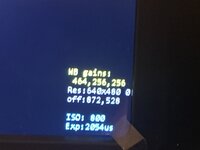
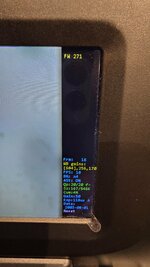
  • Fixed the OSD flicker. The stock UI was clearing the UI layer in two different places. The OSD now redraws immediately when that happens.
  • Stall auto-stop timing corrected from build 265. 270 is back to ~8 s to warn, ~12 s to stop. The x4 auto-stops some of you saw were caused by the Qp floor, which has been off by default since 265.

Source code

The project is now public, MIT-licensed, and buildable: https://github.com/melw/reels-type-d
  • User guide: the menu, what every OSD line means, the auto-stops, troubleshooting
  • Build instructions: Windows + WSL. Building 270 from the repo reproduces the attached file byte for byte.
  • Technical notes: every hook and address, the RAM and settings map, how the rate control works, and the rules for writing new hooks safely

The repo contains no firmware binaries. It builds on top of videodoctor's Type D firmware (post #225 in this thread), which you download yourself; the build checks it by SHA256. Big thanks to @videodoctor for that base and the original Type D work, and to @0dan0 for the A/B/C project this all grew out of. The menu approach and the font are his.

I'm nearly done with my own reels, but the repo is there so anyone can pick it up, fix things, or port to other future models. Pull requests and issues are welcome. And thanks to everyone here who tested builds and sent freeze photos: that is what made the fixes possible!

First-time flash, D-type.
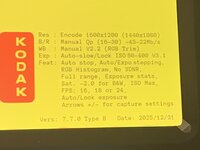
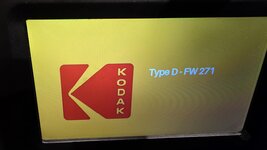
I flashed the FW from post #734. The first screen said "Type D - WIP," but everything else looks no different from factory FW: no OSD.
Then I flashed from #731 and the OSD is there.
 
Last edited:

JohnCT

New Tinkerer
Sep 8, 2026
16
6
3
First-time flash, D-type.
I flashed the FW from post #734. The first screen said "Type D - WIP," but everything else looks no different from factory FW: no OSD.
Then I flashed from #731 and the OSD is there.

Same - my reflash also says "Type D- WIP" but it's otherwise identical to the original firmware.

I just tried the file in #731 and it flashed and now I have the OSD. But I took a second scan and it's a lot darker than my first try on the same film. I put the exposure up as far as it would go without blooming but it's dull and lifeless where the first scan on the factory firm was bright and colorful. Odd.

John
 
Last edited:

RMConverter

New Tinkerer
Oct 7, 2026
2
0
1
Thanks for the detailed testing, that's really useful.

My build (FW 270) is based on the stock Type D firmware. Button handling there is the stock D code; my additions only read the buttons. So dead buttons mean the D firmware doesn't match your unit, which suggests it isn't a Type D.

Two questions:
  1. Which file did you use to restore the original firmware, and what version number does the settings menu show with it?
  2. If you're willing: flash 0dan0's stock D recovery image (post #143) and check whether the buttons work. If they're dead there too, your unit is definitely not a D. You can restore your original firmware afterwards the same way.
With those answers we'll know which type it is. If it's a B or C, the scrambled menus would be something for the A/B/C builds. So I'd keep the machine for now; it isn't something to give up on yet.
FIRST TOPIC - Response to Question on BIOS

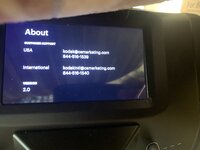
The original version said 2.0. I am attaching a photo. I loaded the version "B" from the post 143. The screen and the buttons worked. I am attaching a photo of the startup screen.

What Worked:
1. Screen appeared to work.
2. Buttons appeared to work.
3. Conversion recorded with higher clarity that the off-the-shelf BIOS.

What Did Not Work:
1. If you clicked the "Play" button, it would freeze up.
2. It did not save the movie when I had a 64 Gig SD card in. It did save when I had an 8 Gig SD Card in.
Original BIOS allowed me to save to 64 Gig SD. Is there a max file file size it will support for the SD Card under the modified BIOS?

SECOND TOPIC - Installing a new camera
Has anyone done a comparison on the different cameras that could be put into a Kodak Reels, and the peripheral equipment I would also need? Are there any specific cameras that would stand out as being exceptional for working with a Kodak Reels? Or for starters, does anyone have a list of the make and models of the cameras that may work in this situation? Where to order the camera and parts, etc.... Will changing the camera require a change to the BIOS? Links to videos would be amazing. Does switching out the camera make a substantial difference, or do limitations of the Reels product make the addition of a camera a marginal difference?

Basically, I am looking for the configuration that will give me the highest quality resolution on my converted films. My alternative option of going to a company that will convert using high grade commercial equipment will jump into the thousands of dollars. I can forgo "Excellent" if I can find a solution with Reels that is "Very Good".


Thank you.
 

Attachments

  • 2026-10-08 - 0Dan0 Version B - Startup Screen.JPG
    2026-10-08 - 0Dan0 Version B - Startup Screen.JPG
    730.6 KB · Views: 1
  • 2026-10-08 - Original Kodak Reels.JPG
    2026-10-08 - Original Kodak Reels.JPG
    1.3 MB · Views: 1
  • flashed with 0Dan0 Version b - About Screen.JPG
    flashed with 0Dan0 Version b - About Screen.JPG
    636.7 KB · Views: 1
Last edited: