
Hello. I stumbled onto this thread while looking for a place to have super 8 movies digitized and I decided to get the Kodak Reels and try it myself. I selected an actual storefront instead of a strictly online vendor thinking I might get an older unit but I ended up with the "D" version (H2825). While searching online, Amazon saved my search history and sent this link for 20% off the unit so I thought I'd share it here. Unfortunately, it looks like the deal expires tonight but I hope someone reading this sees it and can take advantage of what looks like a great deal. Looking forward to coming back to learn more about the unit.

Hacking the Kodak Reels 8mm Film Digitizer (New Thread)
- Thread starter Mac84
- Start date
You are using an out of date browser. It may not display this or other websites correctly.
You should upgrade or use an alternative browser.
You should upgrade or use an alternative browser.


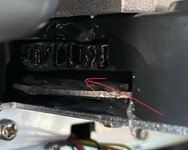
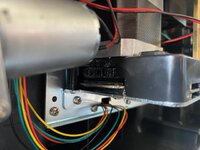
I have one notation about the disturbing scratching sound that can appeare when scanning film. I think that I have located where the silicongrease shall be placed. Look at the pictures and see where the arrow is pointing. Use a syringe to dispense the grease between the plastic gear and the metalplate. If you look under the lower plate (it does not show on my pictures), there is a hole in the center. I have seen grease coming out there, so I will try to put a cöutch of silicongrease in there and then seal the opening with some tape, after cleaning the metalplates suface
Attachments
Last edited:
Before I go ahead with installing it, you think that "C" is the right one.. the "look-up" page is pointing me to "B" (see screenshot)..sorry just want to be as sure as I can before I take the risk!Please confirm if Type C firmware works.
Attachments
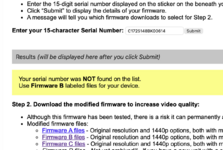

The look up page hasn't be updated with the newer serial numbers. That is Type C. Fortunately it doesn't matter, you can install the wrong version, then install the correct firmware, and it will fine.
Hi there - outstanding work on this! About to take a swing at modifying my unit. Serial is M2024148BK----- Would that be a "C"?The look up page hasn't be updated with the newer serial numbers. That is Type C. Fortunately it doesn't matter, you can install the wrong version, then install the correct firmware, and it will fine.
Hi there - outstanding work on this! About to take a swing at modifying my unit. Serial is M2024148BK----- Would that be a "C"?
This is a new serial M2024 could be either Type B or C. Let us know what it is. Try B, if the screen looks weird, install C.
Known so far:
Serial numbers type and Models:
A2021 A
J2021 A
M2021 A
P2021 A
A2022 A
M2023 B
A2724 B
E3124 B
D2825 B (outlier)
H2324 C
K3124 C
C1725 C
H2825 D
K2225 D
My unit also has a M2024 serial... It is definitely a Type 'C'.Hi there - outstanding work on this! About to take a swing at modifying my unit. Serial is M2024148BK----- Would that be a "C"?
Successful install of v7.7.0 C on serial #2024148BK####. (fwiw - according to the original owner, the unit reports that it was purchased in Dec 2025 from, of all places, Home Depot!)This is a new serial M2024 could be either Type B or C. Let us know what it is. Try B, if the screen looks weird, install C.
Known so far:
Serial numbers type and Models:
A2021 A
J2021 A
M2021 A
P2021 A
A2022 A
M2023 B
A2724 B
E3124 B
D2825 B (outlier)
H2324 C
K3124 C
C1725 C
H2825 D
K2225 D
Initial scan tests show marked visual improvements vs original firmware.
So Far:
- Confirmed loss of file playback functionality
- Small note on fps adjustment: starting from default 18 setting - when adjusting with the + button, the options only cycle between 18 and 24. Using the - button, the options cycle between 18 and 16. Not a big deal, just caused a moment of confusion as I was expecting it to cycle through all 3 options! (you guys probably already noted this and I just haven't read it yet!)
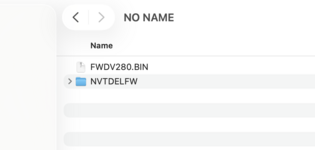
That's how I did it. Successful install of v7.7.0 CJust to be absolutely certain before I go ahead..the .BIN file doesn't actually go inside the NVTDELFW folder, the 2 sit side by side in the root directory, is that correct? Thanks, MD

Can someone please state again specifically how much (measurements) to enlarge the face plate in order to accommodate the lens replacement & spacers? I'd like to do 'the right amount', not too much & not too little...
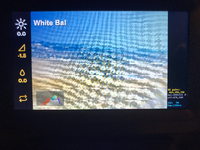
I have just installed the v7.7.1 firmware and can report the following: I am not able to progress beyond the "White Balance" setting, nothing after that is showing (maybe I'm being incredibly stupid but regardless of which buttons I press can't access any of the other "new" parameters). I tried a few seconds of recording but on stopping record the screen froze on the "playback or close" screen and the only way to restore activity was to hold the power button down and restart the machine. So.. not much luck unfortunately. I was using the "C" file. (my serial number C1725148BK00614). Should I try again with the "B" firmware, and if so, should I firstly install the factory firmware, or just go straight to the "B", and should I try the "restore factory settings" button? Would be interested to hear from anyone with a C17251 model to see what they've been able to achieve. Thanks in advance, any advice greatly appreciated.
Attachments
Last edited:
Start with the documentation: https://tinkerdifferent.com/resourc...irmware-for-the-reels-8mm-film-digitizer.165/I have just installed the v7.7.1 firmware and can report the following: I am not able to progress beyond the "White Balance" setting, nothing after that is showing (maybe I'm being incredibly stupid but regardless of which buttons I press can't access any of the other "new" parameters). I tried a few seconds of recording but on stopping record the screen froze on the "playback or close" screen and the only way to restore activity was to hold the power button down and restart the machine. So.. not much luck unfortunately. I was using the "C" file. (my serial number C1725148BK00614). Should I try again with the "B" firmware, and if so, should I firstly install the factory firmware, or just go straight to the "B", and should I try the "restore factory settings" button? Would be interested to hear from anyone with a C17251 model to see what they've been able to achieve. Thanks in advance, any advice greatly appreciated.
Most of the new controls are only available during capture.
You have a C unit, no point installing B or stock firmware.
Hi, I have a K2225 serial, so I guess I have a D Firmware. Will there be a D adapatation of your software and if so roughly when will it be available? If you need my original firmware I might be able to help.
Unfortunately I still have a bricked type D, so nothing to work with at the moment. More importantly I will not likely have any free time for this project until late May. I hope I can then recover the D unit I have, and start again. However, a lot of the development will need to be from scratch as so much changed. User wanting the features of this firmware should look for secondhand units will the older serial numbers, as there a good chance Type D unit will never be supported.
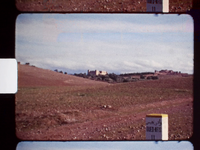
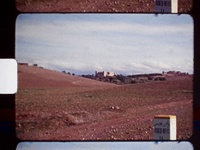
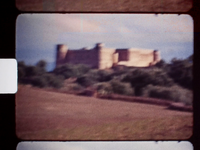
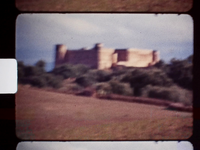
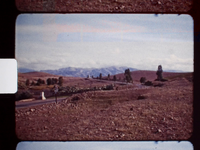
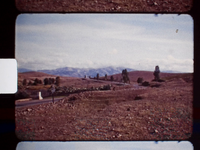
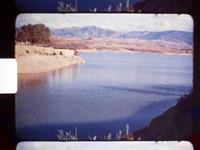
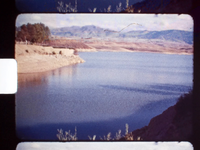
Hi, longtime lurker first time poster here. I bought a C unit last year and have only gotten limited time to test and modify the machine. I finally got around to installing the new lens from scorpion and had to buy new lens mounts from aliexpress to get the focus right. Now i'm encountering an issue with pretty blatant artifacts appearing at the bottom and top of the captured footage. It is a repeatable pattern every 96 frames and especially prominent in light areas such at the sky. I've confirmed that this pattern can also be seen on older footage captured before lens mod. I was wondering if anyone else encountered these or would know what caused these.
It alternates 2-3 times at the top with 2-3 times at the bottom. You can see the bottom example on the snapshot of the lake. Every Snapshot is paired with another frame where the artifact switches from either top to bottom or bottom to top.
It alternates 2-3 times at the top with 2-3 times at the bottom. You can see the bottom example on the snapshot of the lake. Every Snapshot is paired with another frame where the artifact switches from either top to bottom or bottom to top.
Attachments
-
 Artifact_1.png853.9 KB · Views: 149
 -
 Artifact_1_Next_Frame.png834.4 KB · Views: 198
 -
 Artifact_2.png708.9 KB · Views: 157
 -
 Artifact_2_Next_Frame.png706.4 KB · Views: 140
 -
 Artifact_3.png771.8 KB · Views: 190
 -
 Artifact_3_Next_Frame.png784.7 KB · Views: 179
 -
 Artifact_4.png798.4 KB · Views: 186
 -
 Artifact_4_Next_Frame.png801 KB · Views: 154
This is a hardware design flaw.Hi, longtime lurker first time poster here. I bought a C unit last year and have only gotten limited time to test and modify the machine. I finally got around to installing the new lens from scorpion and had to buy new lens mounts from aliexpress to get the focus right. Now i'm encountering an issue with pretty blatant artifacts appearing at the bottom and top of the captured footage. It is a repeatable pattern every 96 frames and especially prominent in light areas such at the sky. I've confirmed that this pattern can also be seen on older footage captured before lens mod. I was wondering if anyone else encountered these or would know what caused these.
It alternates 2-3 times at the top with 2-3 times at the bottom. You can see the bottom example on the snapshot of the lake. Every Snapshot is paired with another frame where the artifact switches from either top to bottom or bottom to top.
Read about it here, and some mitigation steps: https://tinkerdifferent.com/threads...m-digitizer-new-thread.4885/page-2#post-42791