Hacking the Kodak Reels 8mm Film Digitizer (New Thread)

0dan0

Active Tinkerer
Jan 13, 2025
319
481
63
Hi @0dan0 -- I have a couple observations / questions about the ISO / exposure algorithm.

v7.1 - v7.5: During capture with my 'C' unit, the highest ISO / exposure that I observed was ISO 200 / ~5970µs. I never observed an ISO of 400 during capture, even with a black image. Is that behavior consistent with your expectation / experience?

v7.6: During capture with my 'C' unit, the highest ISO / exposure that I observed was ISO 100 / ~5984µs. I never observed an ISO of 200 or 400 during capture, even with a black image. Is that behavior consistent with your expectation / experience?

I understand that you're aiming for the lowest practical ISO for the film's density, but I'm surprised that none of the thousands of feet of film that I've scanned with v7.1+ has triggered neither your highest coded ISO nor an exposure time exceeding 6000µs. If that is by design, then no worries... I just want to confirm that my unit isn't underexposing images due to a hardware malfunction or firmware bug.

The code can go to 400 in preview, but this might be bug. Use the histogram to judge the exposure.
 

rdesros

New Tinkerer
Aug 24, 2025
25
12
3
@0dan0 Quick update on version 7.6: I’m now getting a steady 25–27 Mbps with the stock lens. Sharpness set to -0.5. There’s still a bit of jitter at the bottom of the screen occasionally, but overall the capture quality is pretty good. This is using version A of Kodak Reel. Thx
 

P-car

New Tinkerer
Dec 14, 2025
25
5
3
fantastic!!

Ok, so to get 25-27 Mbps, I just set it to the lowest possible number - 15 for example - and let the also do the rest, correct?
 

0dan0

Active Tinkerer
Jan 13, 2025
319
481
63
Bit-rate is depended on the Qp value. Lower Qp, higher bit-rates. If you values below 22, you adding risk of capture failures. Rare now, but it can happen.
 

rdesros

New Tinkerer
Aug 24, 2025
25
12
3
@0dan0 Quick update on version 7.6: I’m now getting a steady 25–27 Mbps with the stock lens. Sharpness set to -0.5. There’s still a bit of jitter at the bottom of the screen occasionally, but overall the capture quality is pretty good. This is using version A of Kodak Reel. Thx
screenshot.png

This is with Topaz Video AI enhancement applied.
 

0dan0

Active Tinkerer
Jan 13, 2025
319
481
63
Are you reapplying grain in Topaz, as this are pretty nice / gentle enhancements. Can you share your settings?
 

rdesros

New Tinkerer
Aug 24, 2025
25
12
3
I got Type A running at Qp 16 again, outputting 45Mbs. Updating builds now.
Switching back to ISO 50 seems to be improving encoding by cutting down noise, which usually gets in the way of encoders. In the next update, hitting 45 Mbits sustained might not happen, but landing around 28–30 Mbits would still be fine. After that, Topaz can help enhance the image and fill in any gaps with some grain.
 

0dan0

Active Tinkerer
Jan 13, 2025
319
481
63
v7.6.1
BootLogo1600x1200-V761A.png
BootLogo1600x1200-V761B.png
BootLogo1600x1200-V761C.png

Bug fixes only.

- Qp rate control below 20 was fixed on Type A & C (B was okay)
- Now supports up to 400 ISO during encoding (not sure if this is a good thing, but try it.)
 

Attachments

  • FWDV280-TypeA-V761-0dan0.zip
    5.5 MB · Views: 31
  • FWDV280-TypeB-V761-0dan0.zip
    5.5 MB · Views: 30
  • FWDV280-TypeC-V761-0dan0.zip
    5.5 MB · Views: 33

ThePhage

Tinkerer
Oct 30, 2024
40
34
18
v7.6.1
View attachment 25423View attachment 25424View attachment 25425
Bug fixes only.

- Qp rate control below 20 was fixed on Type A & C (B was okay)
- Now supports up to 400 ISO during encoding (not sure if this is a good thing, but try it.)
Thanks @0dan0, I can confirm that at on my Type C scanner, the ISO value does 400 ISO during film scanning and also reported up to 800 ISO when I put my finger between the light and the lens (blacking out the sensor). Also, the encoder is showing as running at Qp 16 (when set to 15). Thanks for the ongoing updates/improvements!
 
  • Like
Reactions: 0dan0

P-car

New Tinkerer
Dec 14, 2025
25
5
3
just updated to 7.6.1 on a C scanner and getting QP=16 and 17 and ISO=50. WOW!! Thank you @OdanO
 
Last edited:
  • Like
Reactions: 0dan0

0dan0

Active Tinkerer
Jan 13, 2025
319
481
63
Now for something completely different.

Here is the github repo for all my C code extensions, and some the scripts I use.


You can see how the histogram and the fonts are rendered, and the crude exposure and manual white balance logic. This is only the tip of the iceberg for the firmware changes, but it where most of the recent extensions are happening. Zero documentation, but I figured a git repo will help us track any future changes.
 

P-car

New Tinkerer
Dec 14, 2025
25
5
3
@OdanO

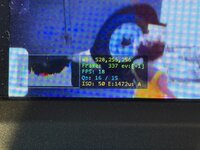
Ive updated my C unit to 7.6.1. My QP is set to 15, but I dont think im getting good Mbps. (the Mbps shown in image are equal to 16, and that's not ideal, correct?)
 

Attachments

  • IMG_9486.JPG
    IMG_9486.JPG
    51.9 KB · Views: 28

ThePhage

Tinkerer
Oct 30, 2024
40
34
18
@OdanO

Ive updated my C unit to 7.6.1. My QP is set to 15, but I dont think im getting good Mbps. (the Mbps shown in image are equal to 16, and that's not ideal, correct?)
The Qp (Quantization Parameter) level that you set (15) and see being achieved (16) is quite good (essentially the highest quality compression you can achieve on this hardware with this current custom firmware, and WAY better than what you could achieve with the stock firmware).

Qp can be thought of as a setting that dictates how much compression is being applied, where a higher number equals more compression. The bitrate of your video is probably somewhere between 30 and 40 Mbps, but you would need to open the file in some software to determine that (or do the math yourself based on filesize and duration).
 
Last edited:
  • Like
Reactions: 0dan0 and P-car