
Thanks a lot. I really appreciate the work you have been putting into this. I had a hunch that the answer i was looking for was already in the thread. I just tested it out and am pleased with the results. I'll be sure to read through the thread, so as not to post any duplicate questions.
Hacking the Kodak Reels 8mm Film Digitizer (New Thread)
- Thread starter Mac84
- Start date
You are using an out of date browser. It may not display this or other websites correctly.
You should upgrade or use an alternative browser.
You should upgrade or use an alternative browser.
In the time between now and then, would you be open to a crowd-funded effort to provide you a new D unit? I think the community here would be able to make that happen in support your work?Unfortunately I still have a bricked type D, so nothing to work with at the moment. More importantly I will not likely have any free time for this project until late May. I hope I can then recover the D unit I have, and start again. However, a lot of the development will need to be from scratch as so much changed. User wanting the features of this firmware should look for secondhand units will the older serial numbers, as there a good chance Type D unit will never be supported.

I damaged the terminals of the 10 pin cable, joining the control board to the processor. I tried to reconfigure the contacts but did`n t suceed. Now I have ordered new cables. Can somebody tell me wether the straight connection (contacts on the same side, Type A) or the inverse one (Type B) is required? I missed to take a picture of the original.
For the 40 pin cable it is clear, that it is type A. Thank you for your help!
The modifyed Kodak Reels is a superb system and I wouldn`t go back to the previous scanner.
For the 40 pin cable it is clear, that it is type A. Thank you for your help!
The modifyed Kodak Reels is a superb system and I wouldn`t go back to the previous scanner.
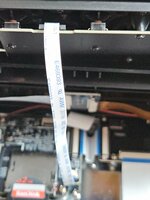
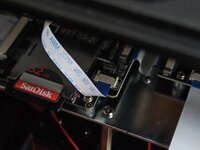
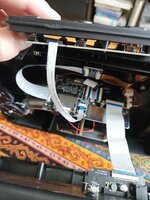
Hi @hasi here the pictures: I had to open my model B again because in the excitement of rebuilding, I've inserted the command board upside-down and I've noticed only when I' was ready to scan a reel...I damaged the terminals of the 10 pin cable, joining the control board to the processor. I tried to reconfigure the contacts but did`n t suceed. Now I have ordered new cables. Can somebody tell me wether the straight connection (contacts on the same side, Type A) or the inverse one (Type B) is required? I missed to take a picture of the original.
The cable is not twisted, but it may be twisted on the board, or simply the board could be mounted reversed compared to the command board. In any cases check the picture: one side of the cable is printed so you can buy a type-a and mount it in the same way. Let me know if the pics are showing enough for you to understand how to mount it
Besides: why didn't you try to cut short the damaged cable, strip gently with some sandpaper the new end, to expose the connectors and give it a try?
Good luck, Federico
Attachments
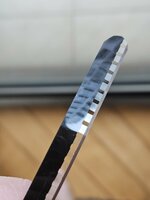
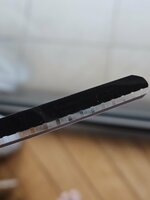
Hi everyone, I'm scanning with 7.7.0 a 8mm 1943 reel from my grandfather. Some war footage in b/w from Tunisia (with Panzer IVs, Macchi planes and burning airstrips: some examples attached) and I've noticed that the film has a bronze/brown strip outside of the driving holes and I reckon it might have an audio channel embedded.
Have a look to the two attached pictures: what do you think?
If so, is there any way to record it, maybe with an old cassette player? I am not aware that my grandfather duplicated the original footage over a new film, adding a post-production sound, so if it is an audio track indeed, it may be original.
Thank you, ciao, F.
Have a look to the two attached pictures: what do you think?
If so, is there any way to record it, maybe with an old cassette player? I am not aware that my grandfather duplicated the original footage over a new film, adding a post-production sound, so if it is an audio track indeed, it may be original.
Thank you, ciao, F.
Attachments





Last edited:
Sorry, one more post for suggesting, if possible, an improvement to add to the next firmware development. I don't know if you guys have the same problem but it happens to me, when the reel has joints, that the frame zoom no longer adapts to the new segment: either on top or at the bottom some lines of the adjacent frame show up.
It would be wonderful if the zoom or even simply the offset point of the captured frame could be moved to match the new position.
The alternative is to capture a wider area and reframe it later on, but sometimes the leaking projector light is way to strong for the faded reels, and it creates a mess.
Probably during the adjustment, the auto exposure should be temporarily locked to the last position and then restored once the position rests for a few frames, so to avoid flickering.
What do you think?
Thank you! F.
It would be wonderful if the zoom or even simply the offset point of the captured frame could be moved to match the new position.
The alternative is to capture a wider area and reframe it later on, but sometimes the leaking projector light is way to strong for the faded reels, and it creates a mess.
Probably during the adjustment, the auto exposure should be temporarily locked to the last position and then restored once the position rests for a few frames, so to avoid flickering.
What do you think?
Thank you! F.
Thank you for the pictures! To me it shows, that the cable is B- Type with the pins inverted. The blue stripe is in both connectors pointing to the top, but since the connector of the control board is upside- down, relative to the cable the contacts are opposite. Please tell me if I see it wrong. For me it was also important to see, that the cable is not twisted 180 deg. -Not respecting that could cause short citcuit and my unit would be gone. I tried with sanding the ends but didn`t succed. I hope that with the ordered cales it returns to life again.Hi @hasi here the pictures: I had to open my model B again because in the excitement of rebuilding, I've inserted the command board upside-down and I've noticed only when I' was ready to scan a reel...
The cable is not twisted, but it may be twisted on the board, or simply the board could be mounted reversed compared to the command board. In any cases check the picture: one side of the cable is printed so you can buy a type-a and mount it in the same way. Let me know if the pics are showing enough for you to understand how to mount it
Besides: why didn't you try to cut short the damaged cable, strip gently with some sandpaper the new end, to expose the connectors and give it a try?
Good luck, Federico
have a nice day!
Hi @hasi here the pictures: I had to open my model B again because in the excitement of rebuilding, I've inserted the command board upside-down and I've noticed only when I' was ready to scan a reel...
The cable is not twisted, but it may be twisted on the board, or simply the board could be mounted reversed compared to the command board. In any cases check the picture: one side of the cable is printed so you can buy a type-a and mount it in the same way. Let me know if the pics are showing enough for you to understand how to mount it
Besides: why didn't you try to cut short the damaged cable, strip gently with some sandpaper the new end, to expose the connectors and give it a try?
Good luck, Federico
Last edited:
I have a feeling time is a bigger hurdle than not having the D unit but I'm willing to contribute to the fund. The 20% off sale is back on for the time being on Amazon: https://amzn.to/4c8GFbbIn the time between now and then, would you be open to a crowd-funded effort to provide you a new D unit? I think the community here would be able to make that happen in support your work?
Not sure how to guarantee we'd get a D unit though.

Hi everyone, I'm scanning with 7.7.0 a 8mm 1943 reel from my grandfather. Some war footage in b/w from Tunisia (with Panzer IVs, Macchi planes and burning airstrips: some examples attached) and I've noticed that the film has a bronze/brown strip outside of the driving holes and I reckon it might have an audio channel embedded.
Have a look to the two attached pictures: what do you think?
If so, is there any way to record it, maybe with an old cassette player? I am not aware that my grandfather duplicated the original footage over a new film, adding a post-production sound, so if it is an audio track indeed, it may be original.
Thank you, ciao, F.
(From https://nostalgicmedia.com/blogs/media-conversion/does-your-film-reel-have-sound)
Does 8mm Film Have Sound?
"8mm film, also known as Standard 8mm or Regular 8mm, was introduced as a cost-effective alternative to 16mm film. Initially, 8mm film was not designed to include sound during filming. However, a technique called "sound striping" allowed for the addition of a magnetic stripe during film processing. To determine if your Regular 8mm film has sound, look for a bronze-colored stripe alongside the sprockets on one or both sides of the film. This stripe indicates the presence of a magnetic sound track."I don't think you'd physically be able to run the 8mm film through a cassette deck. BUT if you removed the playback head from the deck, extended the wires, and held/positioned the head so that the audio track was in contact with the head, while the film is running at normal speed, maybe you could hear the audio (if present). Lots of variables there.... but sounds like a great project.

Just wanted to let you know that I have installed & been running the Type-D WIP Firmware vs that was attached to the post I'm replying to.What's Working
(Type D - WIP Firmware)
- Resolution: 1600x1200 (changed from 640x480 upscaled to 1728x1296, better quality than stock)
- Frame Rate: 18fps
- Auto Exposure: Improved algorithm from custom code
- Stability: Completely stable, motor operates correctly
- All core quality improvements from 0dan0's mod
I've experienced no bugs, working well. This machine was purchased on sale via Amazon last week.
I am here to volunteer for testing any additional firmware updates. Also, thank you kindly for all your hard work!
Hi, I would love to test the software - sounds like magic! I only hope I can get it installed after making a backup of the original firmware. Since I am new here where can I find out what exactely I have to do to proceed?I've ported (what I believe are) the core improvements from 0dan0's Type C firmware to Type D hardware. The device now runs 1600x1200 @ 18fps with improved auto exposure, stable with no motor issues.
The following summary was created by Claude.ai with some notes of my own.
What's Working
- Resolution: 1600x1200 (changed from 640x480 upscaled to 1728x1296, better quality than stock)
- Frame Rate: 18fps
- Auto Exposure: Improved algorithm from custom code
- Stability: Completely stable, motor operates correctly
- All core quality improvements from 0dan0's mod
What's Not Working
- OSD Display: No on-screen histogram, frame counter, or exposure stats
- White balance GUI/control
- Frame rate GUI/control
- Likely due to Type D display hardware differences (frame buffer addresses)
- Custom code executes but output not visible
The Challenge
Type D hardware proved to be significantly different from Type C:
- Memory Layout: Custom code offset +0x1164 from Type C locations
- Function Locations: Preview/capture functions at different addresses
- Motor Timing Sensitivity: Function entry hooks break motor control completely
- Display Hardware: Different frame buffer or overlay addresses
The Solution
After two failed attempts that caused motor issues, I discovered 0dan0 hooks INSIDE functions, not at entry points:
Key Discovery
- Replace stack setup instruction
- Break function flow
- Destroy motor timing
- Leave function entry intact
- Preserve motor timing
- Add hooks at safe points within functions
Applied Hooks
Auto Exposure Hook (Type D: 0x2b688c)
Preview Internal Hook (Type D: 0x2bfeb0)
- Calls custom auto exposure code
- Improves exposure algorithm
- Working perfectly
- Inside preview function at offset +0x170
- Calls OSD drawing code (0x8033aec4)
- Executes successfully but OSD not visible
Technical Details
Memory Offsets
Custom Code Region:
Type C: 0x338f28 - 0x340008
Type D: 0x33a08c - 0x34116c
Offset: +0x1164
Resolution Values:
Type D Width: 0xddc718 (1728 → 1600)
Type D Height: 0xddc71c (1296 → 1200)
18fps Value:
Type D: 0x1f20c8 (60000 → 54000)
Methodology
- Pattern Matching: Found functions by searching for byte signatures
- Custom Code Insertion: Ported 0dan0's custom code with updated addresses
- Hook Analysis: Compared stock vs modded C byte-by-byte to find ALL hooks
- Internal Hooking: Applied hooks inside functions, not at entry points
- Incremental Testing: Phase 1-8, keeping backups at each stage
Results
Video Quality:
Stability:
- Significant improvement over stock Type D
- 1600x1200 resolution
- Proper 18fps speed
- Better exposure control
- No crashes or hangs
- Motor operates correctly
- All menus responsive
- Recording/playback works, not extensively tested
Questions for the Community
For 0dan0:
- Are there known display hardware differences between Type C and Type D? (Pretty sure this is a bona fide "YES!")
- What are the frame buffer addresses you use for OSD drawing?
- Any Type D-specific display register addresses?
For Type D Owners:
Would anyone be interested in testing this firmware? I believe it's a solid improvement even without the OSD.
Files and Tools
I can share:
- Modified firmware (Phase 8 v3)
- Python scripts for analysis and porting
- Documentation of the process
- Ghidra analysis notes
Acknowledgments
Huge thanks to:
- 0dan0 for the original Type C firmware and detailed change notes
- The TinkerDifferent community for the knowledge base
- Everyone who documented the Reels hardware
Next Steps
I'm happy with Phase 8 v3 as-is - the quality improvements are significant and it's completely stable. But if anyone has insights into Type D display hardware or wants to help investigate the OSD issue, I'd be interested in pursuing that.
For now, I'm just enjoying filming with better resolution and the correct frame rate!
Technical Appendix
Hook Locations (Type D)
Auto Exposure:
- Location: 0x2b688c
- Target: 0x8033b7f4 (custom auto exposure)
- Status:
Preview Internal Hook:
- Location: 0x2bfeb0 (inside preview function)
- Target: 0x8033aec4 (OSD drawing)
- Status:
Phase Progression
- Phase 1-3: Device type changes and NVM address updates
- Phase 4: Custom code insertion (28KB)
- Phase 5: Resolution and 18fps changes
- Phase 6: White balance (skipped - not essential)
- Phase 7: Auto exposure hook (stable baseline)
- Phase 8 v1-v2: Failed - function entry hooks broke motor
- Phase 8 v3: Success - internal hooks preserve motor timing


I haven't caught up on this thread but it's exciting to see all the new posts!
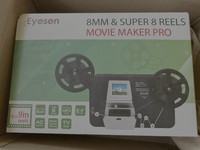
I just thought I'd share something briefly. A company reached out to send me a Movie Maker Pro for review. I just took it out of the box and was curious how the capture quality compares with the Kodak.
I'm unsure if I got a lemon or what, but the Movie Maker seems to be wildly out of focus!
I hope to do an in-depth review and tear down of this product in a future video, but I thought you'd all appreciate a quick look. The top screen grab is from the Movie Maker, the later from the Kodak.


I just thought I'd share something briefly. A company reached out to send me a Movie Maker Pro for review. I just took it out of the box and was curious how the capture quality compares with the Kodak.
I'm unsure if I got a lemon or what, but the Movie Maker seems to be wildly out of focus!
I hope to do an in-depth review and tear down of this product in a future video, but I thought you'd all appreciate a quick look. The top screen grab is from the Movie Maker, the later from the Kodak.
Thank you for pointing this out! I've been following the thread but somehow missed that there was a relatively stable test branch of the Type D firmware. I had been using the stock firmware and then using ffmpeg as suggested in an earlier post to adjust the frame rate back to 18 frames per second which took another 30 minutes per 50 foot reel and oddly added about 100 MB to the file size. I thought the size increase made sense because the length of the movie was now longer but with the updated firmware, the file size is the same as with stock firmware.Just wanted to let you know that I have installed & been running the Type-D WIP Firmware vs that was attached to the post I'm replying to.
I've experienced no bugs, working well. This machine was purchased on sale via Amazon last week.
I am here to volunteer for testing any additional firmware updates. Also, thank you kindly for all your hard work!
For anyone else wanting to try the new firmware, the links to the new and stock versions are in the user guide that is linked in the first post of this thread.
I did want to point out that I was able to do the firmware update with a 128 GB SD card, although I had to format it to FAT32 which is well documented in the thread. To format the card to FAT32 in Windows, I had to use "rufus" as suggested by another member. I don't have a card reader on my Windows PC but I was able to use the Kodak Reels as the card reader using its micro USB cable. It's probably a good idea to reformat the card to exFAT after the firmware update to avoid the file size limitation if the card will be used for other things.
I had a brief scare with one reel that turned out very jittery but after searching the thread, another member had the same issue which was caused by not properly threading the outfeed. I threaded the film properly and the jitter went away.
I don't think I've shared anything here that hasn't been covered but I'm hoping it might help someone that hasn't combed through the entire thread.
Thank you for pointing this out! I've been following the thread but somehow missed that there was a relatively stable test branch of the Type D firmware. I had been using the stock firmware and then using ffmpeg as suggested in an earlier post to adjust the frame rate back to 18 frames per second which took another 30 minutes per 50 foot reel and oddly added about 100 MB to the file size. I thought the size increase made sense because the length of the movie was now longer but with the updated firmware, the file size is the same as with stock firmware.
I had a brief scare with one reel that turned out very jittery but after searching the thread, another member had the same issue which was caused by not properly threading the outfeed. I threaded the film properly and the jitter went away.
Appreciate the report and activity here to keep the thread alive.
Just as a note, changing the playback frame rate shouldn’t add to the file size or change the length. For those using 0dan0’s custom firmware you should be able to do this even while capturing (the playback frame rate is added to the file when capture is ended/completed).
Also, regarding intermittent jitter. There is a specific kind of jitter related to the timing of frame capture and frame advancing not being synchronized properly. A portion of the top or bottom of the frame is vertically compressed or expanded on alternating frames. Discussed throughout the threads, and hasn’t been resolved. It did happen with stock firmware, and may be seen more dramatically with Super8 film, especially with a modified lens (capturing a larger field of view). Many tests and tweaks have been done to try to minimize the jitters occurrence, but so far nothing definitively removes/resolves it. It’s such an intermittent issue that it’s super hard to track down. If it happens to you, just try that capture again and you may luck out on round 2.
I think some of the version D owners out there have reported better results on this front so maybe the manufacturer addressed that issue.

Thank you All for all your contributions on the Firmware upgrades its looks amazing.
I thought you should know that the firmware files from the link from the Lookup tool, that forwards to 'drive.protron.me', those files didn't work for me (would not update the firmware), they may not be the latest versions. However I did find v7.7.1 'C' on this thread and its working.
Also, I am not sure if you are aware but sometimes when running/scanning a 50' / 3" reel it will stop randomly with v7.7.1 C. Not sure if its a buffer issue. I am using the default settings. I didn't change them. Do you recommend increasing the Qp #?
Also after a scan is run the selected button starts moving on its own, without any button pressing.
I turn it off to reset it, but is there a work around?
I thought you should know that the firmware files from the link from the Lookup tool, that forwards to 'drive.protron.me', those files didn't work for me (would not update the firmware), they may not be the latest versions. However I did find v7.7.1 'C' on this thread and its working.
Also, I am not sure if you are aware but sometimes when running/scanning a 50' / 3" reel it will stop randomly with v7.7.1 C. Not sure if its a buffer issue. I am using the default settings. I didn't change them. Do you recommend increasing the Qp #?
Also after a scan is run the selected button starts moving on its own, without any button pressing.
I turn it off to reset it, but is there a work around?

If you want the best quality, just scan at 15, then roll back a few seconds, than continue when it crashes. Then re-assemble the clips in an editor. If you have a lot to scan, just change the Qp live, whenever you can, do not stop capture, as you can only change during capture. There is no harm is using different Qps in the same capture.
Ok great I will try that.
When you change the Qp during a live capture, is it adjusting the bitrate on the fly or only when it finishes and writes the file to the SD card? (while stored in the buffer)
*BTW, I love the auto stop function! I thought it may have detected an empty scan with only white and stopped it.
What are the requirements to auto stop the scan? Does it test for white, and frame count?
When you change the Qp during a live capture, is it adjusting the bitrate on the fly or only when it finishes and writes the file to the SD card? (while stored in the buffer)
*BTW, I love the auto stop function! I thought it may have detected an empty scan with only white and stopped it.
What are the requirements to auto stop the scan? Does it test for white, and frame count?